

Live chat support is customer service delivered through a real-time chat window on a website or app. Agents, often helped by a chatbot, answer questions while the customer is still on the page, handle several conversations at once, and keep a written record of every exchange.
This guide is about running chat support well: the benefits you can expect, real benchmarks from 1.67 billion chats, the best practices that keep queues short, and the metrics that tell you whether it is working. If you want the basics first, read what is live chat software, which covers how the widget works, features, and pricing.
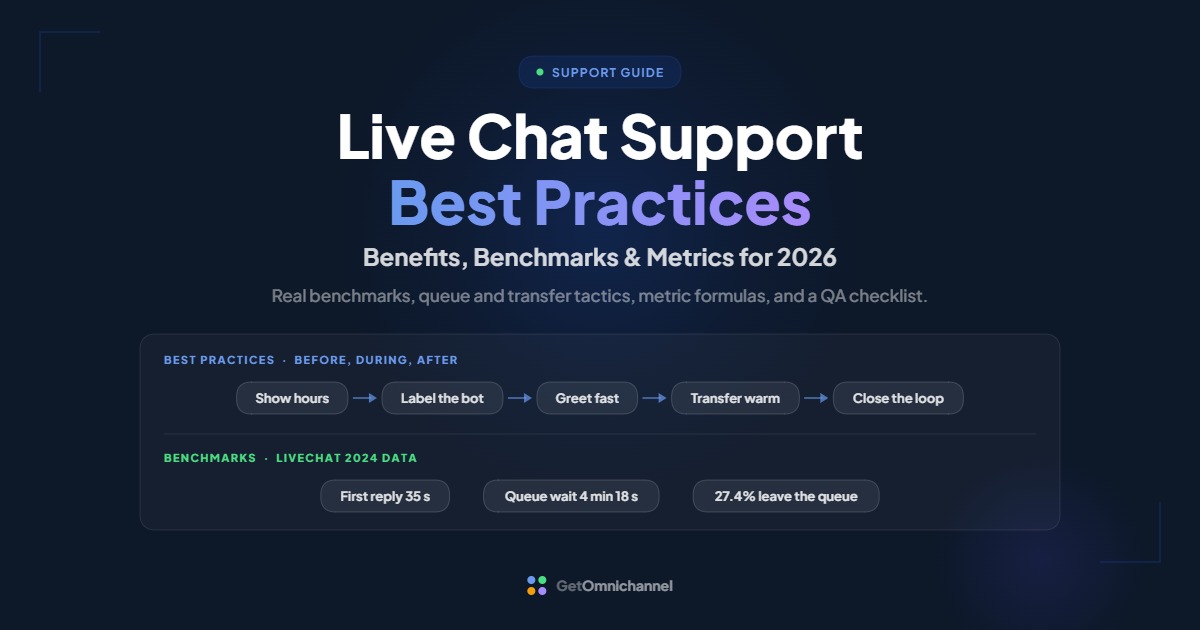
On LiveChat, agents reply in 35 seconds on average, but queued visitors wait 4 minutes 18 seconds and 27.4% leave. Fix the queue first.
Compare live chat tools →What is live chat support?
Live chat support means answering customers through chat instead of, or alongside, email and phone. The customer types into a widget on your site or app, and an agent replies within seconds in a shared workspace. A chatbot may answer first, but the defining feature is that a person can take over in real time.
The UK government’s guidance draws the same line: “A webchat (also known as live chat) is an online conversation between a user and a human advisor,” while a chatbot helps users without one (GOV.UK). In practice, most support teams now run both in the same window.
| Live chat | Phone | ||
|---|---|---|---|
| Customer expects | A reply in seconds to minutes | A reply within hours | An answer on the call |
| Conversations per agent at once | Several, up to a set limit | Many, worked in sequence | One |
| Written record | Automatic transcript | Automatic thread | Only if recorded |
| Best for | Quick questions, guidance during a task, pre-sale help | Detailed requests, attachments, follow-ups | Urgent, complex, or emotional issues |
| Main risk | Long queues when understaffed | Slow replies | Hold times |
Benefits of live chat support
Live chat support answers customers faster than email, lets one agent help several people at once, and keeps a written record that improves training and self-service. The benefits depend on staffing: an unanswered chat costs more goodwill than an unanswered email.
- Faster answers. Across LiveChat’s platform, agents sent their first response in 35 seconds on average (LiveChat Customer Service Report, data last updated 2024). Email support is usually measured in hours.
- More conversations per agent. Because an agent can run several chats at once, LiveChat’s data shows agents handling 84.1 chats per day on average. A phone agent can only take one call at a time.
- Help at the moment of decision. Chat reaches customers while they are still on a pricing, checkout, or settings page. In Forrester’s consumer research, 42% of US online adults said it was important for retailers to offer live chat, up from 27% in 2019 (Forrester, 2021).
- A record you can learn from. Transcripts show which questions your website fails to answer, which feeds better help articles and bot answers.
- Context for the agent. Agents can see the page the customer is on and earlier conversations, so customers repeat themselves less.
Chat is not automatically cheaper. GOV.UK notes that improving existing content, navigation, and search may be “more time and cost-effective” than adding a chat tool (GOV.UK). If most chats ask where something is on your site, fix the site first.
Live chat support benchmarks
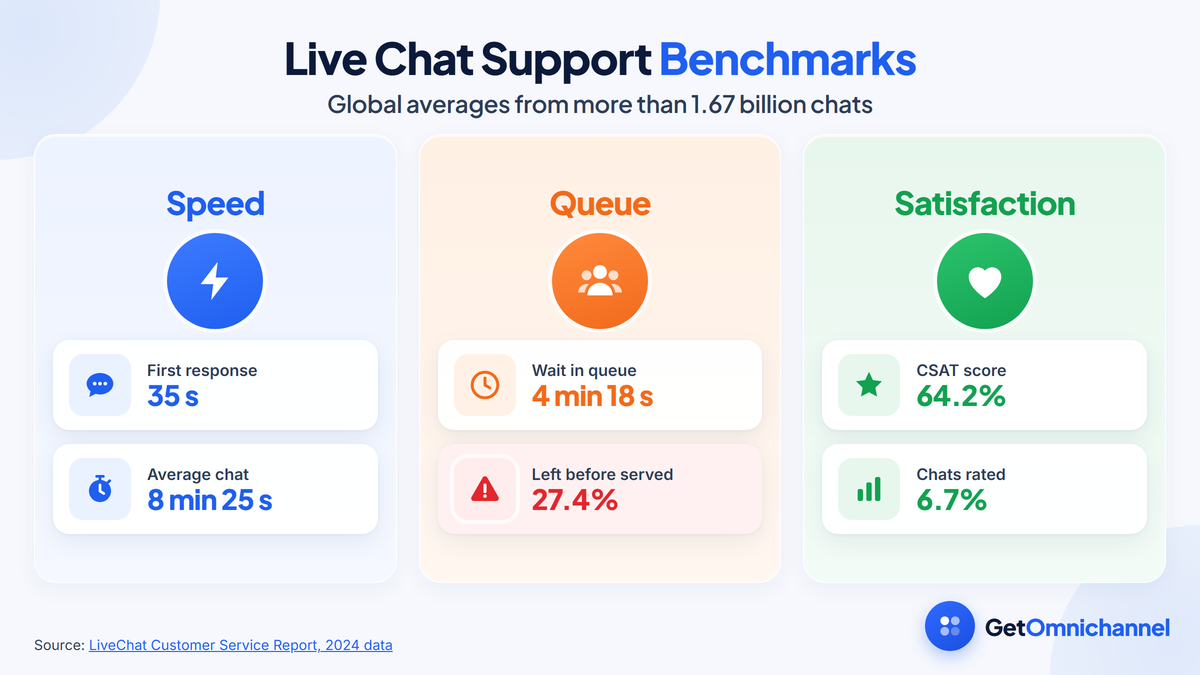
LiveChat’s Customer Service Report, based on more than 1.67 billion chats handled on its platform, puts the average first response at 35 seconds and the average chat at 8 minutes 25 seconds. Queued customers waited 4 minutes 18 seconds on average, and 27.4% left before being served.
| Metric | Global average | What it tells you |
|---|---|---|
| First response time | 35 seconds | Agents reply quickly once a chat is assigned |
| Chat duration | 8 minutes 25 seconds | Plan staffing on minutes per chat, not chats per day |
| Queue waiting time | 4 minutes 18 seconds | Customers can wait far longer than the first-response number suggests |
| Queue dropout rate | 27.4% | More than one in four queued customers leave unserved |
| Customer satisfaction (CSAT) | 64.2% | A baseline to compare your own ratings against |
| Chats that get rated | 6.7% | CSAT reflects a small, self-selected share of chats |
| Chatbot satisfaction | 64.7% | Bot-assisted chats rated about the same as chats overall |
Source: LiveChat Customer Service Report. These are averages from one vendor’s customers, so treat them as a reference point, not a target that fits every industry.
Two numbers in that table change how you should run chat. First, a fast first response hides the real wait: the 35-second figure starts when an agent picks up the chat, while the 4-minute queue happens before that. Track both. Second, only 6.7% of chats get rated, so a good CSAT score can rest on a small, self-selected group. Pair ratings with a weekly review of a random sample of transcripts.
Report first response time and queue wait time side by side. If the queue wait is more than a few times the first response time, you need more agents at peak, a bot in front, or fewer pages showing the chat widget.
Live chat support best practices
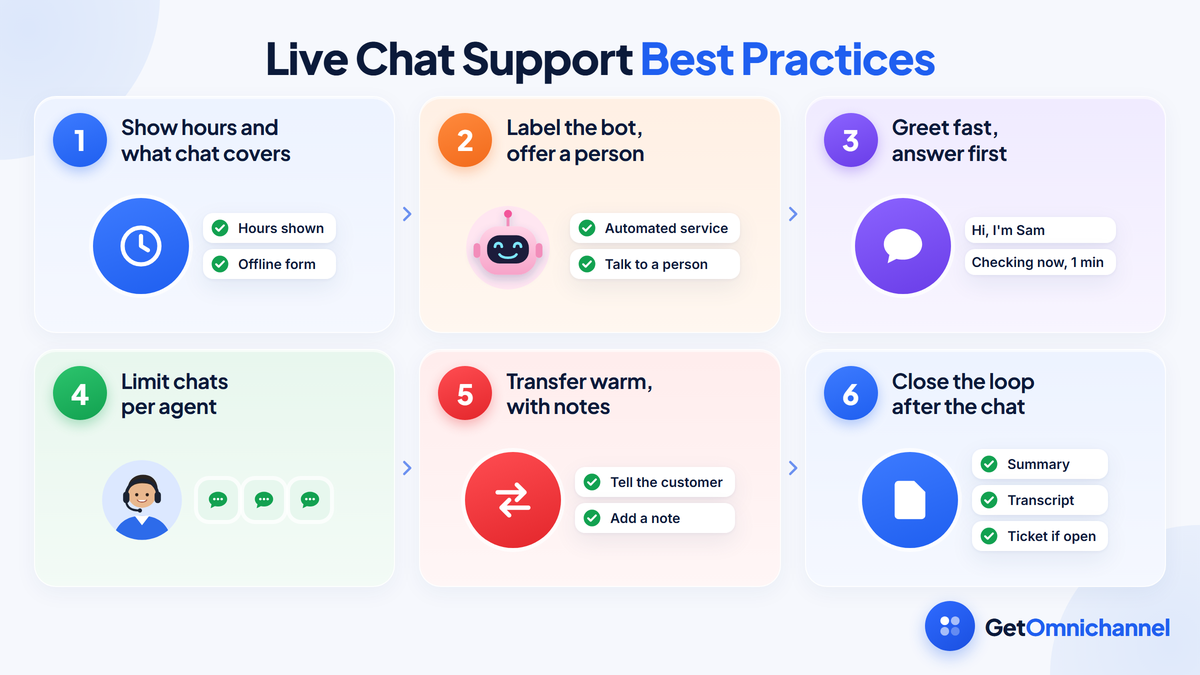
The best practices fall into three stages: set expectations before the chat starts, answer clearly and quickly during it, and close the loop after it ends. Most problems in chat support come from the first stage: hours that aren’t shown, bots that aren’t labelled, and queues with no way out.
Before the chat
Show your hours and what chat can help with
Display chat hours on the widget and switch to an offline form outside them. GOV.UK advises teams to "outline what your tool can and cannot do on a landing page or at the start of your users' chat session" (GOV.UK).
Label the bot, and always offer a person
If a bot answers first, say so. GOV.UK says "it's best to make it clear the user is not talking to a real person," advises against a fictional name or a photo of a person, and recommends "providing a way to transfer to a real person" (GOV.UK).
Keep the pre-chat form short
Ask only for what routes the chat, such as the topic and an email for follow-up. Every extra field is a reason to leave before the conversation starts.
During the chat
Greet fast, then answer first
Open with a short greeting and your name, then answer the question before asking for more details. If you need to look something up, say so and give a time, such as "Checking your order now, about one minute."
Write for a small window
Use short messages, one question at a time, and plain words. Put links and steps in a numbered list, and avoid pasting long policy text.
Limit chats per agent
Set each agent's concurrent chat limit so quality holds. In LiveChat, "when the chat limit is reached for all agents who are accepting chats at the time, new visitors will go into the queue" (LiveChat help center). Start at two or three and adjust based on response times.
Transfer warm, with notes
Before moving a chat to another agent or team, tell the customer why and add a one-line note so the next person doesn't repeat your questions.
After the chat
Close with a summary
Restate what was solved and what happens next. Ask whether anything else is needed before ending the chat.
Send the transcript and open a ticket if needed
Email the transcript where your tool allows it. If the issue isn't resolved, turn the chat into a helpdesk ticket so the follow-up has an owner.
Tag the reason
Tag each chat with its topic. A weekly look at the top tags tells you which help articles to write and which questions a bot can safely take.
How to manage chat queues, transfers, and escalations
Good conversation management keeps queues short, sends each chat to the right person the first time, and moves unresolved issues into a tracked ticket. The three tools are routing rules, queue limits, and clear escalation paths.
- Route by topic before skill. A one-question pre-chat menu, such as billing, orders, or technical help, sends most chats to the right team without a transfer.
- Give the queue an exit. Show the queue position or expected wait if your tool supports it, and offer “leave a message” after a set wait, so customers who can’t wait still reach you.
- Escalate on rules, not mood. Write down when a chat moves up: refunds above a set amount, account security, legal threats, or a customer who has contacted you about the same issue before.
- Move long investigations out of chat. If an answer will take more than a few minutes of research, open a ticket, tell the customer when to expect a reply, and close the chat. Keeping it open ties up a slot.
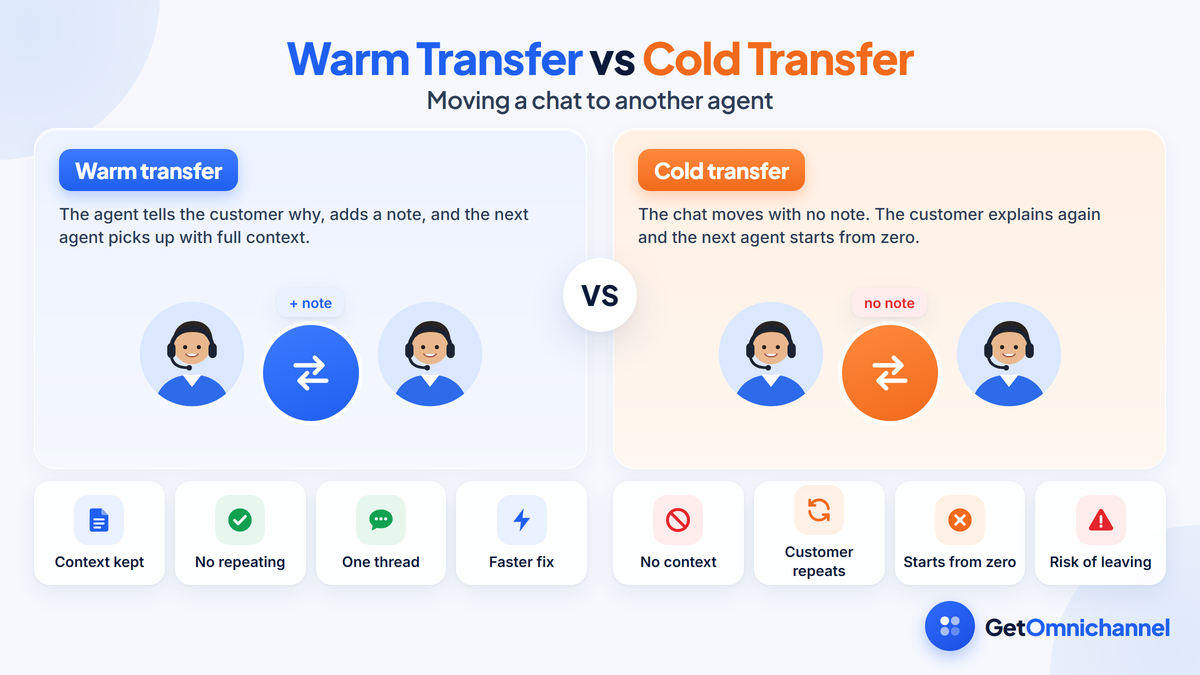
If a chat needs more than one transfer, treat it as a routing problem, not an agent problem. Fix the pre-chat menu or the routing rule that sent it to the wrong place.
Chatbots and AI in live chat support
A chatbot in front of live chat can answer routine questions, collect details, and route the rest, but it must hand over to a person cleanly. In LiveChat’s data, chats with a chatbot involved were rated about the same as chats overall: 64.7% satisfaction against 64.2%.
LiveChat’s report counts about 163 million chats with a chatbot out of more than 1.67 billion in total, roughly one chat in ten (LiveChat). That is a useful reminder: even on a platform that sells AI, most chats are still handled by people.
- Give the bot a narrow job. Order status, opening hours, password resets, and collecting an order number before a person joins.
- Pass the context. When the bot hands over, the agent should see everything the customer already typed.
- Measure the handoff. Track how often the bot transfers to a person and why. A rising handoff rate on one topic means the bot’s answer for it needs work.
For the trade-offs between human agents, rule-based bots, and AI agents, including how AI resolutions are priced, see our guide to live chat software.
How to write live chat replies
Chat replies work best when they are short, specific, and written the way a helpful person talks. Lead with the answer, give one next step, and avoid scripted lines that don’t respond to what the customer actually asked.
| Instead of | Write | Why |
|---|---|---|
| "Your call is important to us." | "Hi Maya, I'm Sam. Let me check that order now." | A name and an action show a real person is working on it |
| "Please be advised that refunds take 5 to 7 business days." | "Your refund is on its way. It usually arrives in 5 to 7 business days." | Answer first, in plain words |
| Three questions in one message | One question, then wait | Customers answer the last question and skip the rest |
| A pasted paragraph of policy | Two sentences and a link | Long blocks are hard to read in a small window |
| "Is there anything else?" as soon as you reply | "Did that fix it?" then the closing question | Confirm the answer worked before wrapping up |
Saved replies help with speed, but edit them before sending. A canned answer that ignores part of the question reads as a bot, even when a person sent it.
Live chat support metrics and how to calculate them
Track first response time, queue wait time, queue dropout rate, chat duration, resolution rate, and CSAT. Define each one the same way every month, and compare first response time with queue wait time, because together they show the real customer wait.
| Metric | How to calculate it | Reference point |
|---|---|---|
| First response time | Time from the chat being assigned to the agent's first reply, averaged | 35 seconds (LiveChat average) |
| Queue wait time | Time from the customer requesting a chat to an agent picking it up, averaged | 4 minutes 18 seconds (LiveChat average) |
| Queue dropout rate | Customers who left the queue before being served ÷ customers who entered the queue | 27.4% (LiveChat average) |
| Chat duration | Time from first message to chat close, averaged | 8 minutes 25 seconds (LiveChat average) |
| Resolution rate | Chats closed without a follow-up ticket or call ÷ all chats | Set your own baseline |
| CSAT | Positive ratings ÷ all ratings | 64.2% (LiveChat average) |
| Rating rate | Chats rated ÷ all chats | 6.7% (LiveChat average) |
Reference points are global averages from the LiveChat Customer Service Report, data last updated 2024. To size your team from these numbers, use the busiest-hour staffing formula in our live chat software guide.
Quality, accessibility, and privacy
Quality in chat support comes from regular transcript reviews, an accessible widget, and careful handling of personal data. These are the areas competitors rarely cover and customers notice most when they go wrong.
A weekly transcript review
Pick a random sample of chats each week, not just the rated ones, and score each on five questions:
- Accurate: was the answer correct and in line with policy?
- Complete: did it answer every part of the question?
- Clear: was it short, plain, and easy to act on?
- Efficient: did the customer have to repeat anything or wait without an update?
- Closed: was there a summary and a next step, or a ticket if unresolved?
Accessibility
A chat widget should work with a keyboard and a screen reader. One building block is the ARIA log role, which marks an area “where new information is added in a meaningful order and old information may disappear,” with chat logs given as an example (MDN Web Docs). Ask your vendor how its widget announces new messages and whether it has been tested with assistive technology.
Privacy
Transcripts often contain names, emails, and order details. Under the GDPR’s storage limitation principle, personal data should be kept “for no longer than is necessary for the purposes for which the personal data are processed” (GDPR, Article 5). Set a retention period for transcripts, limit who can export them, and don’t ask customers to type full payment card numbers into chat.
What to look for in live chat support software
For a support team, the features that matter most are routing and queue controls, concurrent chat limits, warm transfers with notes, chat-to-ticket handoff, saved replies, a labelled bot with handover, and reporting on queue wait and dropout, not just first response time.
- Queue reporting. Check that the tool reports queue wait and dropout, since first response time alone hides the real wait.
- Helpdesk link. Chats that need follow-up should become tickets with the transcript attached.
- Shared customer history. Agents should see earlier chats, emails, and calls in one place, which is the idea behind omnichannel customer service.
- Pricing that fits your volume. Per-seat, per-conversation, and per-resolution pricing behave very differently as you grow.
Compare tools side by side in our guide to the best live chat software, or see a head-to-head in LiveChat vs Intercom.
How this guide was made
Researched and written by Kinjal Trivedi, SaaS & Technology Writer at GetOmnichannel. Benchmarks come from LiveChat's Customer Service Report (global averages from its own platform, data last updated 2024), guidance on webchat and chatbots from GOV.UK, accessibility details from MDN Web Docs, privacy wording from the GDPR text, and survey data from Forrester, all linked at each claim and checked in October 2026. The share of chats with a chatbot is our own calculation from LiveChat's published totals. The writing examples and review checklist are editorial guidance, not test results. We did not test the products named here.
Good live chat support is fast at both ends: a short queue before the chat and a clear answer during it. Show your hours, label any bot, cap chats per agent, transfer with notes, and close every chat with a summary or a ticket. Then track queue wait and dropout next to first response time, and review a sample of transcripts every week.
Frequently asked questions
Conclusion: run chat support from the queue backward
Live chat support pays off when customers get help fast at every step, not just after an agent picks up. The benchmark data shows the biggest gap sits in the queue, so staffing, routing, and a clear exit for waiting customers matter as much as quick replies.
Set expectations before the chat, write short and specific replies during it, and close the loop after it. Measure queue wait and dropout alongside first response time, and read real transcripts every week.
Next step: Find a tool with the queue, routing, and reporting controls described here in our guide to the best live chat software.
 Your information is encrypted and kept secure.