

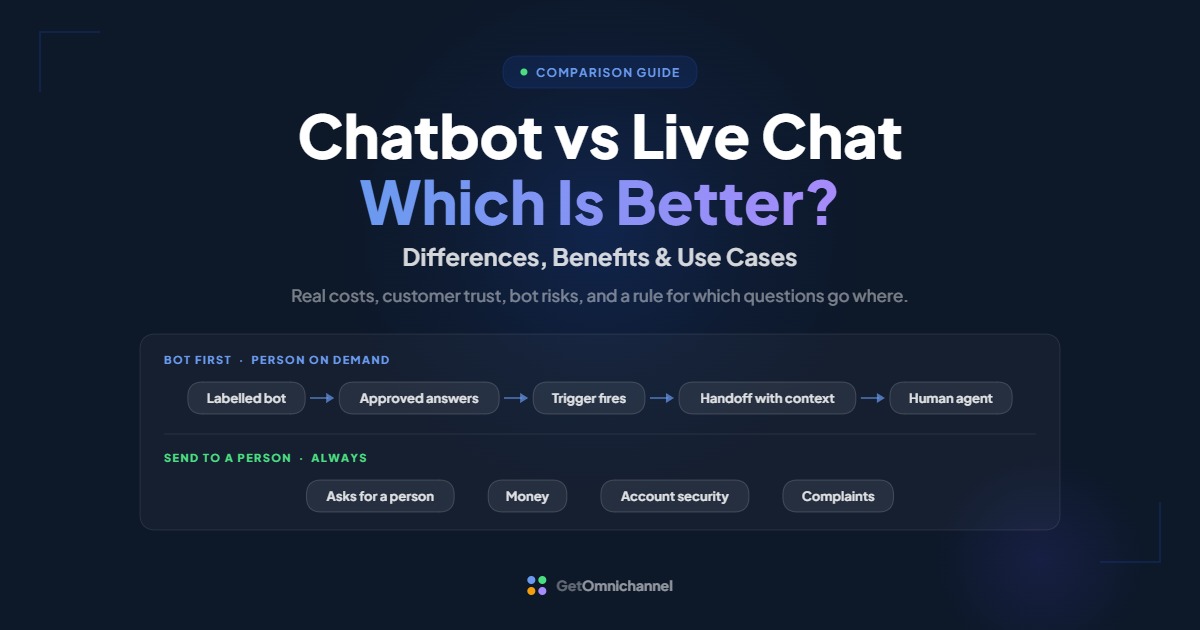
Neither is better on its own. A chatbot answers repeat questions instantly and around the clock, while live chat connects customers to a person for complex, sensitive, or high-value conversations. Most support teams get the best results from a bot that handles routine questions and hands everything else to a person, with the conversation history attached.
This guide compares the two on what matters to a support team: speed, cost, accuracy, customer trust, and legal risk. It ends with a simple rule for which questions go to a bot and which go to a person, and the triggers that should move a chat from one to the other. For how live chat software works in general, see what is live chat software.
Let a bot answer questions with one correct answer. Send money, account access, complaints, and repeat contacts to a person, and keep that path one tap away.
Compare live chat tools →What is the difference between a chatbot and live chat?
Live chat is a conversation with a person through a chat window. A chatbot is software that answers in that same window without a person. The UK government’s guidance puts it simply: a webchat “is an online conversation between a user and a human advisor,” while a chatbot helps users solve problems without one (GOV.UK).
Chatbots come in two broad kinds. Rule-based bots follow buttons and scripted paths you build, such as “Track my order” or “Talk to sales.” AI chatbots, often sold as AI agents, write answers from your help articles and data. Both usually sit in front of live chat, so the customer sees one widget either way.
| Chatbot | Live chat | |
|---|---|---|
| Who answers | Software, from scripts or your help content | A support agent |
| Availability | 24/7 | Your staffed hours |
| Speed | Instant | Seconds to minutes, plus any queue |
| Conversations at once | Effectively unlimited | A few per agent, up to a set limit |
| Best for | Repeat questions with one correct answer | Judgement, complaints, money, and sales conversations |
| Typical pricing | Included, per conversation, or per AI resolution | Per agent seat |
| Main risk | Wrong answers and dead ends | Long queues when understaffed |
Chatbot pros and cons
Chatbots answer instantly at any hour and never run out of capacity, but they can give wrong answers with confidence and frustrate customers who want a person. The upside depends on how narrow and accurate you keep them.
Pros
- Always on. A bot answers at 3 a.m. and on holidays, when no agent is online.
- Instant, at any volume. There is no queue for the bot, even during a spike.
- Consistent answers. A bot repeats your approved wording for policies, prices, and steps.
- Collects details first. It can gather an order number or email before a person joins, which shortens the human part of the chat.
Cons
- Wrong answers are your responsibility. In 2024, a Canadian tribunal ordered Air Canada to compensate a customer after its website chatbot gave wrong information about bereavement fares (details below).
- Customers are wary. In a Gartner survey, 64% of customers said they would prefer companies didn’t use AI for customer service (Gartner, July 2024).
- Dead ends. A bot that can’t understand the question and won’t hand over turns a quick fix into a complaint.
- Upkeep. Bots answer from what you give them. Outdated help content becomes outdated answers.
Live chat pros and cons
Live chat gives customers a person who can use judgement, calm a frustrated customer, and close a sale, but it only works when someone is available. Its costs grow with every agent you add.
Pros
- Judgement and empathy. A person can bend a rule, read frustration, and fix problems no script covers.
- Handles the unexpected. Edge cases, multi-step problems, and “it’s complicated” questions.
- Builds trust. Knowing a real person is there matters most when money or access is involved.
- Fast once connected. On LiveChat’s platform, agents sent their first reply in 35 seconds on average (LiveChat Customer Service Report, data last updated 2024).
Cons
- Limited hours. Outside staffed hours, live chat becomes an offline form.
- Queues. The same LiveChat report found queued customers waited 4 minutes 18 seconds on average, and 27.4% left before being served.
- Cost grows with headcount. Every extra agent means another seat and another salary.
- Capacity limits. Each agent handles only a few chats at once. When every agent is at their limit, new visitors queue (LiveChat help center).
What do customers prefer: chatbots or live chat?
Customers are wary of AI in support mainly because they fear it will block them from a person. When a bot is part of the chat, ratings can match human-only chats, so the issue is less the bot itself than whether it gets in the way.
- Wary of AI. Gartner’s survey of 5,728 customers, run in December 2023, found 64% would prefer companies didn’t use AI for customer service, and 53% would consider switching to a competitor if they found out a company was going to use it (Gartner).
- The top fear is losing the human. In the same survey, the most common concern was that AI would make it harder to reach a person, ahead of job losses and wrong answers.
- But bots don’t automatically lower ratings. In LiveChat’s data, chats with a chatbot involved had 64.7% satisfaction, against 64.2% for chats overall (LiveChat).
Customers don't object to bots that answer quickly and step aside. They object to bots that stand between them and a person. Make "talk to a person" visible from the first message, and most of the resistance goes away.
Which is better: chatbot or live chat?
Use a chatbot for questions with one correct answer that your help content already covers, and live chat for anything involving money, account access, complaints, or judgement. For most teams the answer is both, with clear rules for who takes what.
| Question type | Best handled by | Why |
|---|---|---|
| Order status, delivery tracking | Chatbot | One correct answer from your system |
| Opening hours, shipping and return policy | Chatbot | Fixed answers from your help content |
| Password reset, how-to steps | Chatbot, then a person if stuck | Routine, but some users need help |
| Product questions before buying | Chatbot first, person for larger or complex orders | Speed matters; high-value sales benefit from a person |
| Refund or billing dispute | Person | Money and judgement involved |
| Complaint or angry customer | Person | Needs empathy and authority to fix |
| Account security or suspected fraud | Person | High risk if the answer is wrong |
| Repeat contact about the same issue | Person | The bot already didn't solve it |
Your volume decides how much the bot matters. If most chats are order status and policy questions, a bot can take a large share. If most chats are custom quotes or troubleshooting, a bot can still collect details, but people will do most of the work.
Chatbot vs live chat cost
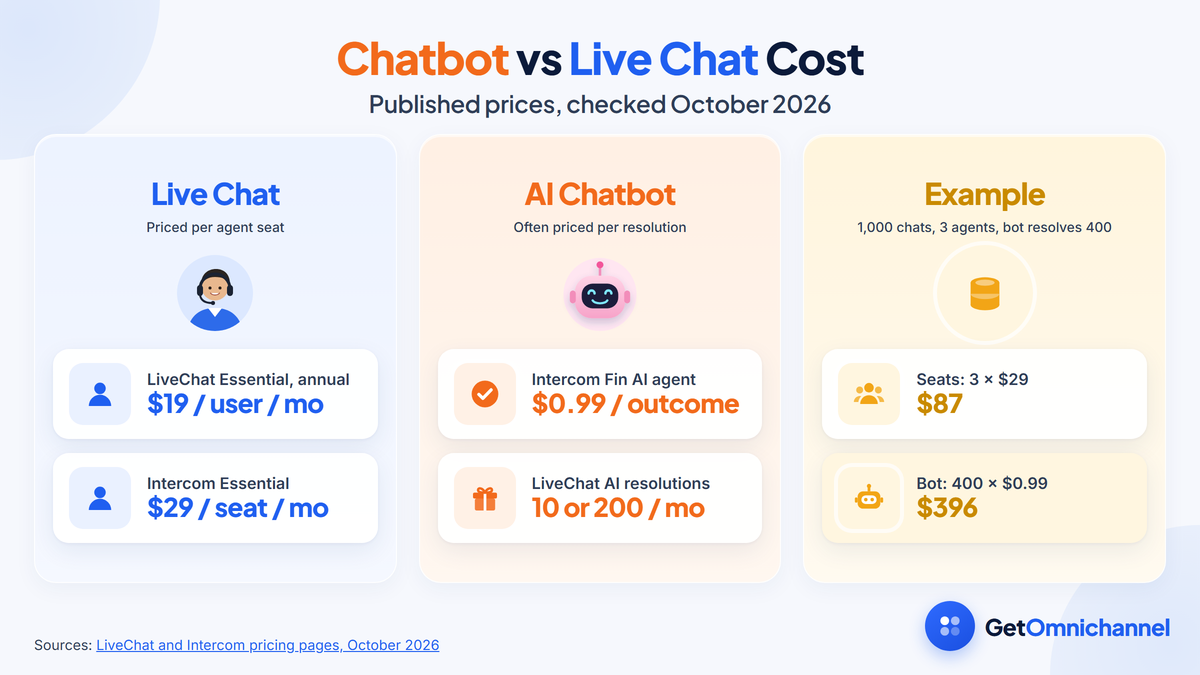
Live chat is usually priced per agent seat, so cost grows as you hire. AI chatbots are often priced per conversation or per resolution, so cost grows as the bot handles more. The cheaper option depends on your chat volume and how much of it a bot can resolve.
| Pricing model | Example | Cost grows with |
|---|---|---|
| Per agent seat | LiveChat Essential $19 per user/month annual ($25 monthly); Intercom Essential $29 per seat/month | Team size |
| Per AI resolution | Intercom Fin AI agent: $0.99 per outcome | How many chats the bot resolves |
| AI resolutions included in a plan | LiveChat: 10 AI resolutions a month on Essential, 200 on Growth | Moving to a higher plan |
| Per conversation volume | Tidio Starter: $24.17/month with 100 billable conversations | Total chat volume |
Sources: LiveChat pricing, Intercom pricing, and Tidio pricing, checked October 2026.
Worked example: 1,000 chats a month
- Setup: a team of 3 agents on Intercom Essential, with the Fin AI agent in front. This is an illustrative calculation, not a customer.
- Seats: 3 × $29 = $87 a month.
- Bot: if Fin resolves 400 of the 1,000 chats, that adds 400 × $0.99 = $396, for $483 in total.
- What it buys: the agents now handle 600 chats instead of 1,000. Whether that is worth $396 depends on what an extra agent costs you, so compare it with your real staffing cost.
Two things this math leaves out. A bot needs someone to maintain its answers, and a bot that gives wrong answers can cost more than it saves. For full plan details, see our Intercom and Tidio reviews.
Chatbot risks: accuracy, liability, and disclosure
A chatbot speaks for your business, so its mistakes are your mistakes. Keep it accurate, tell customers when they are talking to a bot, and know the rules that apply where you operate.
Accuracy and liability
In Moffatt v. Air Canada, decided on February 14, 2024, British Columbia’s Civil Resolution Tribunal rejected the airline’s argument that it wasn’t responsible for its chatbot. The tribunal wrote that a chatbot “is still just a part of Air Canada’s website” and that “it should be obvious to Air Canada that it is responsible for all the information on its website.” It found the airline “did not take reasonable care to ensure its chatbot was accurate” and ordered it to pay $812.02 in damages, interest, and fees (Civil Resolution Tribunal).
The lesson is practical: limit the bot to questions your help content answers correctly, review its transcripts, and keep policy answers in sync with the pages they come from.
Disclosure
- EU AI Act. Article 50 requires providers to design AI systems that interact directly with people so “the natural persons concerned are informed that they are interacting with an AI system,” unless that is obvious. It applies from 2 August 2026 (EU AI Act, Article 50).
- UK government guidance. GOV.UK says “it’s best to make it clear the user is not talking to a real person,” advises against a fictional name or a photo of a person, and recommends “providing a way to transfer to a real person” (GOV.UK).
Labelling a bot is also good service. It sets expectations, and it gives customers a reason to ask for a person when they need one.
How to use chatbots and live chat together
The common setup is bot first, person on demand. The bot greets the customer, answers what it can from approved content, and hands over to an agent, with the conversation attached, whenever a trigger fires or the customer asks.
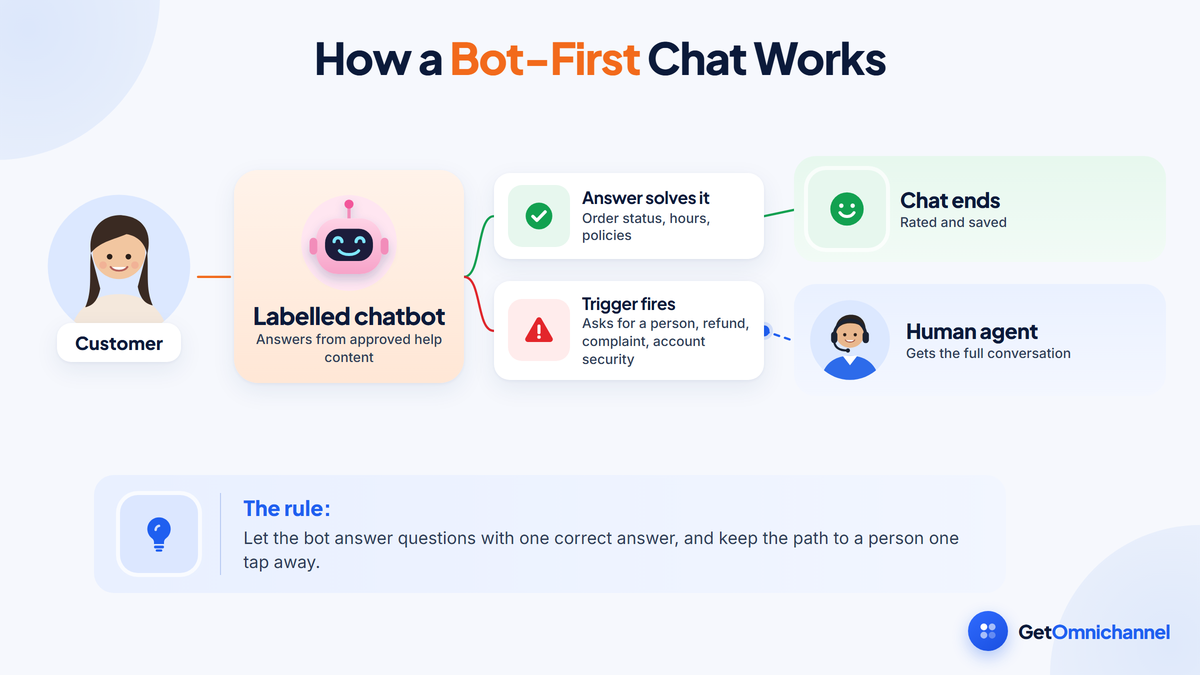
Label the bot from the first message
Say the customer is talking to an automated assistant, and show the option to reach a person right away.
Give it a narrow, approved scope
Start with the questions that have one correct answer, such as order status, opening hours, and return policy, and connect only the help articles you have checked.
Collect details before handing over
Have the bot ask for an order number or email, so the agent doesn't have to.
Hand over with the full conversation
When the chat moves to a person, the agent should see everything the customer already typed. Asking again is the most common complaint about bots.
Review bot transcripts every week
Read a sample of bot chats, fix wrong or weak answers at the source, and add new questions to the bot only once you have an approved answer.
When should a chatbot hand off to a person?
Hand off as soon as the customer asks for a person, after the bot fails to answer twice, or when the topic involves money, account security, a complaint, or a repeat contact. Outside staffed hours, the bot should collect details and create a ticket instead.
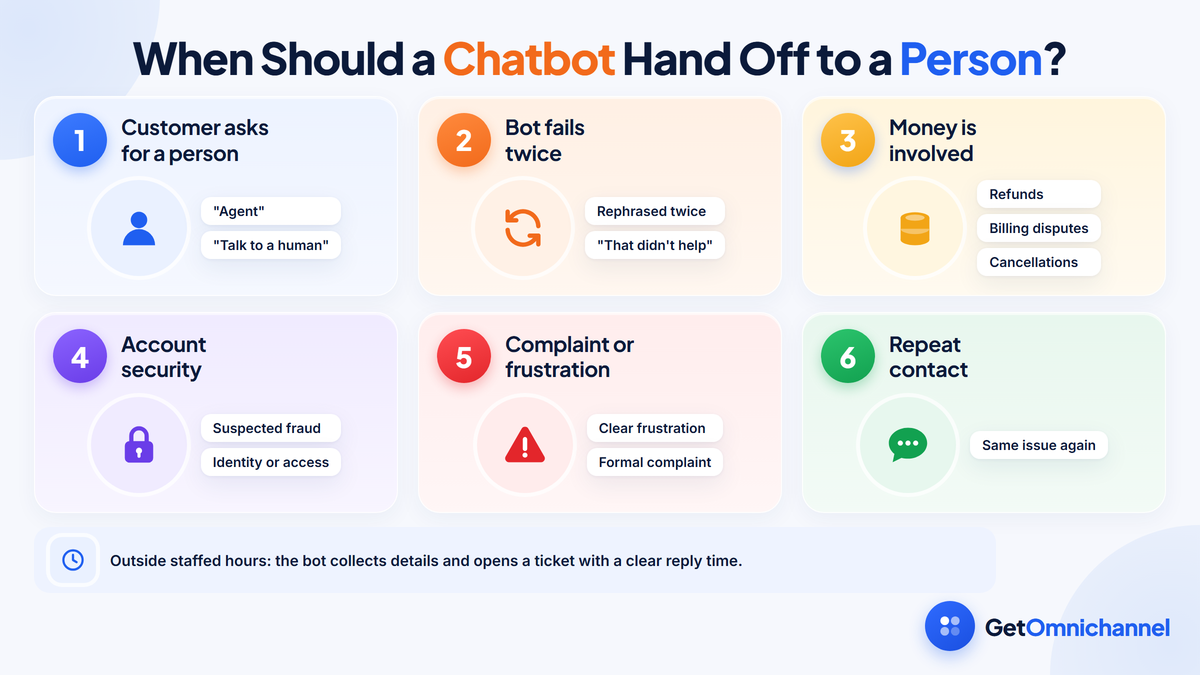
- The customer asks. Words like “agent,” “person,” or “human” should always route to a person.
- Two failed answers. If the customer rephrases twice or says the answer didn’t help, stop trying.
- Money. Refunds, billing disputes, and cancellations.
- Account security. Login problems involving identity, suspected fraud, or data access.
- Complaints. Clear frustration or a formal complaint.
- Repeat contacts. The customer has already been in touch about the same issue.
If no agent is online, the bot should say so, collect contact details and the question, and open a ticket with a clear reply time. Pretending a person will join soon is worse than an honest offline message.
How to measure chatbot and live chat performance
Track the bot and the people separately, then together. The key numbers are bot resolution rate, handoff rate, satisfaction for bot and human chats, repeat contact rate, and the queue wait customers face when they reach a person.
| Metric | How to calculate it | What it tells you |
|---|---|---|
| Bot resolution rate | Chats the bot closed without a person ÷ chats the bot started | How much work the bot really takes |
| Handoff rate | Bot chats passed to a person ÷ chats the bot started | Where the bot's knowledge runs out |
| Satisfaction, bot vs human | Positive ratings ÷ all ratings, split by who answered | Whether the bot is hurting the experience |
| Repeat contact rate | Customers who contact you again about the same issue within a set period ÷ all customers | Whether bot answers actually solved problems |
| Queue wait after handoff | Time from handoff to an agent's first reply, averaged | Whether people are available when the bot steps aside |
Watch the handoff topics most closely. A rising handoff rate on one topic usually means the bot’s answer for it is missing or wrong.
How this guide was made
Researched and written by Kinjal Trivedi, SaaS & Technology Writer at GetOmnichannel. Customer attitude figures come from Gartner's July 2024 survey release, chat benchmarks from LiveChat's Customer Service Report (data last updated 2024), prices from each vendor's pricing page, definitions and guidance from GOV.UK, the Air Canada ruling from the Civil Resolution Tribunal's published decision, and disclosure rules from the text of the EU AI Act, all linked at each claim and checked in October 2026. The question routing table, worked cost example, and handoff triggers are editorial guidance and illustrative calculations, not test results. This is not legal advice, and we did not test the products named here.
Chatbots and live chat do different jobs. A bot is fast, cheap at volume, and always on, but it is only as good as its answers and becomes a liability when it is wrong. A person is slower and costs more, but handles judgement, money, and frustration. Use a labelled bot for questions with one correct answer, hand off early with the conversation attached, and keep a person one tap away.
Frequently asked questions
Conclusion: let the bot answer, let people decide
The chatbot vs live chat question has a practical answer for most support teams: use both, with clear roles. A labelled bot takes the questions that have one correct answer, at any hour, and a person takes everything involving money, access, complaints, and judgement.
Write the handoff triggers before launch, keep the bot’s answers tied to checked help content, and measure the bot and the people separately so you can see where each one helps.
Next step: Compare tools with strong bot-to-agent handoff in our guide to the best live chat software.
 Your information is encrypted and kept secure.