

This guide covers omnichannel customer communication: how it differs from multichannel, what you need to build it, and why connected channels affect retention.
Ask ten people what “omnichannel” means and you will get ten different answers. Some say it means being on every channel. Others picture one big dashboard. What usually gets lost is whether those channels share the same customer record.
If you have ever used live chat, then called support and had to retell the whole story, you already know why handoffs matter. We define omnichannel here, compare it to multichannel, walk through a sample journey, and outline practical steps to connect the tools you already use.
Omnichannel is one customer record across channels, not simply opening more places for people to reach you.
Compare platforms →
Watch the 3-minute explainer: What Is Omnichannel? A Complete Guide
What is omnichannel?
Omnichannel means phone, live chat, email, SMS, and social all tie into one shared view of the customer. When someone DMs you on social and calls support later, the phone agent can see the earlier thread. The customer should not have to repeat the story, and nothing useful should vanish in the handoff.
The word pairs “omni” (all) with “channel.” What matters is whether channels share data, not how many you list on a contact page. A company can run five channels and still miss omnichannel if each one keeps its own silo.
Teams often add channels hoping for better retention, then stall on satisfaction scores. In many cases the new channel never joined the shared record, so customers still start from zero.
Omnichannel vs multichannel
Most people searching “what is omnichannel” really want this comparison, so it helps to be precise.
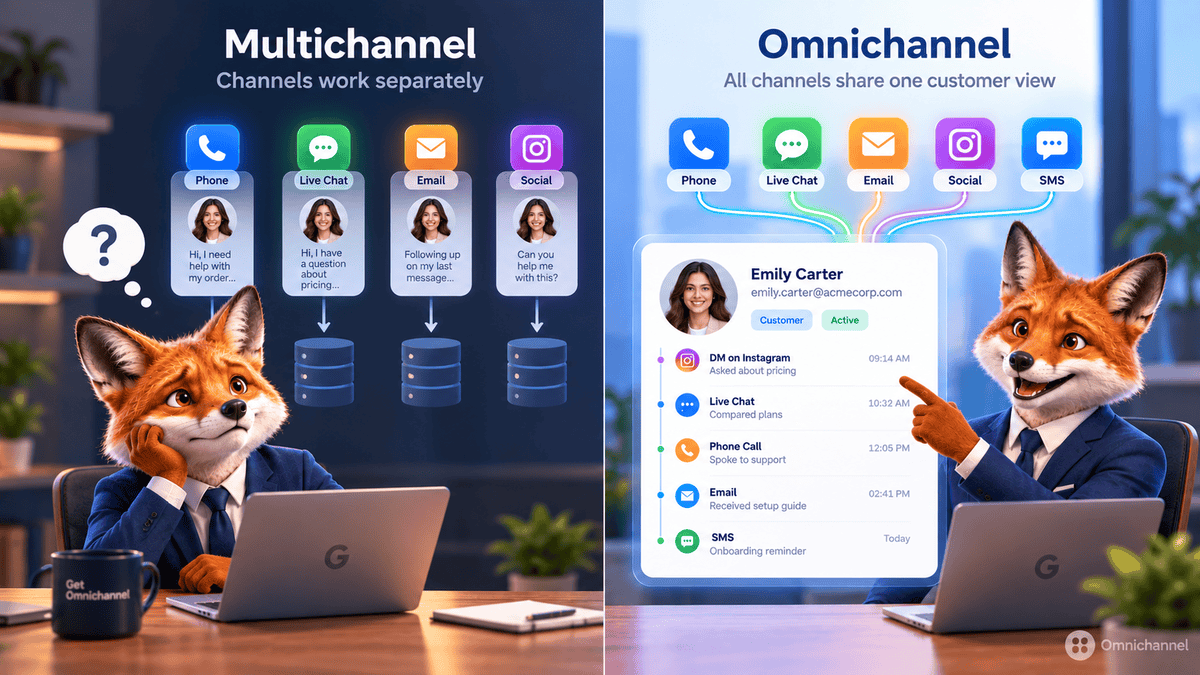
Multichannel means you operate on several channels (website, phone, email, social) that often run on separate systems. Customers can reach you in more than one way, but each channel usually opens a fresh thread.
Omnichannel means those channels read from the same customer record. History, preferences, and the open issue follow the person when they switch from chat to phone or email.
| Single-channel | Multichannel | Omnichannel | |
|---|---|---|---|
| Channel presence | One channel only | Multiple, independent | Multiple, connected |
| Customer data | Contained in one system | Siloed per channel | Unified across channels |
| Handoffs | Not applicable | Customer repeats context | Context carries over automatically |
| Messaging consistency | Consistent by default | Can vary by channel | Consistent across every channel |
| Underlying goal | Serve where you already are | Be reachable everywhere | Be recognizable everywhere |
Single-channel favors simplicity, multichannel favors reach, and omnichannel favors continuity. Most companies add multichannel presence first, then wire channels together. That order is usually easier than trying to flip every system at once.
Common myths about omnichannel
- “Omnichannel means identical products or pricing everywhere.” It does not. The shared customer record can stay consistent even when a channel looks or works differently.
- “Omnichannel is only for large enterprises.” Small teams can connect email, chat, and social through a CRM without a full CDP rollout.
- “Omnichannel is a one-time technology purchase.” Software helps, but teams still have to use the shared record in daily work.
- “More channels always means better omnichannel.” Extra channels that stay disconnected just add multichannel sprawl. Connection depth beats channel count.
Why omnichannel customer experience matters
Disconnected channels show up in repeat contacts, longer handle times, and churn. A few numbers that frame the cost:
- Companies with strong omnichannel engagement retain significantly more customers than those with weak cross-channel connectivity. Aberdeen Group research has cited gaps as wide as 89% retention versus 33% for companies that do not connect their channels.
- Zendesk's CX Trends 2026 report found 85% of CX leaders say a single unresolved issue is enough to lose a customer. A dropped handoff between channels often becomes that unresolved issue.
- Customers expect to move between chat, phone, and email without repeating themselves. When you cannot deliver that, competitors who can will feel easier to work with.
Study after study links connected channels to higher retention, higher lifetime value, and lower support cost, while siloed channels correlate with frustration and repeat tickets. A mobile-friendly site went from optional to expected years ago; for many buyers, smooth channel switching is in the same category now.
A real omnichannel customer journey, step by step
A short walkthrough is easier to picture than another definition. Here is a typical support path when systems are wired correctly:
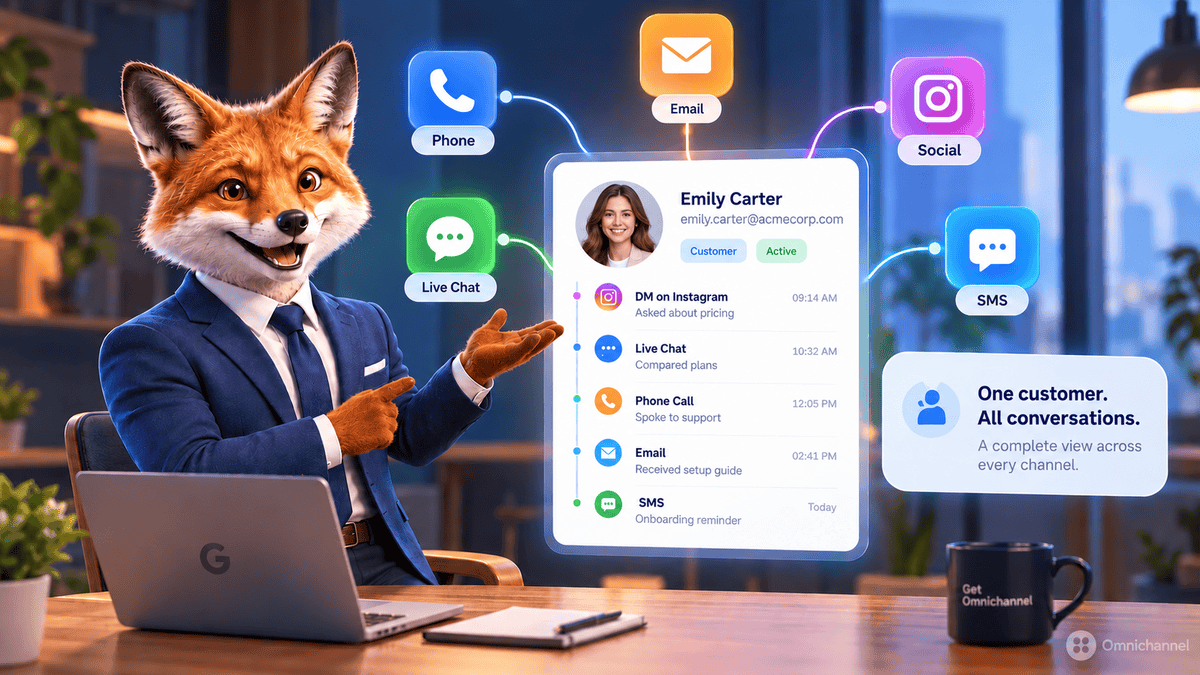
Social media
A customer sends a quick question by direct message. It is simple enough that nobody needs to pull an account yet.
Live chat
Later they open live chat on the site for a follow-up. Because social and chat share a record, the agent already sees the DM and the customer does not re-explain.
Voice support
They call about something more complex. The phone agent opens the same thread: social message, chat log, and notes from earlier steps.
SMS confirmation
After the call, an automated text confirms the resolution and references the same case ID used throughout.
In a multichannel setup, each of those four steps would often reset the conversation. Omnichannel keeps one thread across all of them.
The four core components of an omnichannel strategy
Connected experiences usually depend on four pieces of technology and process working together.
A unified customer data platform
Every channel should read from and write to the same customer record. Teams often use a customer data platform (CDP) or a CRM synced across support, sales, and marketing instead of letting each department keep a separate database.
Consistent messaging and branding
Data has to match what customers hear. If social promotes one offer and email shows another, or chat and phone give different answers, people notice and trust drops.
Real-time synchronization
Delayed updates break the promise. If someone changes an address in the app and a phone agent still sees the old one twenty minutes later, the "unified" record is not unified in practice.
Automation and AI-assisted routing
Routing, summarization, and simple self-service increasingly sit between channels: send the message to the right queue, brief the human agent, or close repetitive requests without a handoff.
Omnichannel across support, sales, and marketing
The term comes up most in support, but the same idea applies anywhere customers interact with you:
- Customer support: agents work with full context, and customers avoid repeating themselves when they switch channels.
- Sales: browsing, email opens, and chat questions can sit in one view before a rep gets on a call.
- Marketing: lifecycle stage and campaign messaging stay aligned across email, SMS, and social instead of living in separate tools.
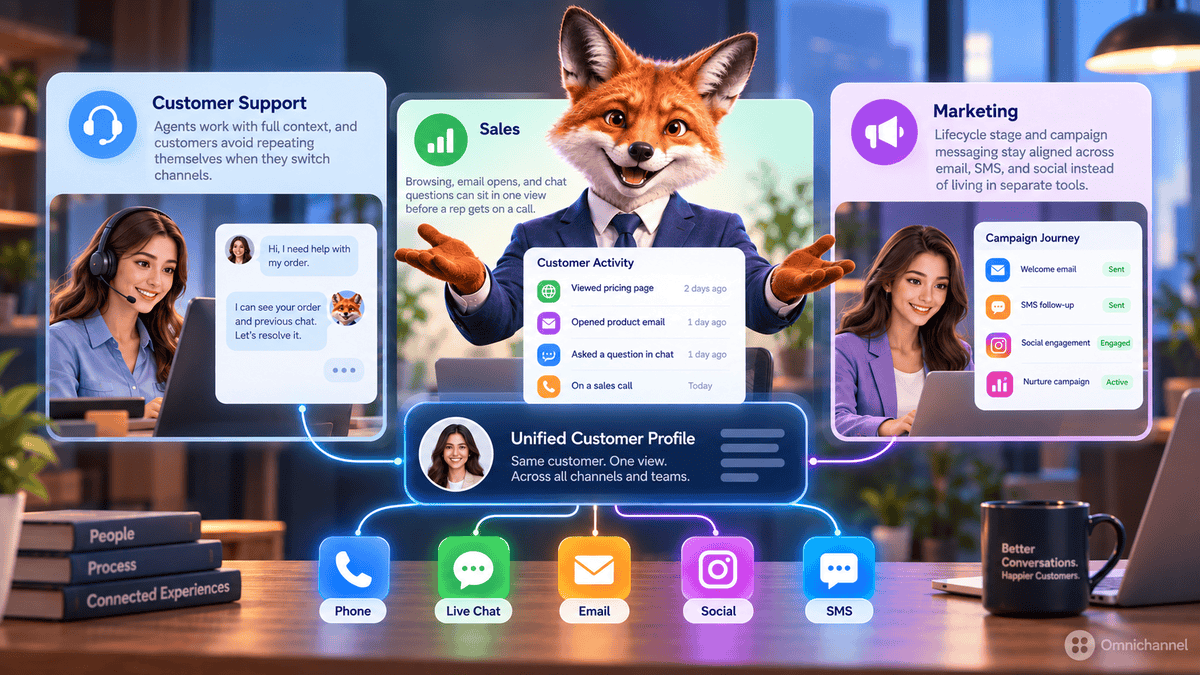
Teams that see the most benefit treat omnichannel as a shared data standard across functions, not a support-only IT project.
Common challenges when implementing omnichannel
Nothing here runs itself. These are the usual sticking points:
- Data silos. Legacy systems that were never built to exchange data remain the hardest technical blocker for many companies.
- Integration cost. Linking CRM, helpdesk, marketing, and telephony costs money and engineering time even with modern connectors.
- Organizational silos. Support, sales, and marketing may share tools on paper but still work toward separate goals. A platform alone does not fix that without leadership backing one record everyone uses.
Planning for those org issues early keeps rollouts from stalling six months in when the tools work but habits do not.
How to start building an omnichannel strategy: a 3-step framework
Map the customer journey first
Before you buy connectors, list the touchpoints customers really use, not the ones you wish they used. That map shows what must link to what.
Connect the tools you already have
Start with integrations among your CRM, helpdesk, and marketing stack so they share one record. Most modern products offer native links or a CDP in the middle.
Train the team, then keep measuring
A unified system only helps if people open it. Train support, sales, and marketing to update the shared record, then track repeat contacts, resolution time, and satisfaction over time.
What omnichannel looks like done well
Non-software examples make the idea concrete. Starbucks Rewards lets customers load funds, check balance, and see order history from the app, the website, or an in-store kiosk because all three read one account. Disney’s MagicBand ties park entry, hotel access, and payment to one wearable, so the guest’s identity does not reset when they switch “channels.”
In both cases the surface changes while the customer record stays the same, much like the support journey above, only with a wristband and an app instead of chat and a phone call.
How to measure omnichannel success
After you connect systems, track whether behavior improves:
- Repeat-contact rate: how often customers reopen the same issue. Connected setups should push this down over time.
- Channel-switch resolution rate: share of issues closed without re-explaining context after a channel change.
- Average handle time (AHT): should fall as agents spend less time reconstructing history.
- Customer satisfaction (CSAT) by channel and cross-channel: compare multi-channel tickets to single-channel ones to see if handoffs feel smoother.
- First-contact resolution (FCR): often rises when agents inherit full context on the first touch.
Most CRMs and helpdesks report the first three metrics out of the box, so you can start there before buying a separate analytics layer.
Omnichannel is less about channel count and more about whether those channels share one customer view. Map a real journey first; an hour of that work usually shows where data still stops at a channel boundary.
Frequently asked questions
Conclusion
More channels alone rarely fix retention. What changes outcomes is whether chat, phone, email, and social read the same customer history. Teams that wire records together tend to see fewer repeat conversations, faster resolutions, and higher satisfaction. Teams that label a project “omnichannel” without shared data usually see little movement on those metrics.
If you are unsure where you stand, use the journey map from step 1. Most groups can spot broken handoffs in under an hour, and that list becomes the backlog for integrations and training.
Next step: Compare how leading CRM, helpdesk, and contact-center platforms handle unified data, sync, and automation in our omnichannel software comparisons.
 Your information is encrypted and kept secure.