

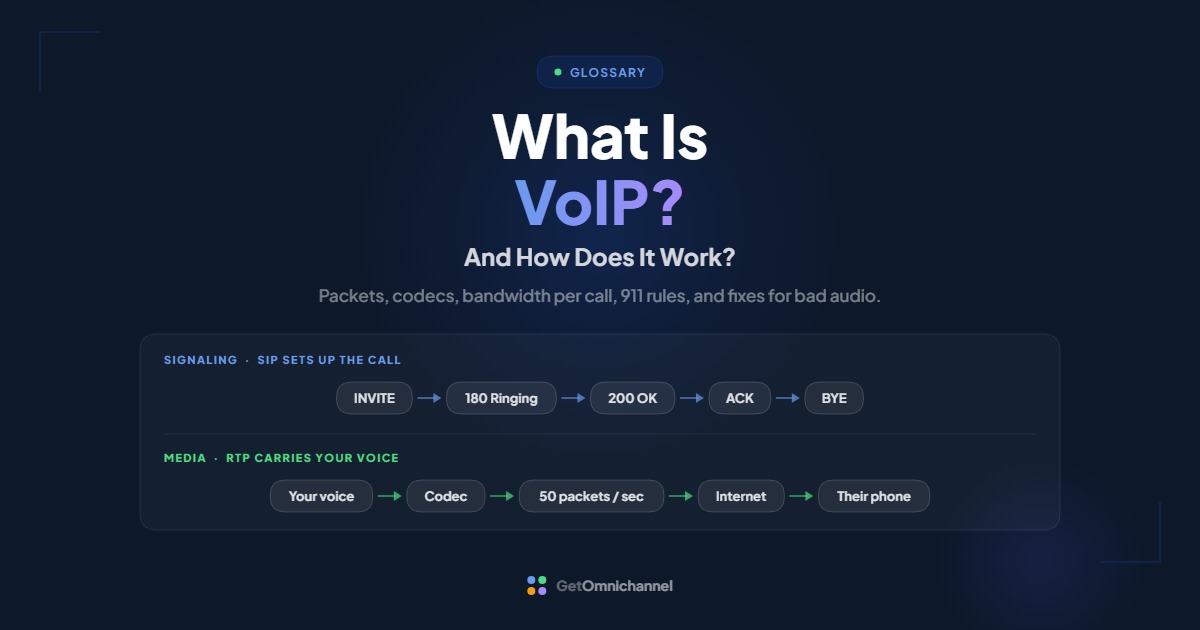
VoIP (Voice over Internet Protocol) is a way of making phone calls over an internet connection instead of a traditional copper phone line. Your voice is converted into digital data, split into small packets, sent across the internet, and reassembled into sound on the other end, usually in well under a second.
If you’ve used a business phone app, a desk phone plugged into an office network, or a “call” button inside a helpdesk, you’ve almost certainly used VoIP. This guide explains what happens behind that button: the protocols that set a call up, the codecs that shrink your voice, the bandwidth math for your office, and the specific network problems that cause choppy, one-way, or dropped calls.
SIP sets the call up; RTP carries your voice in about 50 packets a second. Bad audio is usually the network, not the provider.
Compare VoIP providers →What is VoIP?
VoIP stands for Voice over Internet Protocol. It is a technology that carries voice calls as data packets over an IP network, the same kind of network that carries email, web pages, and video. A traditional landline, by contrast, uses the public switched telephone network (PSTN), which was built to carry analog voice over dedicated circuits.
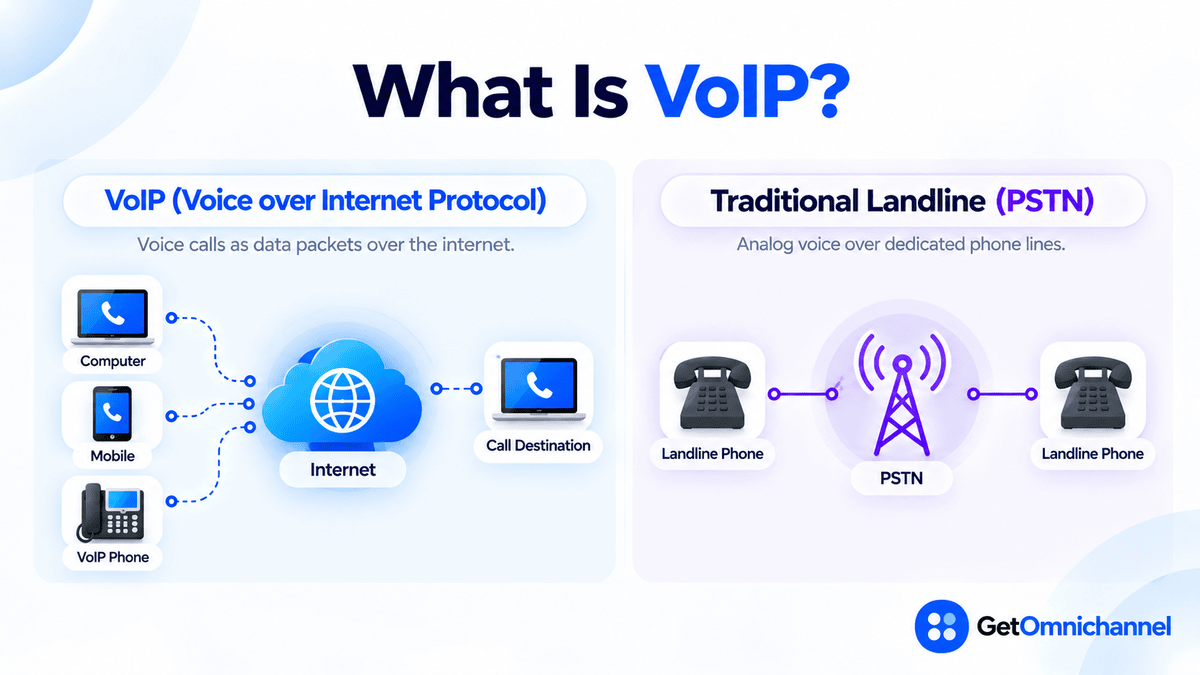
You’ll also see VoIP called internet calling, IP telephony, cloud calling, or a business phone system. They describe the same underlying idea. What changes from product to product is where the phone system lives (in the cloud or in your server room) and what you can call (only other app users, or any phone number in the world).
That last distinction matters more than most guides admit. US regulators use the term interconnected VoIP for services that can both make calls to and receive calls from regular phone numbers on the PSTN. The FCC’s 911 rules apply to interconnected VoIP providers specifically (FCC 19-76, 2019). An app that only calls other users of the same app is still VoIP, but it isn’t a phone line replacement.
How does VoIP work? A call, step by step
Every VoIP call runs on two separate tracks: signaling, which sets the call up and tears it down, and media, which carries your actual voice. Most call problems come from one of the two, so it helps to know which is which.
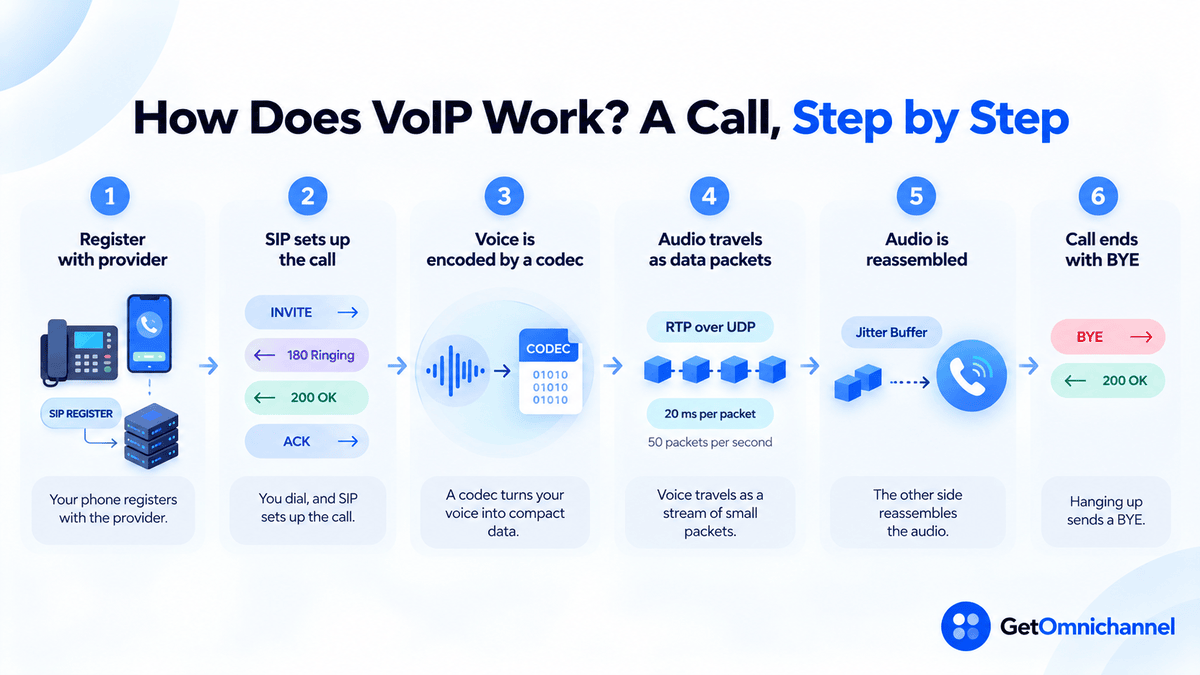
Your phone registers with the provider
When a desk phone or app starts up, it sends a SIP REGISTER message to your provider's server. This tells the provider, "this phone number is currently reachable at this internet address," so incoming calls know where to go. SIP (Session Initiation Protocol) is the signaling standard most VoIP systems use; it's defined in IETF RFC 3261.
You dial, and SIP sets up the call
Your phone sends an INVITE toward the number you dialed. The other side replies 180 Ringing while it rings, then 200 OK when someone answers. Your phone confirms with an ACK. That three-message handshake (INVITE, 200 OK, ACK) is what turns a dial into a connected call. The INVITE also carries a description of which audio formats each side supports, so both ends agree on a codec before any voice is sent.
A codec turns your voice into compact data
Your microphone produces an analog sound wave. A codec (coder-decoder) samples it, converts it to digital data, and usually compresses it. Different codecs trade bandwidth for audio quality, which is why the same call can use roughly 21 Kbps or 87 Kbps depending on the codec (see the table in the next section).
Voice travels as a stream of small packets
The encoded audio is chopped into short slices, commonly 20 milliseconds each, and sent as packets using RTP (Real-time Transport Protocol, RFC 3550) over UDP. At 20 ms per packet, that's 50 packets every second in each direction (Cisco). UDP is used instead of TCP because a late voice packet is useless. It's better to skip it than to pause the call waiting for a resend.
The other side reassembles the audio
Packets don't always arrive evenly spaced. The receiving phone holds them for a moment in a jitter buffer, puts them back in order, decodes them, and plays them through the speaker. If the person you're calling is on a landline or mobile network, a gateway run by your provider converts the packets into a format the traditional phone network understands, and back again.
Hanging up sends a BYE
When either person hangs up, their phone sends a SIP BYE, the other side answers 200 OK, and the media stream stops.
| Signaling | Media | |
|---|---|---|
| Job | Register, ring, answer, transfer, hang up | Carry the actual voice |
| Common protocol | SIP (secured version: SIP over TLS) | RTP (secured version: SRTP) |
| Traffic pattern | A few short messages per call | About 50 packets per second, each direction |
| When it breaks | Phone won't ring, calls fail to connect, calls drop at a fixed time | Choppy, robotic, delayed, or one-way audio |
Rule of thumb: if the call connects but sounds bad, look at the network path for media (bandwidth, jitter, packet loss). If the call won’t connect, won’t ring, or drops at the same moment every time, look at signaling (registration, firewall, or router settings).
How much bandwidth does a VoIP call use?
Less than most people expect, but more than the codec’s headline number. Every 20 ms packet carries 40 bytes of IP, UDP, and RTP headers on top of the voice data, plus Ethernet framing. That overhead is why a 64 Kbps codec actually uses about 87 Kbps on the wire.
| Codec | Codec bit rate | Packets / sec | Actual bandwidth | Typical use |
|---|---|---|---|---|
| G.711 | 64 Kbps | 50 | 87.2 Kbps | Standard narrowband phone quality; common default |
| G.722 | 64 Kbps | 50 | 87.2 Kbps | Wideband ("HD voice") desk phones |
| G.726 | 32 Kbps | 50 | 55.2 Kbps | Mid-compression |
| iLBC (20 ms) | 15.2 Kbps | 50 | 38.4 Kbps | Tolerates packet loss better |
| G.729 | 8 Kbps | 50 | 31.2 Kbps | Low-bandwidth links |
Figures from Cisco’s voice bandwidth reference, which assumes 20 ms packets, 40 bytes of IP/UDP/RTP headers, and 18 bytes of Ethernet overhead, with no voice activity detection. Many modern apps use Opus, an adaptive codec that can run anywhere from 6 Kbps to 510 Kbps (RFC 6716), so its real usage depends on how the app configures it.
Worked example: a 10-person office
- Busiest moment: assume all 10 people are on calls at once (a deliberately pessimistic case).
- On G.711: 10 × 87.2 Kbps = 872 Kbps, or under 1 Mbps, in each direction. Upload counts as much as download, because you're sending your voice the whole time.
- On G.729: 10 × 31.2 Kbps = 312 Kbps each direction.
- The takeaway: raw bandwidth is rarely the problem on a modern business connection. The problem is competition: a large cloud backup or video upload can saturate the upload link for a few seconds, and voice packets queue behind it. That's what quality-of-service (QoS) settings on your router are for.
Running VoIP over a VPN or certain Wi-Fi setups adds more per-packet overhead than the table shows, so leave headroom. If the arithmetic says you need 1 Mbps, don’t plan around a link with 1.2 Mbps of upload to spare.
What affects VoIP call quality?
Three network measurements decide whether a call sounds natural. Bandwidth matters less than all three.
- Latency (delay) is how long a packet takes to get from mouth to ear. The ITU’s planning guidance (ITU-T G.114) treats one-way delay up to about 150 ms as acceptable for most conversations and says 400 ms should not be exceeded for general network planning. Past roughly 150 ms, people start talking over each other.
- Jitter is variation in packet arrival times. A small jitter buffer smooths it out, but the buffer itself adds delay. High jitter sounds choppy or robotic.
- Packet loss is packets that never arrive. Because voice uses UDP, lost packets aren’t resent. Codecs can mask the odd missing packet, but sustained loss produces gaps and clipped words.
What to do with this: before switching to VoIP, run your provider’s network test, or a general speed test that reports jitter and packet loss, during your busiest hour, not first thing in the morning. A connection that looks fine at 8 a.m. may not be fine at 2 p.m. when everyone’s syncing files. Your provider’s network requirements page will list the exact thresholds it supports.
What equipment do you need for VoIP?
Less than a traditional phone system. At minimum you need an internet connection and one way to make calls:
- Softphone app: software on a computer or smartphone. No hardware cost; quality depends heavily on the headset and the Wi-Fi.
- IP desk phone: a physical phone that plugs into your network (often powered over the network cable via PoE). Best for reception desks and people who spend all day on calls.
- Analog telephone adapter (ATA): a small box that lets a regular analog phone, fax machine, or door entry system connect to a VoIP service.
- A router you can configure: you’ll want QoS (to prioritize voice traffic) and the ability to turn off “SIP ALG,” a router feature that often breaks VoIP more than it helps (see troubleshooting below).
- A wired-quality headset: the cheapest audio upgrade available. Many “bad VoIP” complaints are actually laptop microphones picking up a room.
Types of VoIP systems
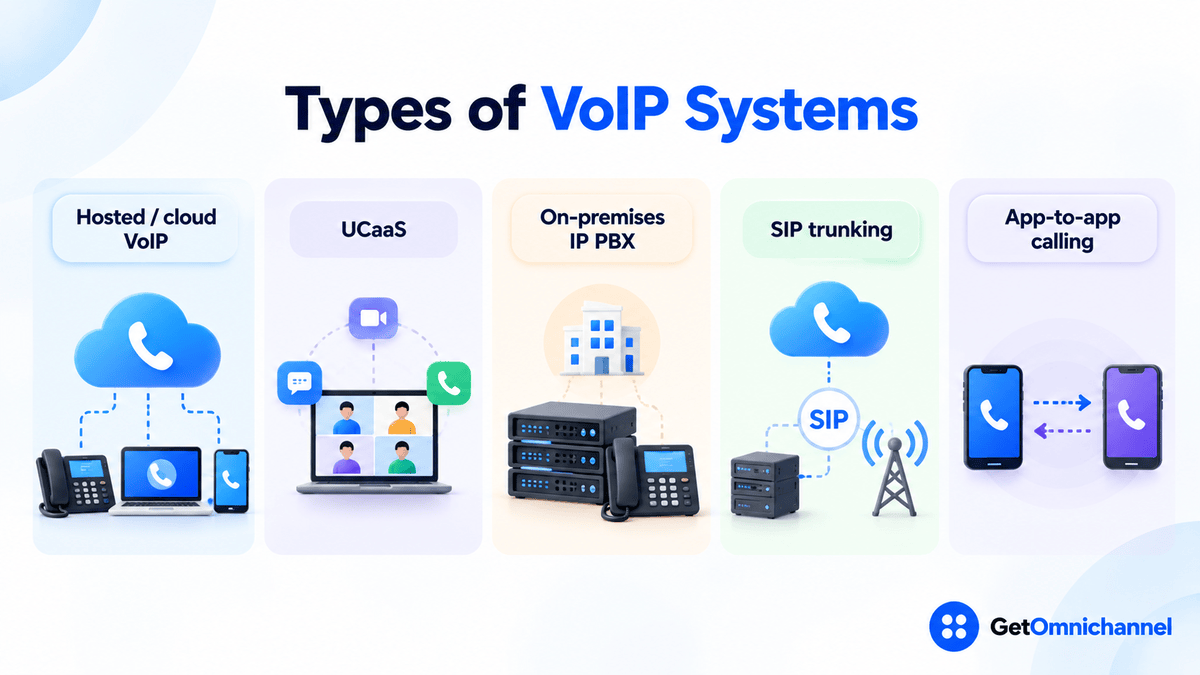
“VoIP” covers several different setups. The right one depends mostly on whether you want to manage phone infrastructure yourself.
| Type | What it is | Who manages it | Best fit |
|---|---|---|---|
| Hosted / cloud VoIP | The phone system runs in the provider's data centers; you use apps and phones | Provider | Most small and mid-size businesses, remote teams |
| UCaaS | Cloud VoIP bundled with video meetings and team messaging | Provider | Teams that want calls, meetings, and chat in one app |
| On-premises IP PBX | Your own phone server, connected to the outside world by a provider | You or an IT partner | Organizations with strict control or legacy hardware needs |
| SIP trunking | A provider connection that gives an existing PBX outside phone lines over the internet | Shared: you run the PBX, provider runs the trunk | Replacing analog or ISDN lines without replacing the PBX |
| App-to-app calling | Calls only between users of the same app | App vendor | Internal calls; not a phone line replacement |
For customer-facing teams, there’s a sixth flavor worth knowing: cloud contact center software, which adds queues, IVR menus, call recording, and agent reporting on top of VoIP. If calls are a core support channel, compare the best call center software rather than a basic phone system.
VoIP vs landline: what’s the difference?
| Traditional landline | VoIP | |
|---|---|---|
| How voice travels | Dedicated circuit on the phone network | Data packets over any internet connection |
| Tied to a location? | Yes, the number lives on a physical line | No, the number follows the user to any device |
| Adding a line | Technician visit, new wiring | Add a user in an admin dashboard |
| Built-in features | Basic calling; extras often cost more | Voicemail-to-email, call routing, recording, CRM and helpdesk integrations |
| Power outage | Copper lines have historically carried their own power | Stops working unless the router, modem, and phones have backup power |
| Internet outage | Unaffected | Calls fail over to mobile apps or forwarding rules, if configured |
| 911 location | Fixed to the line's service address | Must be registered and kept up to date (see next section) |
- Numbers work from anywhere: office, home, or a phone app
- Scales up or down per user, without rewiring
- Calls can connect to your CRM, helpdesk, and reporting
- Features like call routing and recording are usually included
- Only as reliable as your internet connection
- Needs backup power and a failover plan for outages
- 911 address must be kept current for each user
- Poorly configured routers cause most quality problems
Pricing varies too widely by provider, plan, and seat count to give a fair single number here. Our best VoIP providers guide lists current plans with the date each price was checked.
How does 911 work on VoIP?
This is the part most “what is VoIP” guides mention in one line. It deserves more, because a landline’s location is fixed but a VoIP number can be used anywhere.
In the US, two federal laws shape how 911 works on business phone systems, including VoIP. Both are summarized in the 911.gov fact sheet on Kari’s Law and RAY BAUM’S Act:
- Kari’s Law requires multi-line telephone systems to let users dial 911 directly, without a prefix like “9” for an outside line, and to notify someone on site (such as a front desk or security) when a 911 call is placed. It applies to systems manufactured, imported, sold, leased, or installed after February 16, 2020.
- RAY BAUM’S Act (Section 506) led the FCC to require a dispatchable location with 911 calls: a street address plus details like floor or room number, so responders know where to go. The FCC’s 2019 order applies these location rules to interconnected VoIP providers (FCC 19-76).
What this means in practice: when you set up VoIP, register an emergency address for every user and every desk phone, and make it someone’s job to update it when people move desks, change offices, or work from home. Ask any provider you’re evaluating how it handles location for remote and mobile users. The FCC’s rules change over time, so check the current requirements on fcc.gov for your situation.
Is VoIP secure?
It can be, but security isn’t automatic. Ask whether both halves of the call are encrypted:
- Signaling encryption (SIP over TLS) protects who called whom, when, and call setup details.
- Media encryption (SRTP) protects the voice itself. SRTP is the secure profile of RTP, defined in RFC 3711.
- Toll fraud is the risk most specific to VoIP: someone gains access to an account or device and runs up charges calling premium or international numbers. Strong admin passwords, multi-factor login, international calling turned off for users who don’t need it, and spending alerts are the basic defenses.
- Account and device hygiene: change default desk phone passwords, keep firmware updated, and remove users promptly when people leave.
If you’re in a regulated industry, compliance claims such as HIPAA support should be confirmed on the provider’s own security or compliance page and in your contract. Don’t take them from a comparison table, including ours.
Common VoIP problems and how to fix them
Most VoIP issues fall into a handful of patterns. Use the signaling vs media split from earlier to narrow them down.
| Symptom | Likely cause | First thing to try |
|---|---|---|
| Choppy or robotic audio | Jitter or packet loss, often from a saturated upload link or weak Wi-Fi | Test on a wired connection; enable QoS on the router to prioritize voice |
| One-way audio (you hear them, they can't hear you) | Firewall or NAT blocking the media stream while signaling gets through | Turn off SIP ALG on the router; open the media ports your provider lists |
| Calls drop at about 30 seconds | The final ACK of the SIP handshake isn't reaching the other side, so it gives up waiting (RFC 3261 timeout of about 32 s) | Turn off SIP ALG; check firewall rules and NAT timeouts for SIP traffic |
| Phone shows "unregistered" or won't ring | Registration expired or blocked | Reboot the phone; check the account credentials; confirm the router isn't rewriting SIP traffic |
| Echo | Speakerphone or laptop mic picking up the speaker; high latency makes it noticeable | Use a headset; reduce delay by avoiding VPN for voice if your IT policy allows |
| Long pauses, people talking over each other | High latency, often from routing calls through a distant VPN or region | Check which data center region your provider uses; test without VPN |
The roughly 30-second drop is a classic sign worth recognizing. Under the SIP standard, the answering side keeps resending its 200 OK until it receives the caller’s ACK, and gives up after 64 × T1, which is 32 seconds with the default 500 ms timer (RFC 3261). Audio may flow normally until then, which makes it look like a random drop when it’s really a network setting.
How to switch to VoIP: a 5-step checklist
Count your peak concurrent calls
Not total staff: the most people who are on calls at the same moment. Multiply by the per-call bandwidth for your codec (about 87 Kbps for G.711) to get your minimum upload and download needs, then add headroom.
Test your network at your busiest hour
Check latency, jitter, and packet loss, not just speed. If results are poor, fix the router (QoS on, SIP ALG off) before blaming any provider.
Decide what calls need to connect to
If calls are part of customer support or sales, prioritize providers that integrate with your helpdesk or CRM, so call history lands on the same customer record as email and chat. That's the core idea behind omnichannel communication.
Plan the number port and the cutover
You can usually keep your existing numbers by porting them to the new provider. Keep the old service active until the port completes and test inbound calls before cancelling anything.
Register 911 addresses and set outage rules
Enter a dispatchable address for every user and phone. Then set failover: forward calls to mobile apps if the office internet goes down, and put the modem, router, and network switch on a battery backup.
How this guide was made
Researched and written by Kinjal Trivedi, SaaS & Technology Writer at GetOmnichannel. This guide explains how VoIP works in general and does not rank or score specific providers. Protocol details come from the IETF standards linked in the text (RFC 3261, 3550, 3711, 6716), bandwidth figures from Cisco's published reference, delay guidance from ITU-T G.114, and 911 rules from the FCC and 911.gov documents linked at each claim (checked October 2026). The 10-person office is an illustrative calculation, not a customer.
VoIP turns your voice into a stream of small data packets, about 50 a second, and the internet does the rest. Bandwidth is rarely the problem. A busy upload link, a router that rewrites SIP traffic, or a missing 911 address usually is. Fix those three before you switch, and VoIP will sound like any other phone call.
Frequently asked questions
Conclusion: VoIP is simple once you know the two tracks
VoIP replaces a dedicated phone circuit with ordinary internet data. SIP handles the ringing, answering, and hanging up. A codec and RTP carry your voice as about 50 small packets a second. A gateway connects you to every regular phone number in the world. Once you know which of those two tracks, signaling or media, a problem lives on, almost every VoIP issue becomes fixable.
For businesses, the bigger decision isn’t whether to use VoIP. It’s which provider fits how your team talks to customers, and whether those calls should connect to the rest of your support and sales tools.
Next step: Compare current plans and features in our guide to the best VoIP providers, or, if phones are a core support channel, see the best call center software.
 Your information is encrypted and kept secure.