

An AI chatbot for customer service is software that answers customer questions in chat, email, or messaging apps by finding the answer in your help content and writing a reply. Newer versions, often sold as AI agents, can also take actions such as checking an order, and hand the conversation to a person when they can’t help.
This guide explains how these bots work under the hood, which questions they handle well, what Klarna’s results and reversal teach about using them, and what six tools charge. It ends with a six-step rollout and the metrics that show whether the bot is really solving problems. For when a bot should hand over to a person, see chatbot vs live chat.
An AI chatbot is only as accurate as the help content it searches. Fix the content behind your top questions, label the bot, and keep a person one tap away.
Compare live chat tools →What is an AI chatbot for customer service?
An AI chatbot for customer service is an automated assistant that understands questions written in everyday language and answers them from your approved content, without a person typing the reply. Unlike a rule-based bot, it doesn’t need a scripted path for every question.
The names overlap. Vendors now call most of these tools “AI agents”: Intercom’s is Fin, Zendesk sells AI agents, Freshworks has the Freddy AI Agent, HubSpot has the Customer Agent, and Tidio has Lyro. The practical difference is in what the bot can do, not what it’s called.
| Rule-based chatbot | AI chatbot | AI agent | |
|---|---|---|---|
| Answers from | Buttons and scripted paths you build | Your help articles, files, and web pages | Your help content plus connected systems |
| Understands free text | Only keywords you set | Yes | Yes |
| Takes actions | Only fixed flows | No, answers only | Yes, such as order lookups or updates in authorised systems |
| Setup work | Build every path | Clean up and connect knowledge | Knowledge plus integrations and rules |
| Typical failure | Dead ends when the question doesn't fit a button | Confident answers from outdated content | Actions taken on the wrong account or data |
How does an AI customer service chatbot work?
The bot reads the customer’s question, searches your approved content for the most relevant passages, writes an answer based on them, and, if it’s connected to your systems, takes an action. When it can’t answer safely, it hands the conversation to a person.
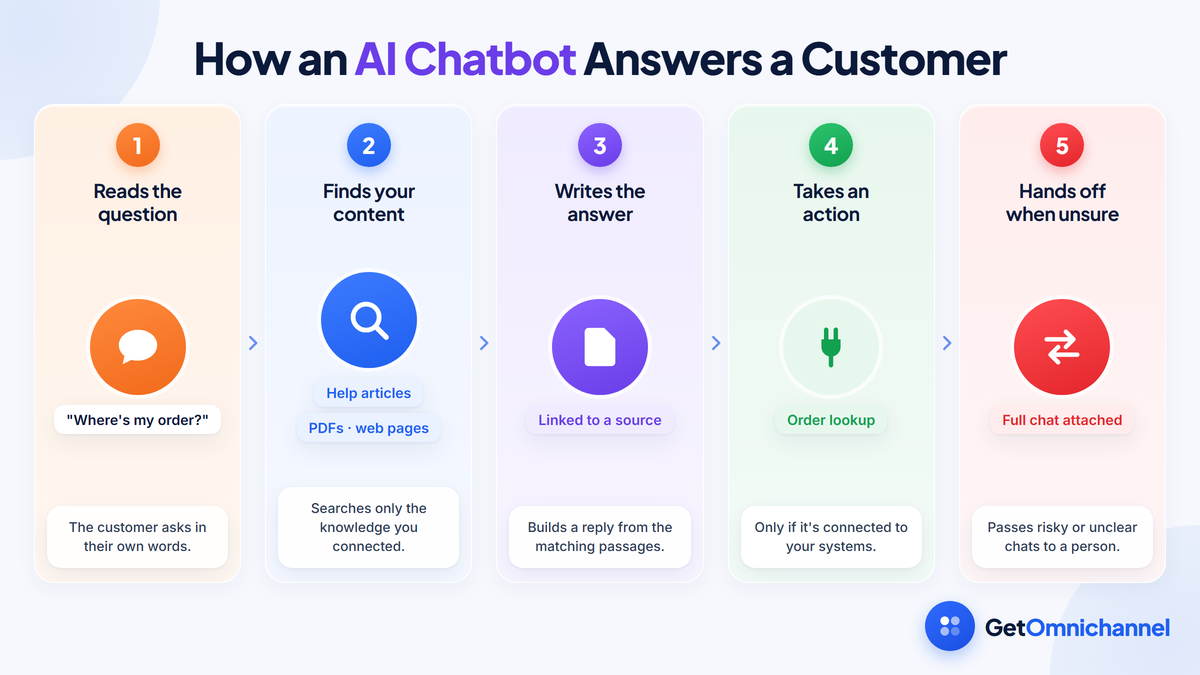
It reads the question
The customer types in their own words, in the chat widget, email, or a messaging app. Intercom says Fin works "across email, voice, live chat, social, and more" and in more than 45 languages.
It finds the relevant content
A retrieval step searches the knowledge you've connected: help articles, internal docs, PDFs, and web pages. Intercom describes a retrieval model that finds candidate answers and a reranker that picks the best ones.
It writes an answer from that content
The bot summarises the passages into a reply. Freshworks says its AI agents answer only from "pre-approved knowledge sources," with each answer linked to a source, and Intercom's answer inspection shows which sources shaped a reply.
It takes an action, if connected
With integrations, an AI agent can look up or change data. Zendesk says its AI agents can "perform actions in authorized systems autonomously," and Intercom uses data connectors and Procedures for multi-step tasks.
It hands off when it should
When the bot can't help, it passes the chat to a person. Intercom says Fin "will always automatically hand off when that is the safest option," including for high-risk medical, legal, or financial questions. HubSpot's agent asks the visitor to rephrase or transfers to a human, and Freshworks lets admins set trigger phrases such as "talk to an agent."
Every step depends on step 2. An AI chatbot can only be as accurate as the help content it searches, so outdated or contradictory articles become outdated or contradictory answers.
What can an AI chatbot handle, and what should it not?
AI chatbots handle repeat questions with one correct answer well: policies, how-to steps, and order status when connected to your systems. Keep refunds, complaints, account security, and anything involving judgement or risk with people.
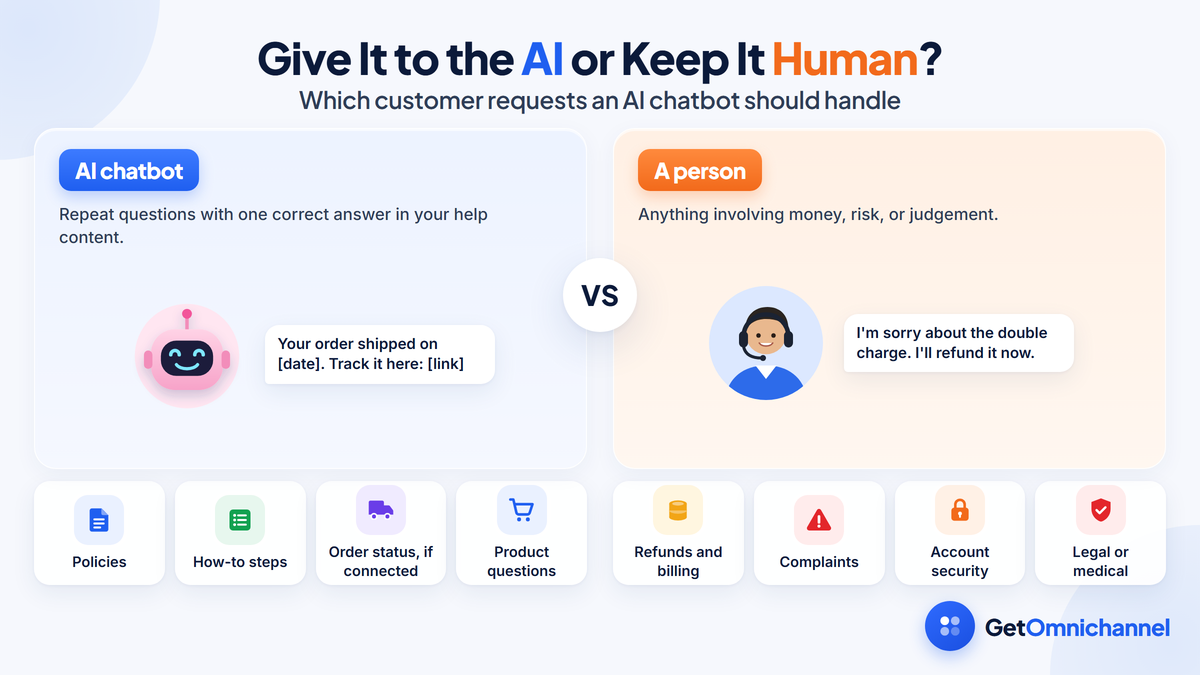
| Request type | Fit | What it needs |
|---|---|---|
| Policies: returns, shipping, opening hours | Strong | Up-to-date help articles |
| How-to and troubleshooting steps | Strong | Step-by-step articles with screenshots |
| Order status, booking changes | Good, if connected | An integration with your order or booking system |
| Pre-sales product questions | Good for simple ones | Product pages and pricing content; handoff for large deals |
| Refunds and billing disputes | Hand off | A person with authority to decide |
| Complaints and frustrated customers | Hand off | Empathy and the power to fix things |
| Account security, fraud, legal, medical | Hand off | A trained person; high risk if wrong |
The handoff rules for each of these, and what customers think of bots, are covered in our guide to chatbot vs live chat.
What results do AI customer service chatbots deliver?
The best-known example is Klarna. In its first month, Klarna’s AI assistant handled two-thirds of customer service chats, which the company said was the work of 700 full-time agents. A year later, its CEO said the company would invest in human support again because AI alone gave lower-quality service.
What Klarna reported in February 2024
- 2.3 million conversations in the first month, two-thirds of Klarna's customer service chats.
- The equivalent work of 700 full-time agents, with customer satisfaction "on par with human agents."
- Under 2 minutes to resolve an errand, compared with 11 minutes before, and a 25% drop in repeat inquiries.
- More than 35 languages, in 23 markets, 24/7, with an estimated $40 million profit improvement in 2024.
Source: Klarna press release, February 27, 2024. These are company-reported figures.
What changed in 2025
In May 2025, Klarna CEO Sebastian Siemiatkowski told Bloomberg that AI chatbots were cheaper than human staff but produced “lower quality” output. “Really, investing in the quality of human support is the way of the future for us,” he said, adding that “it’s so critical that you are clear to your customer that there will always be a human if you want” (Entrepreneur, reporting the Bloomberg interview, May 9, 2025).
Where analysts expect this to go
Gartner predicts that agentic AI will autonomously resolve 80% of common customer service issues without human intervention by 2029, leading to a 30% reduction in operational costs (Call Centre Helper, reporting Gartner’s March 2025 prediction). That is a forecast for common issues, not a measured result.
A bot can take a large share of routine chats quickly. Volume isn't the same as quality, though, and the companies that go furthest with AI still keep a visible path to a person.
How much do AI customer service chatbots cost?
Most vendors charge for each conversation the AI resolves, on top of the plan. Published rates run from $0.49 per session on Freshchat and $0.50 per resolution on HubSpot to $0.99 on Intercom and LiveChat and $2.00 on Zendesk pay-as-you-go.
| Tool | AI product | Price | What counts as one |
|---|---|---|---|
| Customer Agent (Professional and Enterprise) | $0.50 per resolution (50 HubSpot Credits) | Agent replied or acted, and the visitor didn't ask for a person within 72 hours | |
| Freddy AI Agent | $49 per 100 sessions on Growth; 500 free once | A session: chat interactions within 24 hours | |
| Fin AI Agent | $0.99 per outcome | Customer confirms it's resolved, doesn't ask for more help, or Fin completes a workflow, including handoffs | |
| AI agents | 10 resolutions/month on Essential, 200 on Growth; then $49.50 per 50 | An AI resolution | |
| Lyro | From $32.50/month for 50 conversations | A Lyro AI conversation | |
| AI agents | 5 per agent/month on Suite Team, 10 on Professional; then $2.00 pay-as-you-go | A request resolved with no escalation |






Sources: HubSpot (price effective April 14, 2026), HubSpot help, Freshchat, Intercom, LiveChat, Tidio, and Zendesk, checked November 2026.
Worked example: 300 AI resolutions a month
- HubSpot Customer Agent: 300 × $0.50 = $150 a month, on a Professional or Enterprise subscription.
- Freshchat Freddy AI Agent: 3 × $49 = $147 a month, after the 500 free sessions are used.
- Intercom Fin: 300 × $0.99 = $297 a month, plus seats.
- Zendesk Suite Team, 5 agents: 25 included, then 275 × $2.00 = $550 a month, plus seats.
This is an illustrative calculation, and the AI fee comes on top of the plan you need for your human agents. For plan details, see our reviews of Intercom, HubSpot Live Chat, Freshchat, and Tidio.
How to roll out an AI chatbot for customer service
Start with your most common questions, fix the help content behind them, set the bot’s scope and handoff rules, test it on real questions, launch on one channel with the bot clearly labelled, and review its conversations every week.
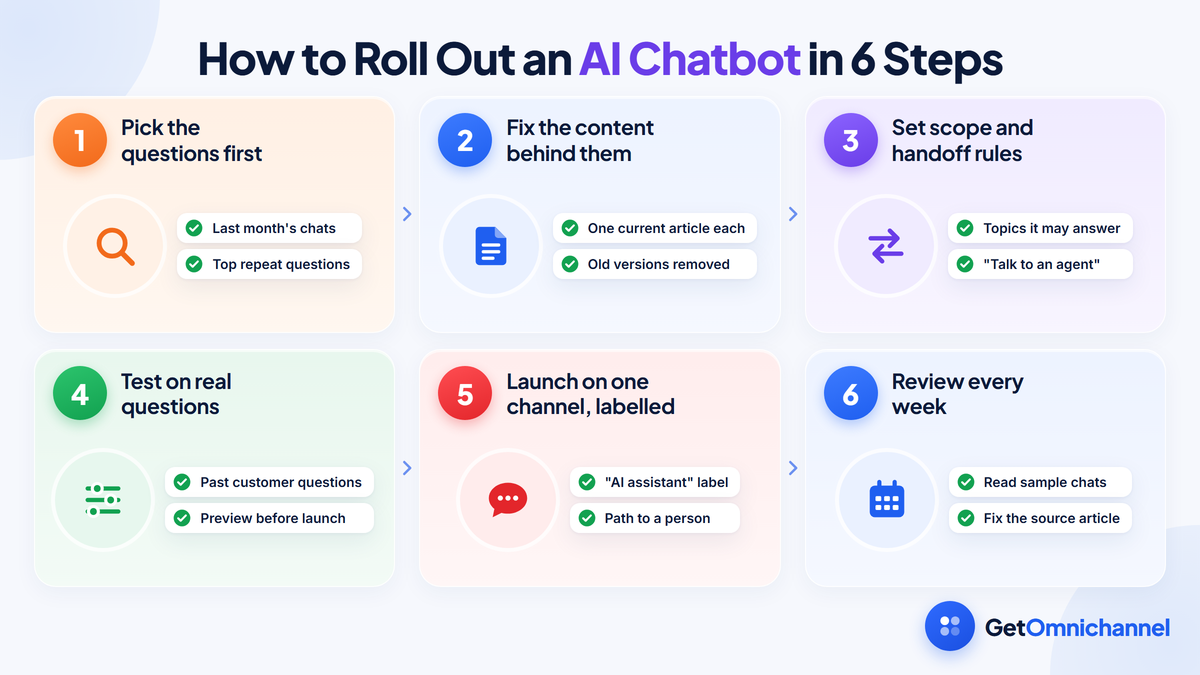
Pick the questions first
Pull a month of chat and email transcripts and list the questions that come up most. Those with one correct answer are the bot's first job.
Fix the content behind them
Check that each of those questions has one current, clearly written help article. Remove or update old articles that contradict it, because the bot will find those too.
Set scope and handoff rules
Decide which topics the bot may answer and which always go to a person, and add trigger phrases such as "talk to an agent." Collect the order number or email before handing over, so the agent doesn't have to ask again.
Test on real questions
Run a sample of past customer questions through the bot's preview before launch. HubSpot says previewing and testing its agent doesn't use credits, so testing costs nothing there.
Launch on one channel, labelled
Start with web chat, tell customers they're talking to an AI assistant, and show the way to a person from the first message. Add email and messaging once the bot performs well.
Review conversations every week
Read a sample of bot conversations, fix wrong answers at the source article, and add actions such as order lookups only once the answers are reliable.
How do you keep an AI chatbot’s answers accurate?
Limit the bot to approved content, send high-risk topics straight to people, tell customers it’s an AI, and review what it says. A business is responsible for its chatbot’s answers, so accuracy is a legal issue as well as a service one.
- Answer only from approved sources. Restrict the bot to the help content you've checked. Where the tool shows which source shaped a reply, as Intercom's answer inspection does, use it to trace wrong answers.
- Escalate high-risk topics. Intercom escalates self-harm, jailbreak attempts, and high-risk medical, legal, or financial advice automatically. Add your own: refunds, account access, and complaints.
- Tell customers it's an AI. In the EU, Article 50 of the AI Act requires AI systems that interact with people to be designed so users know they're talking to an AI, from 2 August 2026 (EU AI Act, Article 50).
- Remember you're liable. In 2024, a Canadian tribunal held Air Canada responsible for wrong information from its website chatbot (Civil Resolution Tribunal). The ruling is covered in chatbot vs live chat.
- Review, then expand. Read a weekly sample of conversations, especially ones customers reopened, and widen the bot's scope only when its answers in the current scope are consistently right.
How do you measure an AI chatbot’s performance?
Track resolution rate, handoff rate, reopen rate, satisfaction for bot and human conversations, and cost per resolution. Check how your vendor defines a resolution first, because the vendor’s count is also its bill.
| Metric | How to calculate it | What it tells you |
|---|---|---|
| Resolution rate | Conversations the bot closed without a person ÷ conversations the bot started | How much work the bot takes on |
| Handoff rate | Bot conversations passed to a person ÷ conversations the bot started | Where its knowledge or permissions run out |
| Reopen rate | "Resolved" customers who contact you again on the same issue within 7 days ÷ resolved conversations | Whether resolutions were real |
| Satisfaction, bot vs human | Positive ratings ÷ all ratings, split by who answered | Whether the bot hurts the experience |
| Cost per real resolution | Monthly AI fee ÷ (resolutions − reopened ones) | What each solved problem actually costs |
Vendor definitions matter. HubSpot counts a resolution when its agent replied or acted and the visitor didn’t ask for a person within 72 hours, and says assigning the conversation to a human manually, including through workflows, doesn’t stop it counting. Intercom counts an outcome when a customer doesn’t ask for more help after Fin responds. Both are reasonable, but neither proves the customer’s problem was solved, which is why your own reopen rate is the number to watch.
How this guide was made
Researched and written by Kinjal Trivedi, SaaS & Technology Writer at GetOmnichannel. How the bots work comes from each vendor's help documentation (Intercom, Zendesk, Freshworks, and HubSpot), prices from vendor pricing pages, Klarna's results from its February 2024 press release, the CEO's 2025 comments from Entrepreneur's report of a Bloomberg interview, and Gartner's prediction from Call Centre Helper's report of it, all linked at each claim and checked in November 2026. The fit table, rollout steps, and metrics are editorial guidance, and the worked cost example is an illustrative calculation.
An AI chatbot for customer service is a search engine over your help content that writes replies, and sometimes takes actions. It works best on repeat questions with one correct answer, costs roughly $0.50 to $2 for each conversation it resolves, and is only as accurate as your content. Start narrow, label it, keep a person one tap away, and judge it on your own reopen rate, not the vendor's resolution count.
Frequently asked questions
Conclusion: start narrow, measure honestly
AI chatbots for customer service have moved from scripted menus to assistants that write answers from your content and, increasingly, act on your systems. Klarna showed how much routine work they can absorb, and also why a visible path to a person still matters.
Pick a short list of repeat questions, make the content behind them right, label the bot, and measure it on reopened conversations as well as the vendor’s resolution count. Expand only when the answers in its current scope are consistently right.
Next step: Compare live chat tools with built-in AI agents in our guide to the best live chat software.
 Your information is encrypted and kept secure.