

Hosted VoIP is a business phone system that runs in a provider’s data centers: you pay a monthly fee per user, and the provider maintains the hardware, software, and updates. An on-premise PBX is a phone system you own and run at your office: you pay upfront for the equipment and licenses, and your team or an IT partner maintains it. For most small and mid-size businesses, hosted VoIP costs less to start and less to run; an on-premise PBX makes sense when you need deep control, already own working equipment, or have specific integration or data-location needs.
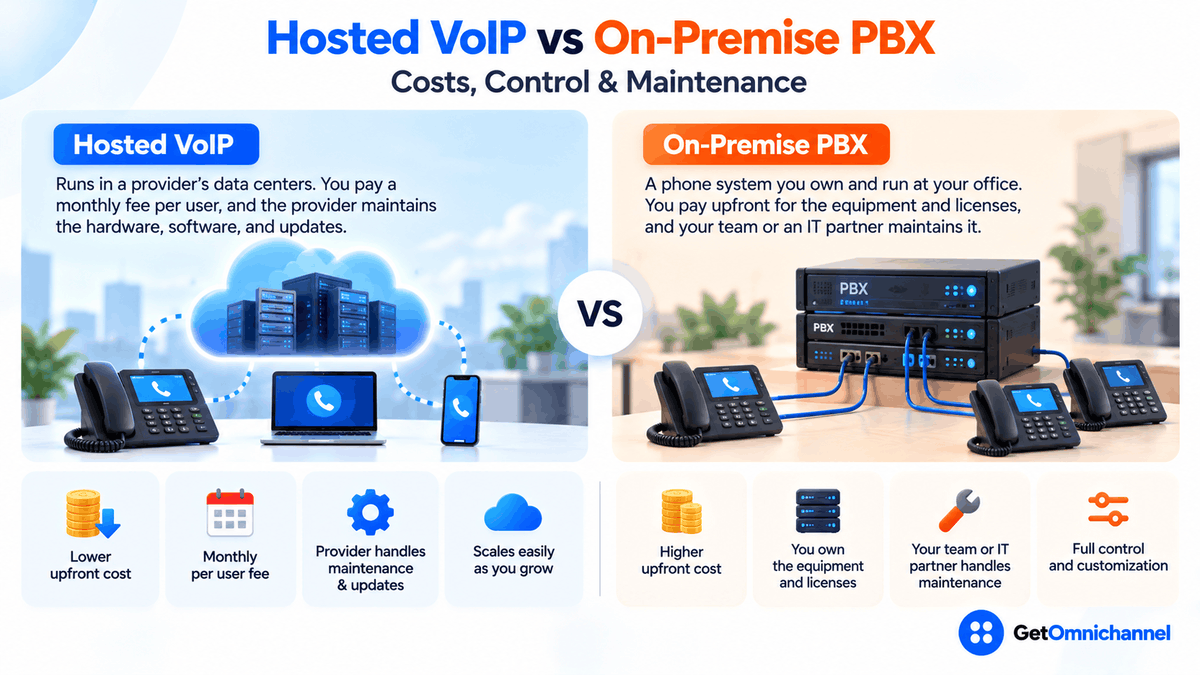
The decision isn’t really about call quality, since both use the same internet calling technology. It’s about who carries the responsibility: for updates, security, outages, and the day the hardware stops being supported. This guide breaks that down line by line, with the cost math to back it up.
Hosted VoIP hands hardware, updates, and end-of-support to the provider. On-premise gives control, but compare 5-year totals first.
Compare VoIP providers →Hosted VoIP vs on-premise PBX at a glance
| Hosted VoIP (cloud) | On-premise PBX | |
|---|---|---|
| Where the system runs | Provider's data centers | A server or appliance at your office |
| Upfront cost | Low: phones or headsets, often optional | High: PBX hardware, licenses, installation, phones |
| Ongoing cost | Monthly fee per user | Phone lines or SIP trunks, maintenance contract, IT time |
| Who maintains it | The provider | Your IT team or a phone system partner |
| Updates and security patches | Applied by the provider | Applied by you, on your schedule |
| Adding users or sites | Admin dashboard, minutes | Licenses, capacity, sometimes new hardware |
| Remote and mobile users | Built in, via apps | Possible, but needs extra configuration |
| Control and customization | Within the provider's feature set and APIs | Full control of dial plans, routing, and integrations |
| End of support | Provider's problem; the service keeps updating | Your problem; hardware and software eventually need replacing |
What are hosted VoIP and an on-premise PBX?
A PBX (private branch exchange) is the brain of a business phone system. It gives every employee an extension, routes incoming calls, runs the “press 1 for sales” menu, handles transfers and voicemail, and connects internal phones to the outside phone network.
An on-premise PBX runs that brain on equipment in your building, usually a dedicated appliance or a server running PBX software. Older systems connect to the phone network over analog or digital phone lines; modern IP PBX systems connect over the internet using SIP trunks.
Hosted VoIP moves the PBX into the provider’s data centers. Your desk phones and apps connect to it over the internet, and the provider runs everything behind them. You’ll also see it called hosted PBX, cloud PBX, or cloud phone system; when it’s bundled with video meetings and team chat, it’s usually sold as UCaaS (unified communications as a service). Both setups use the same VoIP technology to carry calls. For how that works, see what is VoIP and how does it work.
Who is responsible for what
This is the real difference between the two, and the part most comparisons skip. Every phone system needs the same jobs done; the question is who does them.
| Job | Hosted VoIP | On-premise PBX |
|---|---|---|
| PBX hardware and power | Provider | You |
| Software updates and security patches | Provider | You or your partner |
| Office network, internet, and router settings | You | You |
| Desk phones and headsets | You | You |
| Phone lines or SIP trunks | Provider (included) | You buy and manage them |
| 911 configuration | Shared: provider supplies it, you keep addresses current | You configure and maintain it |
| Backups and disaster recovery | Provider, plus your failover rules | You |
| User admin and call routing | You, in a web dashboard | You, in the PBX console |
The 911 row deserves attention. Kari’s Law applies to any “person engaged in the business of installing, managing, or operating” a multi-line telephone system. Such a system must let users dial 911 directly, with no “9” first, and must be configured to notify a central point such as a front desk when someone does (FCC 19-76). With an on-premise PBX, getting that configuration right is on you or your installer.
Hosted VoIP vs on-premise PBX costs
The two cost models are built differently. Hosted VoIP is an operating expense: a predictable monthly fee per user, with little upfront. An on-premise PBX is mostly a capital expense: a large upfront purchase, then smaller ongoing costs for lines, maintenance, and the people who run it. That’s why a fair comparison has to cover several years, usually the expected life of the PBX hardware.
What hosted VoIP costs
- Ooma Office: Essentials $19.95, Pro $24.95, and Pro Plus $29.95 per user per month, with no contract. Source: Ooma Office, checked October 2026.
- Nextiva: Core $15 and Engage $25 per user per month, shown against $23 and $50 respectively, with annual pricing available to small businesses with 1–100 employees. Source: Nextiva pricing, checked October 2026.
On-premise PBX pricing is rarely published, because it depends on the vendor, the number of users, the phones, installation, and the support contract. Get at least two written quotes, and use the worksheet below to compare them on equal terms.
| Cost item | Hosted VoIP | On-premise PBX |
|---|---|---|
| System | None | PBX appliance or server, plus software licenses |
| Installation and setup | Usually self-service or a small fee | Installer or partner fees, cabling if needed |
| Phones | Desk phones or headsets (apps can replace desk phones) | Desk phones compatible with the PBX |
| Service | Per-user price × users × 60 months | Phone lines or SIP trunks × 60 months |
| Maintenance and support | Included | Annual support contract or software assurance |
| People | Light admin time | IT or partner hours for changes, patches, and fixes |
| Power, space, backups | None on site beyond network gear | Battery backup, server space, backup of configuration |
| Replacement | None | Hardware or software refresh if support ends within 5 years |
Worked example: a 20-person office over 5 years
- Hosted on Ooma Office Pro: 20 × $24.95 = $499 per month, or $29,940 over 5 years before taxes and phones.
- Hosted on Nextiva Core at $15: 20 × $15 = $300 per month, or $18,000 over 5 years before taxes and phones.
- On-premise: add your quoted hardware, licenses, and installation to 60 months of lines or SIP trunks, the support contract, and an honest estimate of IT hours. If that total is below the hosted figure for the features you need, on-premise wins on cost.
Compare 5-year totals, not monthly bills. On-premise usually only wins on cost when you already own a supported PBX, have in-house staff who run it anyway, and have a stable headcount. If any of those three is missing, hosted is very likely cheaper.
The hidden cost: end of support
Every on-premise phone platform eventually reaches end of support. After that date, the vendor stops releasing security fixes, and you’re running a business-critical system with known, unpatched weaknesses. That forces a replacement on the vendor’s timeline, not yours.
A recent example: Microsoft’s Skype for Business Server 2019, which many companies used as an on-premise phone system, reached the end of extended support in October 2025, after mainstream support ended in January 2024 (Microsoft Lifecycle).
What to do: before buying or renewing an on-premise PBX, ask the vendor for the published end-of-support dates for the exact hardware and software version, and put the replacement cost into your 5-year worksheet if support ends inside that window. With hosted VoIP, the provider updates the platform continuously, so there’s no equivalent cliff. You only need to replace desk phones the provider stops supporting.
Control and customization
This is where an on-premise PBX genuinely wins, and it’s why some organizations keep one:
- Configuration depth. You control dial plans, routing logic, and system settings directly, instead of choosing from a provider’s menus.
- Legacy equipment. Analog devices, paging systems, door phones, and older handsets often connect more easily to a PBX already built around them.
- Data location. Call recordings and logs can stay on your own servers, which some organizations prefer for internal policy reasons.
- Change timing. Nothing changes until you decide to update it, which matters for tightly controlled environments.
Hosted VoIP trades that control for convenience: features arrive automatically, and most providers offer integrations and APIs for CRM and helpdesk tools. If you need recordings stored in a specific country or region, ask the provider where call data is stored before you sign. Treat compliance claims (such as HIPAA support) as something to confirm in the contract, not on a features page.
Reliability, outages, and disaster recovery
Both systems can be reliable. They just fail in different places:
- Office internet goes down. With hosted VoIP, desk phones stop working, but the system keeps running in the provider’s data center, so calls can forward to mobile apps or voicemail. With an on-premise PBX, internal extension-to-extension calls can keep working on the office network, and outside calls continue if your lines don’t depend on the same internet connection.
- The office itself is out (power cut, flood, fire). With hosted VoIP, staff can keep taking calls from home on the app. With an on-premise PBX, the whole system is down unless you’ve built and paid for a backup site or failover service.
- The system itself fails. Hosted providers run redundant infrastructure, and the service-level agreement in your contract should say what uptime they commit to and what credit you get if they miss it. With an on-premise PBX, recovery depends on your spare parts, your configuration backups, and how fast your partner can respond.
Rule of thumb: on-premise protects you better against an internet outage at one office; hosted protects you better against losing the office itself. A second internet connection, such as a cellular backup, closes most of hosted VoIP’s gap.
The middle ground: SIP trunking
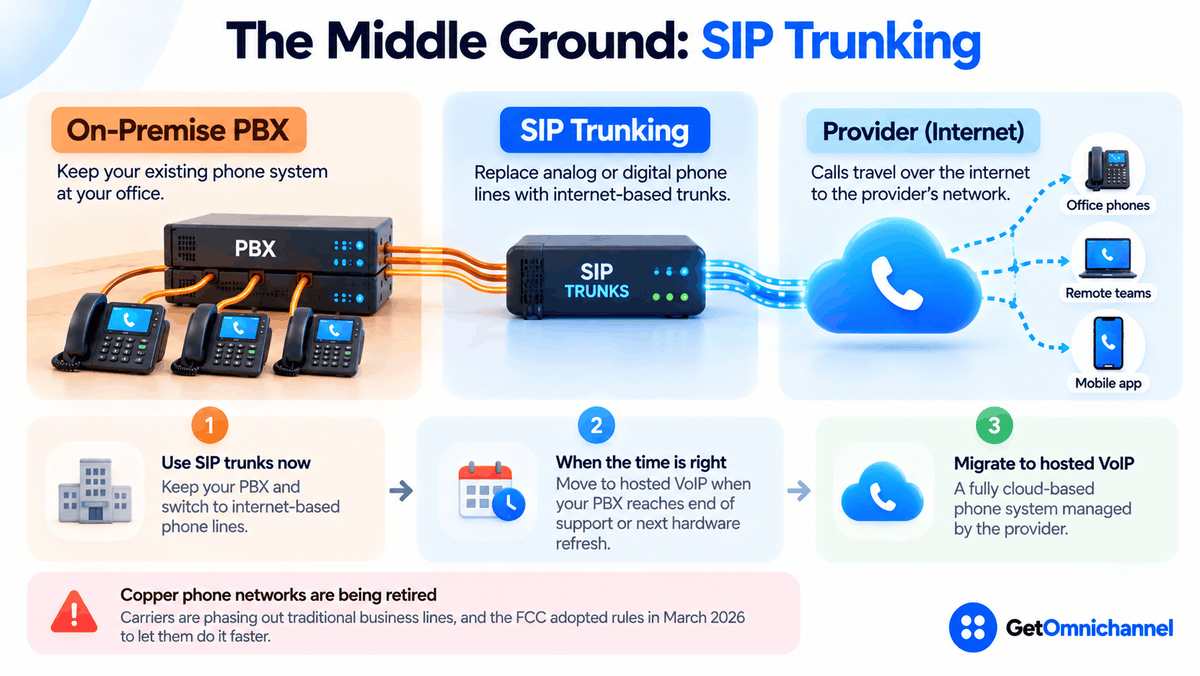
You don’t have to choose all at once. SIP trunking keeps your on-premise PBX but replaces its analog or digital phone lines with internet-based trunks from a provider. It’s a common step when a PBX still has years of support left but the old phone lines are getting expensive or being retired.
That second point is becoming urgent: carriers are retiring the copper networks behind traditional business lines, and the FCC adopted rules in March 2026 to let them do it faster. Our VoIP vs landline guide covers the copper phase-out in detail.
A typical path looks like this: move the PBX to SIP trunks now, then move to hosted VoIP when the PBX reaches end of support or the next major hardware refresh comes due.
Which is right for your business?
| Your situation | Best fit | Why |
|---|---|---|
| Small business, no dedicated IT | Hosted VoIP | No hardware to maintain, low upfront cost |
| Remote, hybrid, or multi-site team | Hosted VoIP | One system for every location and device |
| Fast-growing or seasonal headcount | Hosted VoIP | Add and remove users month to month |
| Supported PBX with years of life left | Keep it, add SIP trunks | Use the investment you've made; plan the move later |
| Strict control or data-location requirements | On-premise PBX | Full control over configuration and where data lives |
| PBX nearing end of support | Hosted VoIP | Avoid buying another platform with its own end date |
| Phone-heavy support or sales team | Cloud contact center | Queues, IVR, recording, and agent reporting |
If phones are a core customer channel, compare the best call center software; for a standard office phone system, start with the best VoIP providers.
How to move from an on-premise PBX to hosted VoIP
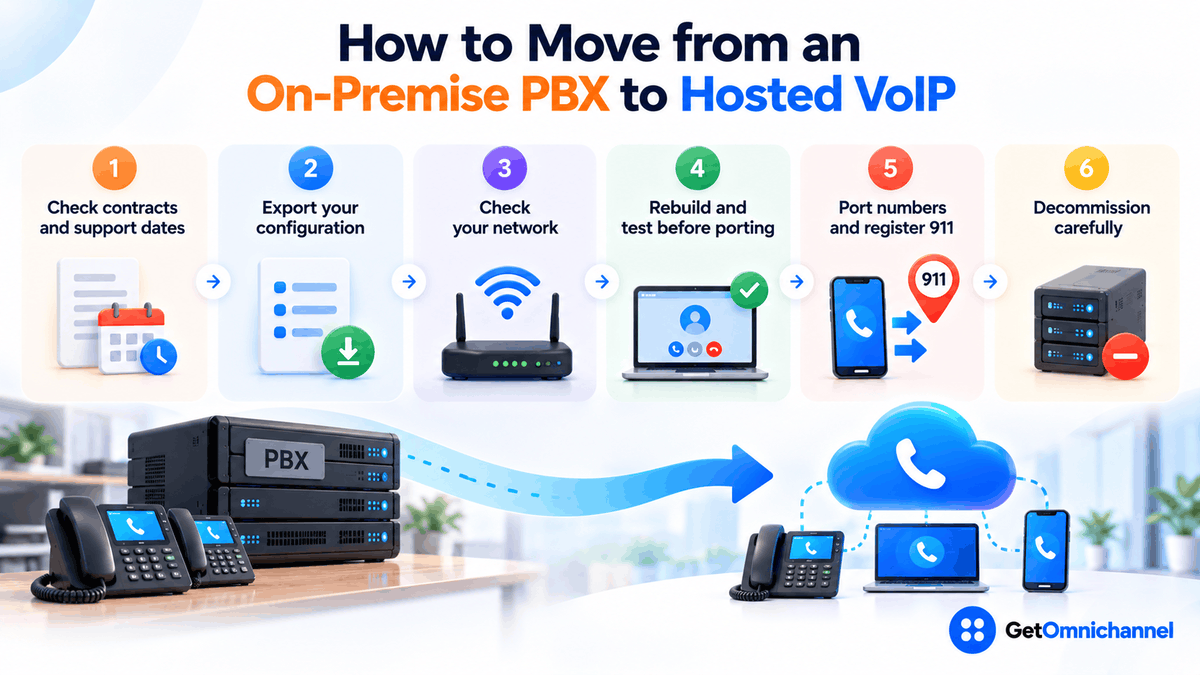
Check your contracts and support dates
Find the end dates for your PBX support contract, phone line or trunk contracts, and the vendor's end-of-support date. These usually set the best time to move.
Export your configuration
Document extensions, call routing, menus, hunt groups, voicemail boxes, and any devices connected to the PBX, such as paging, door phones, or fax.
Check your network
Test latency, jitter, and packet loss at your busiest hour, enable quality-of-service on the router, and plan a backup internet connection if calls are critical.
Rebuild and test before porting
Set up users and call flows in the new system and test them with temporary numbers before moving your real ones.
Port numbers and register 911 addresses
Port your numbers, keep the old lines active until the port completes, and enter a dispatchable 911 address for every user and phone.
Decommission carefully
Move special devices last, keep the old PBX available for a short rollback window, then retire it and wipe any stored recordings and voicemail per your data policy.
How this guide was made
Researched and written by Kinjal Trivedi, SaaS & Technology Writer at GetOmnichannel. This guide compares phone system models in general and does not rank or score specific providers. Hosted VoIP prices are taken from Ooma's and Nextiva's own pricing pages (checked October 2026) and are shown as examples only. End-of-support dates come from Microsoft's lifecycle page, and 911 obligations from the FCC order linked at the claim. The 20-person office is an illustrative calculation, not a customer.
Hosted VoIP hands the hardware, updates, and end-of-support problem to the provider in exchange for a monthly fee, which is the right trade for most businesses. Keep or buy an on-premise PBX only when you need its control, already have the staff to run it, and have priced its replacement into a 5-year total.
Frequently asked questions
Conclusion: decide who should own the responsibility
Hosted VoIP and an on-premise PBX can deliver the same calls. What differs is who owns the hardware, the updates, the outages, and the replacement bill. For most businesses, especially small, remote, or growing ones, handing that to a provider is the better deal. An on-premise PBX still earns its place where control, legacy equipment, or data location come first, as long as its full 5-year cost and end-of-support date are on the table.
Next step: Compare current plans in our guide to the best VoIP providers, or read VoIP vs landline if you’re still on traditional phone lines.
 Your information is encrypted and kept secure.