

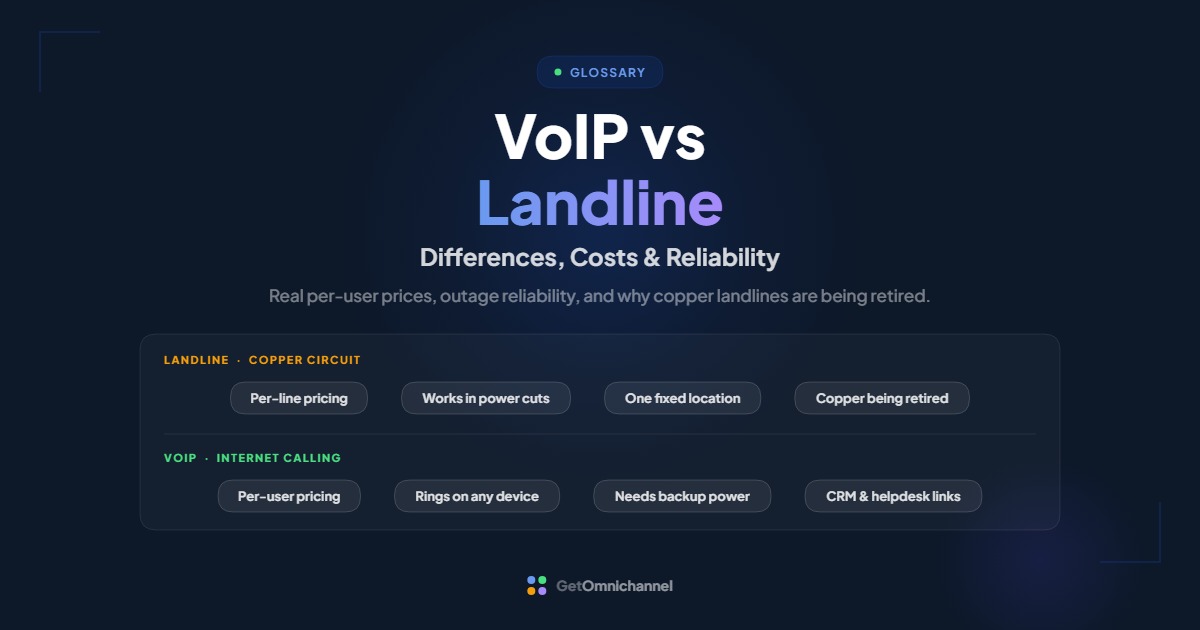
The main difference between VoIP and a landline is how your voice travels. A landline carries calls over a dedicated copper phone circuit, while VoIP sends calls as data over your internet connection. For most businesses, VoIP costs less per line and does more, but it depends on internet and power, so it needs a backup plan that a copper line never did.
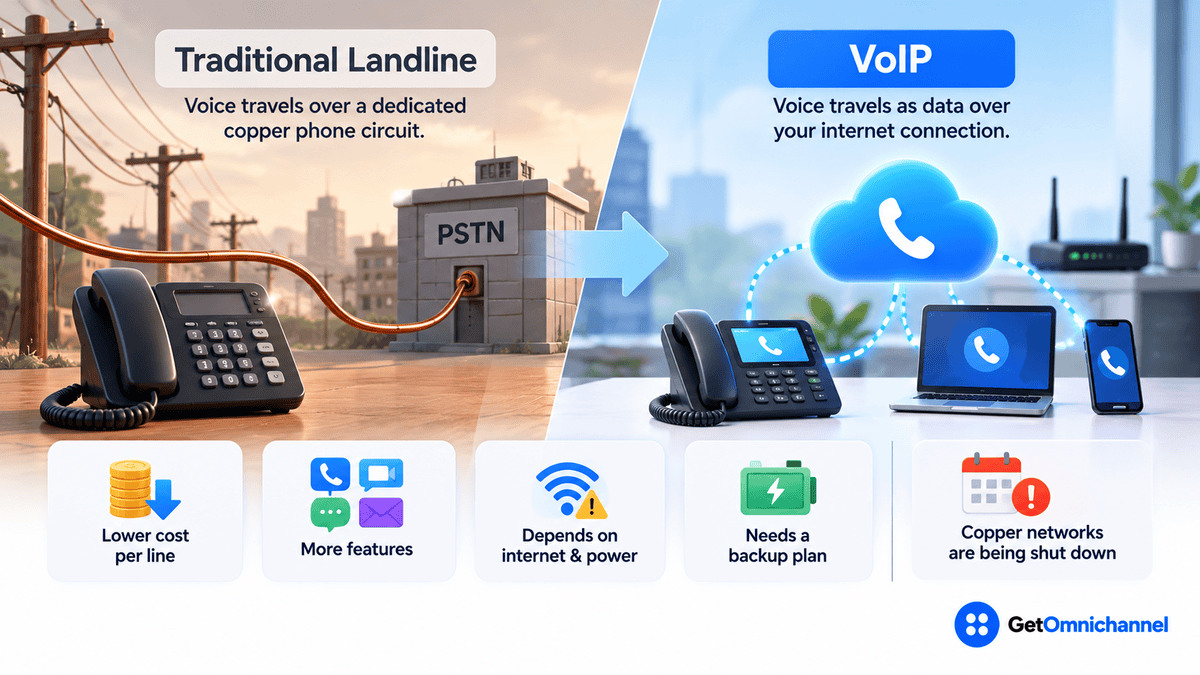
There’s also a deadline most comparisons leave out: the copper networks behind traditional landlines are being shut down. So the real question for many businesses isn’t whether to move off copper, but when, and what to check first. This guide covers the differences, the cost math, reliability in outages, and the lines (alarms, fax, elevators) that need special care when you switch.
VoIP beats landlines on cost and features. Add battery backup and mobile failover, and move alarm or fax lines last.
Compare VoIP providers →VoIP vs landline at a glance
| Traditional landline | VoIP | |
|---|---|---|
| How calls travel | Dedicated copper circuit on the public phone network | Data packets over your internet connection |
| Typical pricing | Per line, plus long-distance, features, and fees | Per user, usually with calling and features bundled |
| Power outage | Copper lines have historically carried their own power | Down unless modem, router, and phones have backup power |
| Internet outage | Unaffected | Desk phones go down; calls can forward to mobile apps |
| Works away from the office | No, the number lives on one physical line | Yes, on any laptop or phone with the app |
| Adding a line | Order, wiring, technician visit | Add a user in an admin dashboard |
| Features | Basic calling; extras often cost more | Call routing, voicemail-to-email, recording, CRM and helpdesk integrations |
| Future availability | Copper service being retired by major carriers | The direction the industry is moving |
Short answer: VoIP is the better fit for most offices, remote teams, and anyone whose phone calls tie into sales or support. A landline (or a landline replacement service) still makes sense for a few single-purpose lines, like alarm panels or a backup phone at a site with unreliable internet, at least until your carrier retires copper in your area.
How VoIP and landlines work differently
A landline, sometimes called POTS (plain old telephone service), connects your phone to the carrier’s local office over a pair of copper wires. While you talk, that circuit is reserved for your call. The phone company also sends a small amount of power down the same wires, which is why a basic corded phone could keep working during a blackout.
VoIP (Voice over Internet Protocol) turns your voice into digital data, splits it into small packets, and sends them over the internet like any other data. Your phone number is tied to an account, not a wire, so it rings wherever you’re signed in: a desk phone, a laptop, or a mobile app. For the full step-by-step of what happens during a call, see our guide to what VoIP is and how it works.
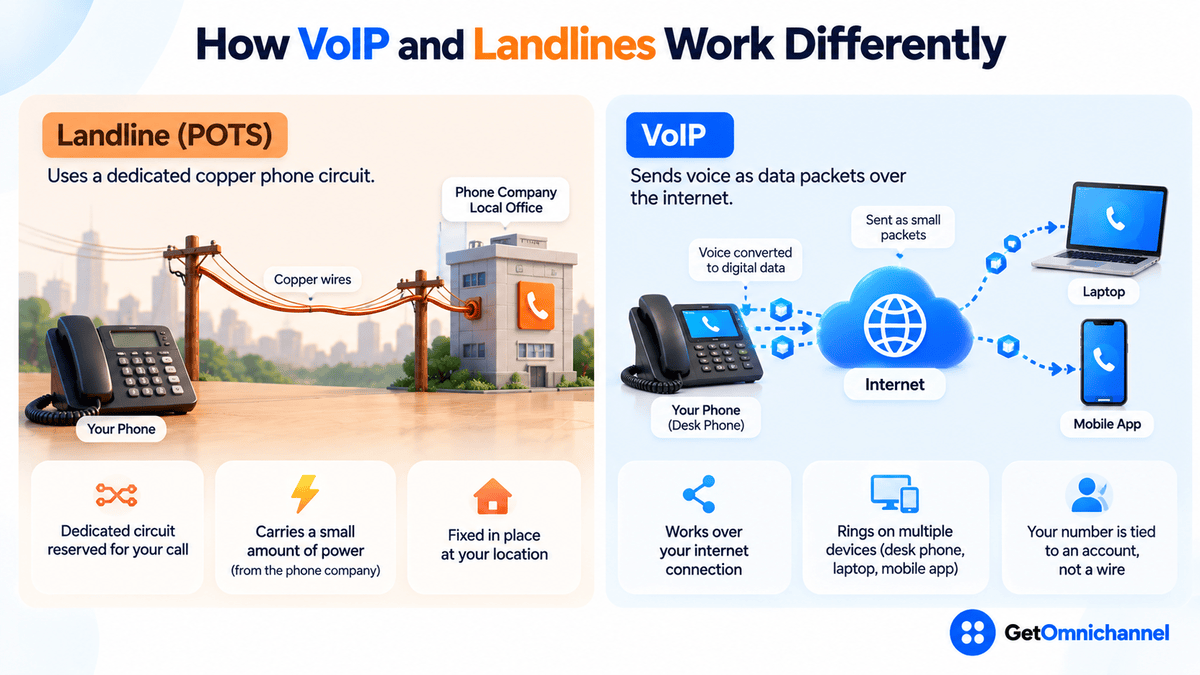
Those two design choices explain almost every difference that follows. A dedicated, self-powered circuit is simple and resilient but fixed in place and expensive to maintain. A data connection is flexible and cheap to scale, but it inherits every weakness of your internet and power supply.
VoIP vs landline costs
Comparing prices is harder than it looks, because the two bills are built differently. A landline bill charges per line and adds charges for long distance, features, and regulatory fees. A VoIP plan charges per user and usually bundles calling and features into one price.
What business VoIP actually costs
- Ooma Office: Essentials $19.95, Pro $24.95, and Pro Plus $29.95 per user per month, with no contract. Source: Ooma Office, checked October 2026.
- Nextiva: Core $15 and Engage $25 per user per month, shown against $23 and $50 respectively, with annual pricing available to small businesses with 1–100 employees. Source: Nextiva pricing, checked October 2026.
Landline pricing is harder to pin down: it varies by carrier, state, number of lines, and contract term, and copper tariffs are changing as carriers retire the network. The only reliable number is the one on your bill, so the worksheet below uses that.
| Cost item | Landline | VoIP |
|---|---|---|
| Monthly service | Per-line charge × number of lines | Per-user price × number of users |
| Calling charges | Long distance and per-minute charges, if any | Usually included for domestic calls; check international rates |
| Features | Voicemail, call forwarding, hunt groups, often priced separately | Usually bundled; advanced features may need a higher tier |
| Taxes and fees | Line charges, surcharges, and taxes on the bill | Also taxed; ask for a quote with taxes included |
| Equipment | Existing phones and on-site phone system | Desk phones or headsets (optional with softphone apps), adapters for analog devices |
| Internet | Not needed for calls | May need a faster plan or a backup connection |
| Changes and moves | Technician visits for new lines or office moves | Self-service in the admin dashboard |
Worked example: an 8-person office
- On Ooma Office Essentials: 8 × $19.95 = $159.60 per month, or $1,915.20 per year before taxes.
- On Nextiva Core at $15: 8 × $15 = $120 per month, or $1,440 per year before taxes.
- Your landline side: add up the last 12 months of phone bills, including every fee and long-distance charge, and divide by 12. That's the number to compare, not the advertised per-line price.
Switching pays for itself in year one if (your landline cost per line − VoIP cost per user) × 12 × number of lines is larger than your one-time switching costs (new phones, adapters, router, setup). If it isn't, keep your existing phones and use softphone apps to cut the one-time cost.
Plan prices change often. Our best VoIP providers guide lists current plans with the date each price was checked.
Is VoIP as reliable as a landline?
It depends on which kind of failure you’re worried about. The two technologies fail in different ways, so “reliability” is really three separate questions.
- Call quality on a normal day. On a stable business connection, VoIP calls sound as clear as a landline, and wideband codecs can sound clearer. When VoIP sounds bad, the cause is usually the local network: a saturated upload link, weak Wi-Fi, or a router setting. Our VoIP explainer has a symptom-by-symptom troubleshooting table.
- Power outages. A copper landline gets its power from the phone company, so a basic corded phone has traditionally kept working in a blackout. VoIP needs your modem, router, network switch, and desk phones to have power. A battery backup (UPS) on that equipment, or phones with charged batteries running the mobile app, closes most of the gap. For homes, FCC rules require providers of non-line-powered fixed voice service to offer subscribers backup power options (FCC 15-98, 2015).
- Internet outages. A landline doesn’t care if the internet is down. VoIP does, but a cloud phone system keeps answering calls in the provider’s data center, so you can set rules to forward calls to mobile phones or send them to voicemail until the connection returns. A second internet connection, such as a cellular backup, removes most of the risk.
What to ask a VoIP provider: Is there an uptime commitment in the contract, and what credit do you get if it’s missed? What happens to incoming calls if our office internet goes down? Can calls fail over to mobile apps automatically? Uptime percentages on marketing pages are claims; the service-level agreement in your contract is what counts.
Landlines are being phased out
This is the biggest change since most VoIP vs landline articles were written. The copper networks behind traditional landlines are expensive to maintain, and carriers are actively retiring them:
- AT&T told investors in December 2024 that it plans to essentially retire its copper network by 2029. It said it spends about $6 billion a year maintaining copper, and that only about 5% of customers still use copper voice service. Source: Telecompetitor, December 4, 2024.
- The FCC adopted an order on March 26, 2026 (FCC 26-19) to let providers retire copper networks faster. It grants blanket authority to grandfather legacy voice services, says state or local rules that require keeping legacy networks after FCC approval may be preempted, and states it is keeping safeguards for 911 service. Source: FCC news release, March 26, 2026.
What this means for you: if you still have copper lines, expect a notice from your carrier at some point offering a replacement service. Carriers’ replacements are usually IP-based themselves. AT&T’s Phone-Advanced, for example, moves customers onto fiber or its fixed wireless service while letting them keep existing landline devices such as phones, fax machines, and alarm systems (Telecompetitor). In other words, many “landlines” are quietly becoming VoIP anyway. Moving on your own schedule gives you time to test, compare providers, and avoid a rushed cutover.
Alarm, fax, and other lines that need care
The office phones are the easy part. The lines that cause problems during a switch are the ones nobody thinks of as “phones.” Before you cancel a single copper line, list everything plugged into one:
- Alarm and security panels often dial a monitoring center over a phone line. Ask your alarm company whether your panel works over VoIP or needs a cellular or IP communicator instead, and test a signal after the switch.
- Fax machines can work over VoIP through an analog telephone adapter, and some providers advertise fax support (Ooma, for example, lists analog fax support). Fax is sensitive to audio compression, so send test pages before relying on it, or move to an online fax service.
- Elevator emergency phones, fire panels, and gate or door entry systems may be subject to safety codes or inspections. Check with the equipment vendor and your building manager before changing the line.
- Card terminals and older equipment with built-in modems may not work reliably over VoIP. Most modern payment terminals use the internet or cellular instead.
A practical rule: switch the office phones first, and move special-purpose lines one at a time, each with its own test. Keeping one inexpensive line for an alarm panel for a few months is cheaper than a failed alarm signal.
911 on VoIP vs landline
With a landline, 911 dispatchers get the address tied to the physical line. With VoIP, your number can be used anywhere, so the location has to be registered and kept current. US rules address this: Kari’s Law requires direct 911 dialing (no “9” first) on multi-line systems, and RAY BAUM’S Act led the FCC to require a dispatchable location, such as a street address plus floor or room, with 911 calls (911.gov fact sheet).
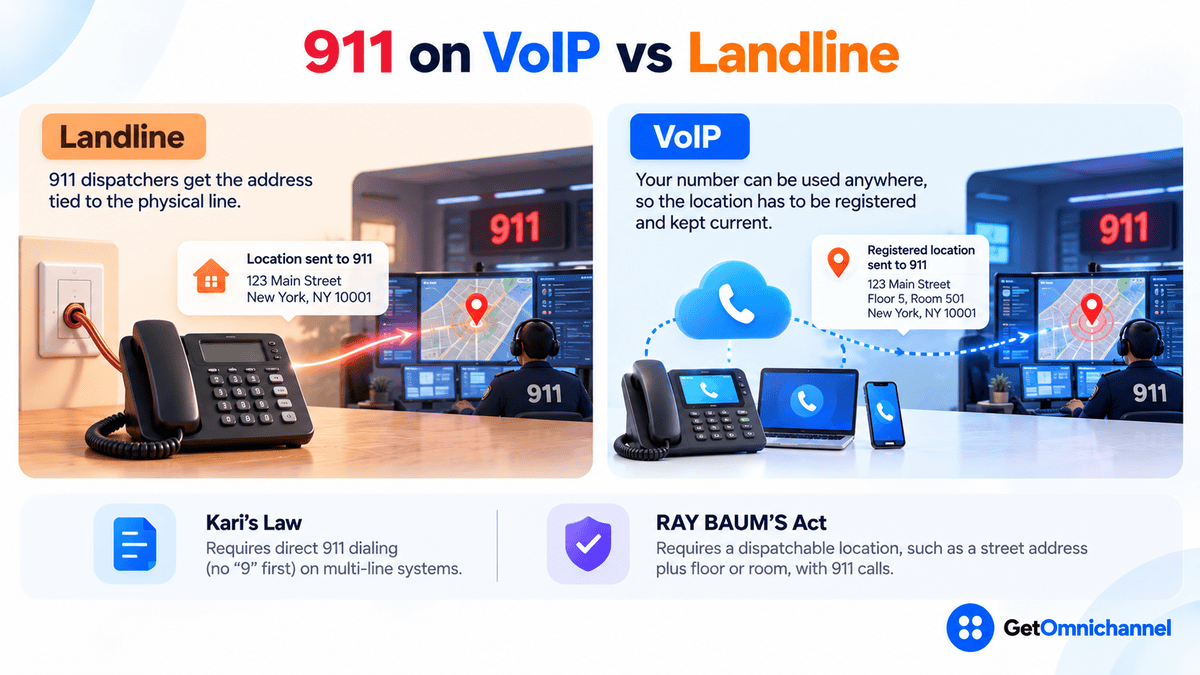
What to do: register an emergency address for every user and desk phone during setup, and make someone responsible for updating it when people move desks or work from home. Our VoIP guide covers how 911 works on VoIP in more detail.
Features: what you gain by switching
- One number that rings on desk phone, laptop, and mobile
- Auto-attendant menus and call routing rules
- Voicemail transcribed and sent to email
- Call recording and call reports
- Integrations with CRM and helpdesk software
- Add or remove users in minutes
- Works without internet
- Traditionally works in a power cut with a corded phone
- Fixed 911 address with no setup
- Simple for single-purpose lines
- No router or network settings to manage
For customer-facing teams, integrations are often the deciding factor. When calls log automatically to the same customer record as emails and chats, agents see the whole history, which is the idea behind omnichannel communication. A landline can’t do that on its own.
Which is better for your business?
| Your situation | Best fit | Why |
|---|---|---|
| Office with reliable broadband | VoIP | Lower per-user cost and more features |
| Remote or hybrid team | VoIP | Same business number on any device |
| Sales or support team | VoIP or a call center platform | Routing, recording, and CRM or helpdesk integration |
| Site with poor or no internet | Landline (or cellular) for now | VoIP needs a stable connection |
| Alarm, elevator, or fax lines | Hybrid, then migrate carefully | Test each device before cutting copper |
| Already received a copper retirement notice | Plan the move now | Choose your replacement before a deadline chooses for you |
If phones are a core support channel with queues and agents, look past basic VoIP to the best call center software, which adds queues, IVR, and agent reporting.
How to switch from landline to VoIP
Inventory every line
List each number on your bill and what it's used for: people, fax, alarm, elevator, card terminal. Many businesses find lines they're paying for but no longer use.
Run the cost worksheet
Use 12 months of real bills and the break-even rule above, including one-time costs for phones and adapters.
Check your internet and power
Test latency, jitter, and packet loss during your busiest hour, enable quality-of-service on the router, and put the modem, router, and network switch on a battery backup.
Port your numbers
Most providers can port existing numbers. Keep the old service active until the port completes, and test inbound calls before cancelling anything.
Register 911 addresses and set failover
Enter a dispatchable address for every user and phone, and set calls to forward to mobile apps if the office internet goes down.
Move special lines last, one at a time
Switch alarm, fax, and other device lines individually, test each one, and only then cancel the copper line.
How this guide was made
Researched and written by Kinjal Trivedi, SaaS & Technology Writer at GetOmnichannel. This guide compares technologies in general and does not rank or score specific providers. VoIP prices are taken from Ooma's and Nextiva's own pricing pages (checked October 2026) and are shown as examples only. Copper retirement details come from the FCC's March 2026 news release and Telecompetitor's report on AT&T's investor update, and 911 and backup power rules from the FCC and 911.gov documents linked at each claim. The 8-person office is an illustrative calculation, not a customer.
For most businesses, VoIP costs less per user and does far more than a landline. Its weak points, power and internet, are fixable with a battery backup and mobile failover. With copper being retired, the smart move is to switch on your own schedule: office phones first, special-purpose lines last, each one tested.
Frequently asked questions
Conclusion: switch on your schedule, not your carrier’s
Landlines are simple and self-powered, which is why they lasted so long. VoIP is cheaper to run, works from anywhere, and connects calls to the rest of your business software. Its dependence on internet and power is real but fixable. With copper networks being retired, most businesses will end up on internet-based calling either way. Choosing the provider and the timing yourself is the difference between a planned upgrade and a rushed one.
Next step: Compare current plans in our guide to the best VoIP providers, or start with the basics in what is VoIP and how does it work.
 Your information is encrypted and kept secure.