

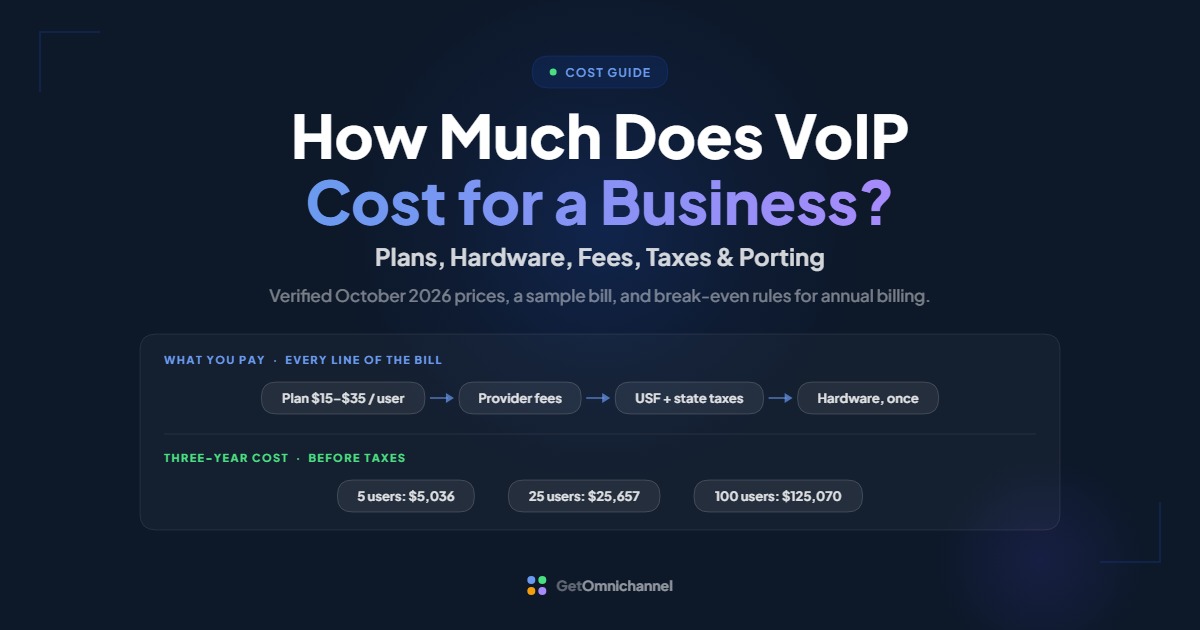
Most business VoIP plans cost $15 to $35 per user per month on annual billing, before fees and taxes. Monthly billing costs more, up to $50 per user on some plans. Provider fees, 911 charges, and taxes come on top, plus a one-time hardware cost that ranges from nothing (using the included apps) to about $210 per desk phone.
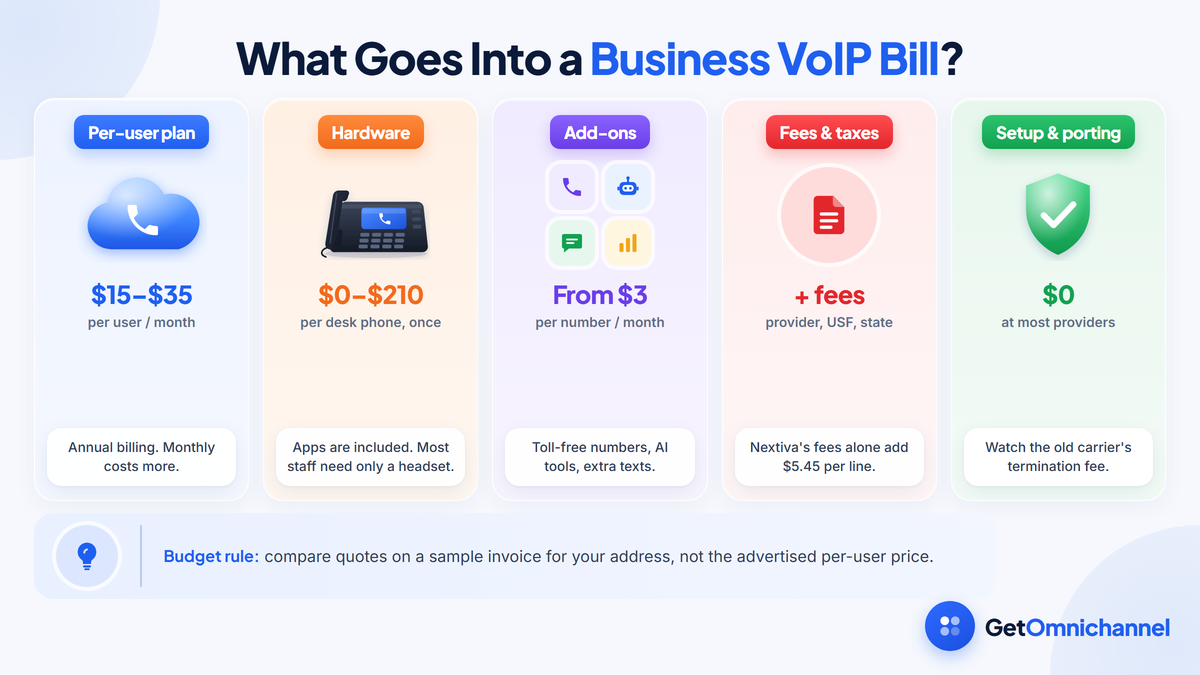
This guide is a budget planner, not a ranking. It breaks a VoIP bill into its parts, prices each one with figures published by providers and retailers (checked October 2026), and works out first-year and three-year costs for a 5-, 25-, and 100-person business. If you want providers ranked, see our best VoIP providers guide.
List prices start around $15 per user. Fees, hardware, and add-ons decide what you actually pay, so compare quotes after taxes.
Compare VoIP providers →VoIP costs at a glance
| Cost | Paid | Typical range | Notes |
|---|---|---|---|
| Per-user plan | Monthly | $15 to $35 per user (annual billing) | Monthly billing: $18 to $50 per user |
| Provider fees | Monthly | Example: $5.45 per line at Nextiva | Regulatory recovery and 911 service fees vary by provider |
| Federal USF and state taxes | Monthly | Depends on your address and the quarter | Q4 2026 federal USF factor: 42.0% of the interstate telecom portion |
| Add-ons | Monthly | $3 per toll-free number to $60 or more for AI analytics | Only what each team uses |
| Phones and headsets | One-time | $0 (apps) to $683 per device | Most staff need only a headset |
| Activation | One-time | $0 at most providers; $29.95 at Ooma | Ask for it to be waived |
| Number porting | One-time | Free at RingCentral, Ooma, and Dialpad (US and Canada) | The old carrier may charge a termination fee |
| International calls | Per minute | $0.01 to $0.63 per minute | Mobile numbers cost far more than landlines |
Sources for every figure are linked in the sections below. Prices change often, so treat this as a starting budget and confirm with a written quote.
How much does VoIP cost per user?
Entry plans from the major providers list at $15 to $20 per user per month when billed annually. Higher tiers run about $20 to $35, and Nextiva’s top Scale plan is $75. These prices usually include unlimited US and Canada calling, a phone number for each user, and desktop and mobile apps.
| Provider | Entry plan | Middle plan | Top plan |
|---|---|---|---|
| Nextiva | Core: $15 / $23 | Engage: $25 / $50 | Scale: $75 |
| Dialpad | Standard: $15 / $27 | Pro: $25 / $35 | Enterprise: quote |
| Zoom Phone | US & CA Unlimited: $16 / $18 | Pro Plus: $20.50 / $24 | Business Plus: $24.50 / $29 |
| RingCentral (RingEX) | Core: $20 annual | Advanced: $25 annual | Ultra: $35 annual |
| Ooma Office | Essentials: $19.95 | Pro: $24.95 | Pro Plus: $29.95 |
Sources: Nextiva pricing, Dialpad plan information, Zoom Phone pricing, Ooma Office plans, all checked October 2026. Zoom’s prices include a Zoom Workplace tier. RingCentral’s annual prices are from RingCentral’s own published plan comparison (updated September 2025); its pricing page says annual billing saves up to 33% but did not display monthly prices when we checked. Ooma Office has no contract, so it has one price.
What the higher tiers actually buy
The step up from an entry plan is rarely about calling, which is unlimited within the US and Canada on all of these plans. It buys capacity and features:
- Business texting. Nextiva Core includes 100 SMS per user per month; Engage includes 500.
- Toll-free minutes. Nextiva Core includes none; Engage includes up to 2,000 and Scale up to 10,000.
- Call recording. Automatic recording starts on Dialpad Pro and Ooma Pro. Zoom Phone includes recording on every plan.
- AI features. Ooma’s AI transcription is on Pro Plus, and Nextiva includes AI transcription and summaries on Scale.
Start every user on the entry plan, then move up only the teams that need recording, a toll-free line with included minutes, or high texting volume. Paying the middle-tier price for everyone is the most common way small businesses overspend on VoIP.
Not every plan is priced per user
- Flat price per account. Grasshopper’s Solo Plus plan is $25 a month billed annually, or $32 monthly, for unlimited users sharing one number and three extensions (Grasshopper). It suits very small teams that mainly need a business number on their own phones.
- Contact center seats are priced per agent and cost more. Nextiva’s Contact Center Essential plan starts at $75 per agent per month.
- Promotions such as Nextiva’s “up to 12 months free” for switchers lower the first year only. Budget years two and three at the full price.
Annual vs monthly billing: when does the discount pay off?
Annual billing is cheaper per month, but it commits you to each seat for 12 months. On Nextiva Core, annual billing costs $15 per user against $23 monthly, saving $96 per user per year. Annual billing only wins for a seat you’ll keep long enough to use the savings.
| Plan | Annual | Monthly | Saving per user per year | Annual is cheaper if the seat lasts |
|---|---|---|---|---|
| Nextiva Core | $15 | $23 | $96 | 7.8 months or more |
| Nextiva Engage | $25 | $50 | $300 | 6.0 months or more |
| Dialpad Standard | $15 | $27 | $144 | 6.7 months or more |
| Dialpad Pro | $25 | $35 | $120 | 8.6 months or more |
| Zoom Phone US & CA Unlimited | $16 | $18 | $24 | 10.7 months or more |
12 × the annual price ÷ the monthly price = the number of months a seat must stay filled for annual billing to be cheaper. Put permanent staff on annual seats. Keep seasonal, contract, or uncertain seats on monthly billing if your provider lets you mix the two; ask before you sign.
Also check the terms that come with the discount. Nextiva’s annual prices, for example, apply to businesses with 1 to 100 employees that sign a paid 12-month or longer term agreement.
How much do VoIP phones and hardware cost?
You may not need to buy any phones. Every provider above includes desktop and mobile apps, so a USB headset at about $58 to $218 is enough for most desk workers. Desk phones cost about $36 to $210, a cordless DECT system about $185, and conference phones about $420 to $680.
| Device | Example models and prices | Best for |
|---|---|---|
| Softphone app | Included with the plan | Laptop and mobile users |
| USB headset | Poly Blackwire 3220: $57.95; Jabra Evolve2 30 SE: $91; Jabra Evolve2 40 SE: $203 to $218 | Anyone on calls from a laptop |
| Entry desk phone | Grandstream GRP2602P: $35.99; Yealink T33G: $84 to $95 | Reception, shared desks |
| Mid-range desk phone | Grandstream GRP2615: $125.99; Poly Edge E220: $143 to $150; Poly Edge E350: $208 | Heavy callers who want more line keys |
| Cordless (DECT) | Yealink W73P system: $185 | Warehouses, shop floors, clinics |
| Conference phone | Yealink CP925: $417; Poly Trio C60: $683 | Meeting rooms |
| Analog adapter (ATA) | Grandstream HT801: $34.99; HT802: $38.99 | Fax machines, door entry, alarm lines |
Sources: Headset Advisor, Ultatel, IP Phone Warehouse, and AVI-SPL. Retail prices change often, and sale prices are shown where the retailer listed one.
Buy or rent?
Some providers rent phones by the month. To compare, divide the purchase price by the monthly rental: that’s how many months it takes for buying to win. For example, at a rental of $5 a month, buying a $95 Yealink T33G pays off after 19 months. Ask your provider for its actual rental rate, and check whether it runs free-phone promotions; Ooma, for example, was advertising free IP phones in October 2026.
Desk phones also need network ports and power. Many run on Power over Ethernet (PoE), so check whether your switch supplies it before you budget for power adapters or a new switch. Our guide to VoIP internet speed requirements covers the network side.
Which VoIP add-ons cost extra?
Add-ons are where quotes grow. The common paid extras are additional and toll-free numbers, toll-free minutes, AI receptionists and call analytics, call queue upgrades, and fax. Buy them for the specific team that needs them, not for every seat.
| Add-on | Example price | Provider |
|---|---|---|
| Extra local number | $9 per month | Grasshopper |
| Extra extension | $3 per month | Grasshopper |
| Toll-free number | $3 per number, plus $0.025 per inbound minute | Nextiva default usage rates |
| Toll-free number with minutes | First number free with 500 inbound minutes a month; $15.99 a month adds 1,000 minutes; 2.9¢ per minute after that; extra numbers $9.95 a month | Ooma |
| AI receptionist | Starts at $39 | RingCentral |
| Conversation intelligence | Starts at $60 | RingCentral |
| Call queue upgrade | $35 | RingCentral (Call Queues Booster) |
| Extra business texting | $25 | RingCentral (Business SMS Booster) |
| Activation | $29.95 one-time | Ooma Office |
Sources: Grasshopper, Nextiva usage rates, Ooma toll-free numbers, RingCentral pricing, and Ooma Office plans. Several providers list AI and fax add-ons as “contact sales” with no public price.
Ask for every add-on price in writing, with the billing unit: per user, per number, per minute, or per account. An add-on quoted "from $25" can mean $25 for the whole company or $25 for each seat.
VoIP taxes and fees: what they add to your bill
Expect three layers on top of the plan price: provider fees (such as regulatory recovery and 911 service fees), the federal Universal Service Fund (USF) charge, and state and local taxes and 911 fees. On a cheap plan, these can add a third or more, so always compare quotes after taxes.
Provider fees
Providers add their own monthly fees, and these are not government taxes. Nextiva’s billing guide lists a Regulatory Recovery Fee of $3.95 per line ($0.99 per virtual number) and says it “is not a tax or charge assessed by any governmental agency.” It lists an E911 fee of $1.50 per line. RingCentral describes its own E911 fee as “not a government-mandated charge.”
The effect is biggest on the cheapest plans. Nextiva’s two fees add $5.45 per line: 36% on top of its $15 Core plan, and 27% on top of a $20 plan.
The federal Universal Service Fund charge
The FCC sets the USF contribution factor every quarter. For the fourth quarter of 2026 it proposed 42.0% (FCC Public Notice DA 26-946). The factor applies only to the interstate and international part of your telecom charges, and providers may not charge a USF line above 42.0% of those interstate charges.
For interconnected VoIP, the FCC’s safe harbor treats 64.9% of telecom revenue as interstate (USAC 2026 guidance). So for every $10 of VoIP telecom charges assessed that way, the USF line can be up to about $2.73 (10 × 0.649 × 0.42). How much of a plan a provider counts as telecom revenue varies, which is one reason USF lines differ between providers, and the factor changes every quarter.
State and local taxes and 911 fees
These depend on your service address. Dialpad says its taxes and fees “are based on your company’s billing address” (Dialpad), and Nextiva notes that “states and local municipalities often charge their own USF and E911 fees.” We found no reliable national percentage for VoIP. For scale only: the Tax Foundation found taxes and fees make up 28.8% of the average US wireless bill in 2026. That’s mobile service, not VoIP, but it shows how large these layers can be.
| Line item | Calculation | Amount |
|---|---|---|
| Plan | 10 × $15 | $150.00 |
| Regulatory Recovery Fee | 10 × $3.95 | $39.50 |
| E911 fee | 10 × $1.50 | $15.00 |
| Subtotal before USF and taxes | $204.50 ($20.45 per user) | |
| Federal USF | Up to 42.0% of the interstate telecom portion | Varies by quarter |
| State and local taxes and 911 fees | Based on your address | Varies by location |
Before you sign, ask each provider for a sample invoice for your address with every tax and fee shown. Compare that total, not the advertised per-user price.
Does number porting cost money?
Usually not with the new provider. RingCentral, Ooma, and Dialpad say they port US and Canadian numbers for free, and Zoom advertises porting with “no hidden fees.” The costs that bite come from the old carrier: early termination fees, a final balance, and paying for both services while the port completes.
| Provider | Porting fee (US and Canada) | Typical time |
|---|---|---|
| RingCentral | Covered by RingCentral | Not stated |
| Ooma Office | Free | 3 to 4 weeks |
| Dialpad | Free for local and toll-free numbers; international ports cost extra | 3 to 7 business days (local), 5 to 10 (toll-free) |
| Nextiva | Not stated on its porting page | 5 to 10 business days |
| Zoom Phone | "No hidden fees" | 4 to 21 days (standard ports) |
Sources: RingCentral, Ooma, Dialpad, Nextiva, and Zoom.
Your rights are on your side. The FCC’s consumer guide says your old company “cannot refuse to port your number, even if you owe money for an outstanding balance or termination fee”, although you still owe that money. FCC rules require simple ports, including ports to interconnected VoIP, to complete within one business day (47 CFR 52.35). Providers quote longer because the paperwork has to match first.
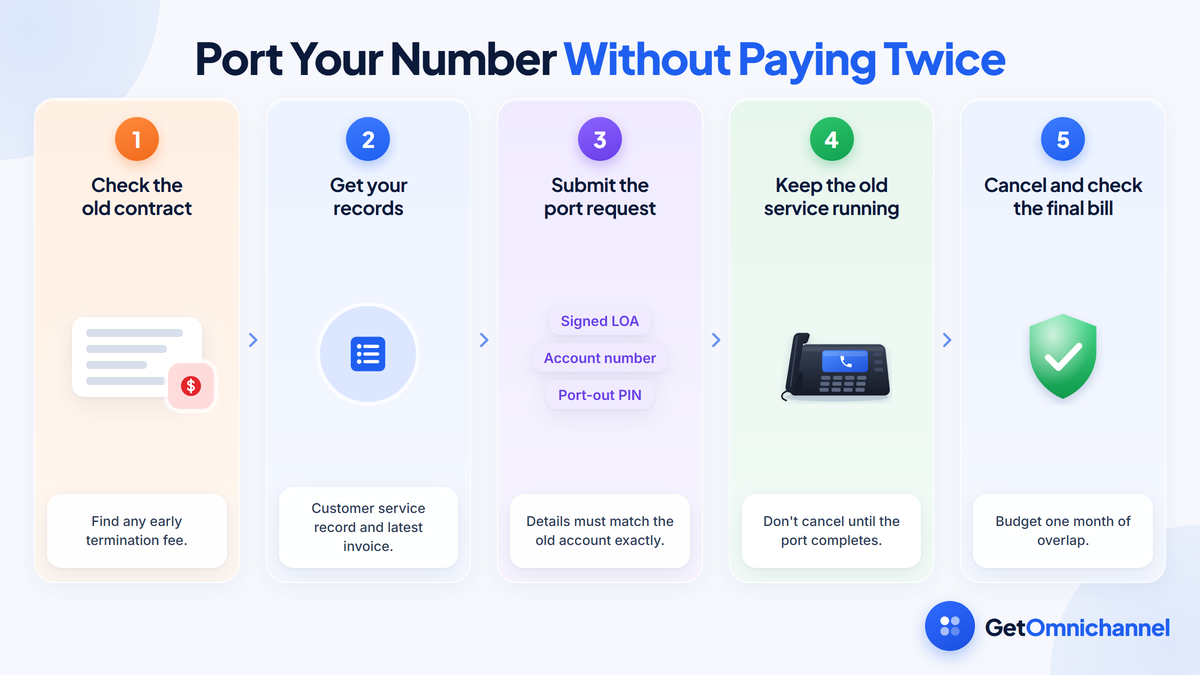
How to port without paying twice
Check the old contract
Look for an early termination fee and the notice period. If the fee is large, it may be cheaper to time the switch for the contract end date.
Get your records
Ask the old carrier for a customer service record (CSR) and keep your latest invoice. The name, address, and account number on the port request must match them exactly.
Submit the port request
Give the new provider a signed letter of authorization (LOA), your account number, and a port-out PIN if the carrier uses one.
Keep the old service running
Don't cancel anything until the port is complete. The FCC's guide warns not to terminate service before the new one is set up, or you can lose the number.
Cancel and check the final bill
Once calls ring on the new system, cancel the old account and confirm the final bill. Budget one month of overlap on the old service.
How much do international calls cost on VoIP?
Most US plans include unlimited calling to the US and Canada only, and charge other countries per minute. Landlines in Western Europe can cost 1 to 3 cents a minute, but mobile numbers in the same countries can cost 40 to 60 cents a minute at some providers.
| Destination | Nextiva | Dialpad (rate after its add-on allowance) |
|---|---|---|
| United Kingdom | $0.01 / $0.42 to $0.58 | $0.03 / $0.09 |
| Germany | $0.02 / $0.54 to $0.63 | $0.03 / not listed |
| India | $0.09 / $0.09 | $0.05 / not listed |
| Mexico | $0.16 / $0.45 | $0.08 / $0.09 |
| Philippines | $0.18 / $0.22 to $0.25 | Not listed |
Sources: Nextiva international rates and Dialpad Global Unlimited add-on. Dialpad’s add-on includes 8,000 international minutes per license per month to 65 countries; its price is quoted on request. Ooma Office includes calls to Canada, Mexico, and Puerto Rico at no extra charge.
Monthly cost = minutes × rate, worked out separately for landlines and mobiles in each country. Example: 500 minutes a month to UK mobiles costs $210 at Nextiva's $0.42 rate and $45 at Dialpad's $0.09 rate; the same minutes to UK landlines cost $5 at Nextiva. If one country takes more than a few hundred mobile minutes a month, price an international bundle.
Total cost of ownership: three worked examples
The examples below use the published prices in this guide. They show how the costs add up over the first year and over three years. Use the assumptions to swap in your own quote.
- Plan price: $20 per user per month on annual billing for the 5- and 25-person examples, and $25 for the 100-person company, which needs call recording. Both sit inside the published range above.
- Provider fees: $5.45 per line per month, using Nextiva's published Regulatory Recovery and E911 fees as the example.
- Hardware: retail prices from the hardware table, bought once in year one.
- Not included: the federal USF charge and state and local taxes, which depend on your address; porting and activation, which are $0 at most providers; and network upgrades and staff time.
| Business | Hardware (one-time) | Monthly plan and fees | Year 1 | 3 years | Per user per month (3 years) |
|---|---|---|---|---|---|
| 5 people on softphones, 5 Jabra Evolve2 30 SE headsets | $455 | $127.25 | $1,982 | $5,036 | $27.98 |
| 25 people: 15 Yealink T33G phones, 10 headsets, 1 Yealink CP925 | $2,752 | $636.25 | $10,387 | $25,657 | $28.51 |
| 100 people: 60 Poly Edge E220 phones, 40 headsets, 4 Poly Trio C60, 2 ATAs | $15,450 | $3,045.00 | $51,990 | $125,070 | $34.74 |
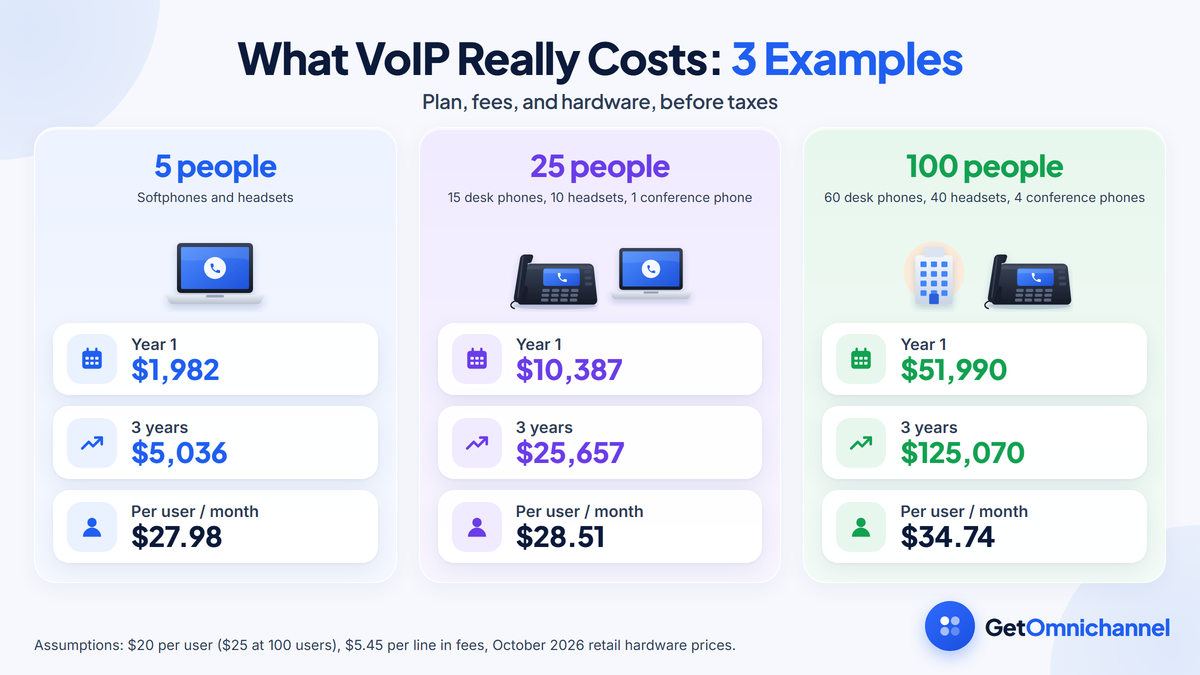
Three patterns stand out. Year one costs the most because it includes all the hardware; after that, the bill is the plan plus fees. Fees add up faster than people expect: over three years, the 5-person office pays $981 in provider fees, more than twice the $455 it spent on headsets, and the 100-person company pays $19,620 in fees, more than its $15,450 in hardware. Per user, the larger company costs more because it chose a higher tier and more desk and conference phones, not because VoIP gets more expensive at scale.
Hidden costs most VoIP quotes leave out
- Overlap with the old carrier. Budget at least one month of your old phone bill while numbers port.
- Early termination fees on the old contract, which the new provider usually won’t cover.
- Network upgrades. A router that supports quality of service (QoS), PoE switch ports for desk phones, or a backup internet connection. See our VoIP network guide.
- Setup time. Someone has to build call flows, hunt groups, voicemail, and business hours, and train staff. Even when the provider does onboarding, your team’s hours are a real cost.
- Price after the promotion. First-year discounts and free months end. Budget renewal years at the full list price.
- Texting setup. Business texting can carry its own setup fee and verification wait. CallHippo, for example, lists a $20 one-time setup fee for US and Canada texting and 2 to 4 weeks of verification. Ask before you rely on SMS.
- Contact center seats. Queues, wallboards, and agent analytics often need a separate per-agent license on top of the phone plan.
How to lower your VoIP bill
- Use annual billing for permanent seats only, using the break-even rule above.
- Default to softphones and headsets. Buy desk phones only for reception, shared desks, and people who prefer them.
- Mix tiers by team if your provider allows it, instead of buying the middle tier for everyone.
- Check the included allowances for toll-free minutes, texts, and international calling before buying add-ons.
- Ask for setup and activation fees to be waived, and for any promotion to be written into the contract.
- Compare quotes after taxes, using a sample invoice for your address.
VoIP budget worksheet
Fill in one column per quote. Ask each provider for the numbers it can’t show on its website.
| Line | Paid | How to work it out |
|---|---|---|
| Plan | Monthly | Users × price per user (annual or monthly) |
| Provider fees | Monthly | Users × fees per line, from the sample invoice |
| Federal USF and state taxes | Monthly | From the sample invoice for your address |
| Add-ons | Monthly | Each add-on × its billing unit |
| Toll-free and international usage | Monthly | Minutes × rate, by country and number type |
| Hardware | One-time | Devices × price (or rental × months) |
| Activation and porting | One-time | From the quote; usually $0 |
| Old carrier overlap and termination fee | One-time | One month of the old bill plus any fee |
| Network upgrades | One-time | Router, switch, or backup connection, if needed |
Year 1 = 12 × the monthly lines + all one-time lines. Each later year = 12 × the monthly lines.
How this guide was made
Researched and written by Kinjal Trivedi, SaaS & Technology Writer at GetOmnichannel. Plan prices, add-ons, fees, porting terms, and international rates come from each provider's own pricing, billing, and help pages; hardware prices from US retailers; and the USF factor and porting rules from the FCC, USAC, and the Code of Federal Regulations, all checked in October 2026. The break-even months, sample bill, international estimate, and three total-cost examples are our own calculations from those figures. This is a cost guide, not a ranking, and we did not test call quality.
Budget $15 to $35 per user per month for the plan, then add provider fees, the federal USF charge, and state taxes, which can add a third or more to the cheapest plans. Most staff need only a headset, porting is usually free, and annual billing pays off for seats you'll keep for more than about 7 to 11 months. Compare quotes on a sample invoice for your address, not on the advertised price.
Frequently asked questions
Conclusion: plan for the full bill
Business VoIP is affordable, but the advertised per-user price is only the first line of the bill. Add provider fees, the USF charge, and state taxes, decide who really needs a desk phone, and buy add-ons team by team. Use annual billing for permanent seats, keep the old line running until your numbers port, and compare every provider on a sample invoice for your address.
Next step: Once you have a budget, compare plans and features in our guide to the best VoIP providers.
 Your information is encrypted and kept secure.