

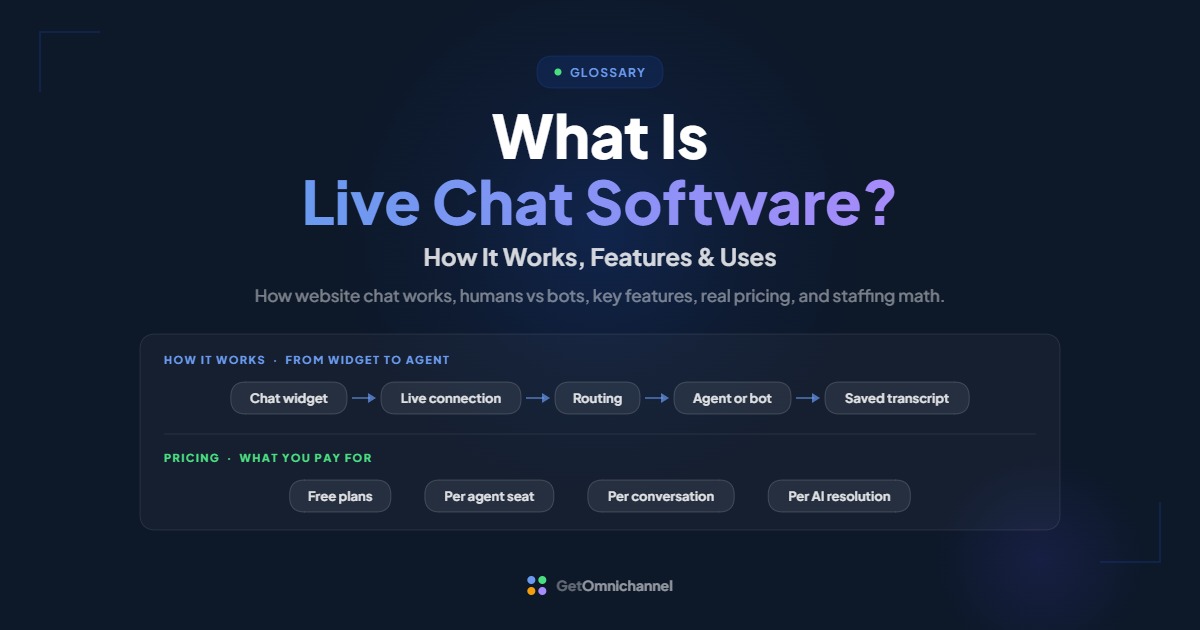
Live chat software is a tool that puts a chat window on a website or app so visitors can message a business in real time. Messages go to a shared agent workspace, where a person, a chatbot, or an AI agent replies within seconds, and the full conversation is saved for later.
This guide covers how website chat works behind the bubble, when a human should answer and when a bot should, the features worth paying for, real published prices (checked October 2026), and a simple way to work out how many agents you need. If you already know the basics and want tools ranked, see our best live chat software guide.
A chat widget promises a quick reply. Staff it for your busy hours, let a bot handle repeat questions, and hand everything else to a person.
Compare live chat tools →What is live chat software?
Live chat software has two halves. Visitors see a chat widget, usually a bubble in the bottom corner of a website, inside a mobile app, or on a help center. Your team sees an agent workspace, a web or desktop app where incoming chats arrive, get assigned, and get answered.
Between the two sits the vendor’s server, which passes messages back and forth, stores the history, and applies your rules: who gets which chat, what happens after hours, and when a bot steps in. That is why live chat is sold as software and not just a feature. The widget is the easy part. Routing, history, and reporting are what you are paying for.
The term overlaps with a few others. A chatbot is an automated responder that can run inside the same widget. A messaging platform also pulls in WhatsApp, Facebook Messenger, or SMS. A helpdesk centres on email tickets but often includes chat. Many products now do all three, so judge a tool by what it does, not by what it is called.
How does live chat software work?
A small piece of code loads the chat widget on your site and keeps an open connection to the vendor’s server. When a visitor sends a message, the server routes it to an available agent or bot, the reply comes back over the same connection, and the transcript is saved. Here is each step in order.
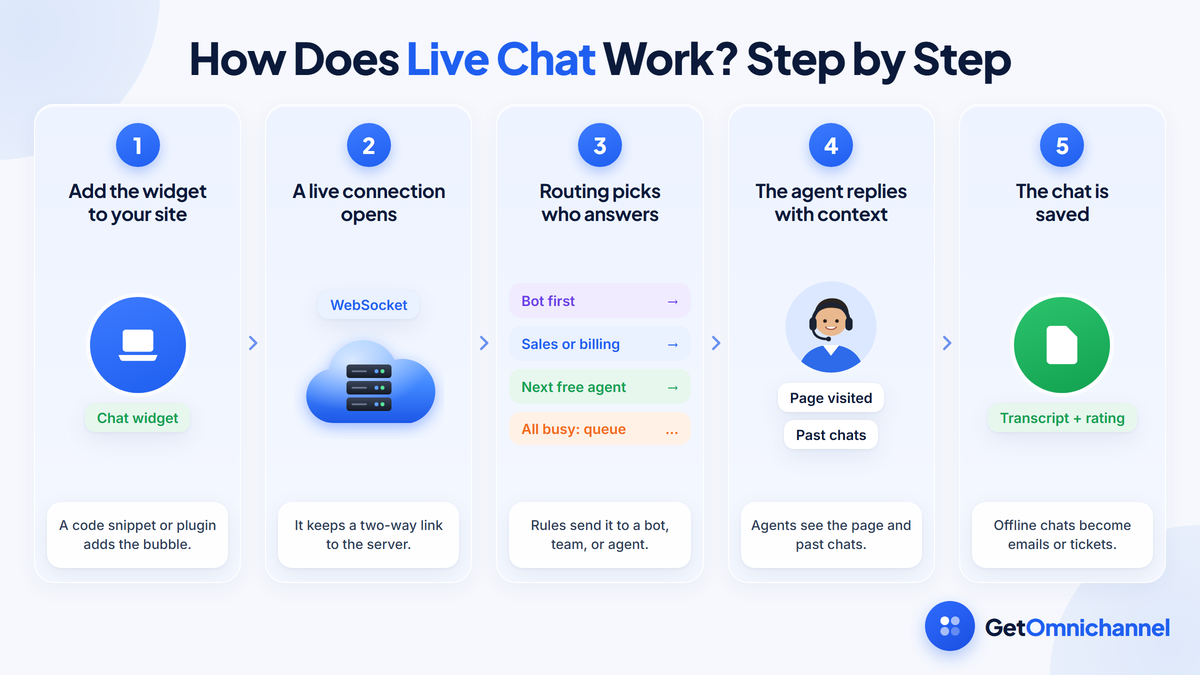
You add the widget to your site
Most tools give you a short JavaScript snippet to paste into your site's template, or a plugin for platforms such as WordPress or Shopify. You set the colors, greeting, and which pages show the bubble.
The widget opens a live connection
When a page loads, the widget connects to the vendor's servers. Many chat tools use WebSockets for this, a browser technology that opens "a two-way interactive communication session between the user's browser and a server" so messages arrive without the page asking over and over (MDN Web Docs). That is what makes replies and typing indicators appear instantly.
Routing picks who answers
Your rules decide where the chat goes: a bot first, a department such as sales or billing, or the next free agent. Each agent has a limit on how many chats they handle at once. In LiveChat, "when the chat limit is reached for all agents who are accepting chats at the time, new visitors will go into the queue" (LiveChat help center).
The agent replies with context
The agent workspace shows the conversation alongside useful context, such as the page the visitor is on, earlier chats, and saved replies. Some tools go further: LiveAgent's typing view lets agents "preview the text a customer is typing at the moment" (LiveAgent).
The chat closes and is saved
The transcript is stored, often with a satisfaction rating and tags for reporting. If nobody is online, the widget usually switches to an offline form that turns into an email or a helpdesk ticket, so the question isn't lost.
Show the chat bubble only where a quick answer changes what the visitor does next, such as pricing, checkout, and help pages. A widget on every page during hours you can't staff collects messages you'll answer too late.
Human agents vs chatbots vs AI agents
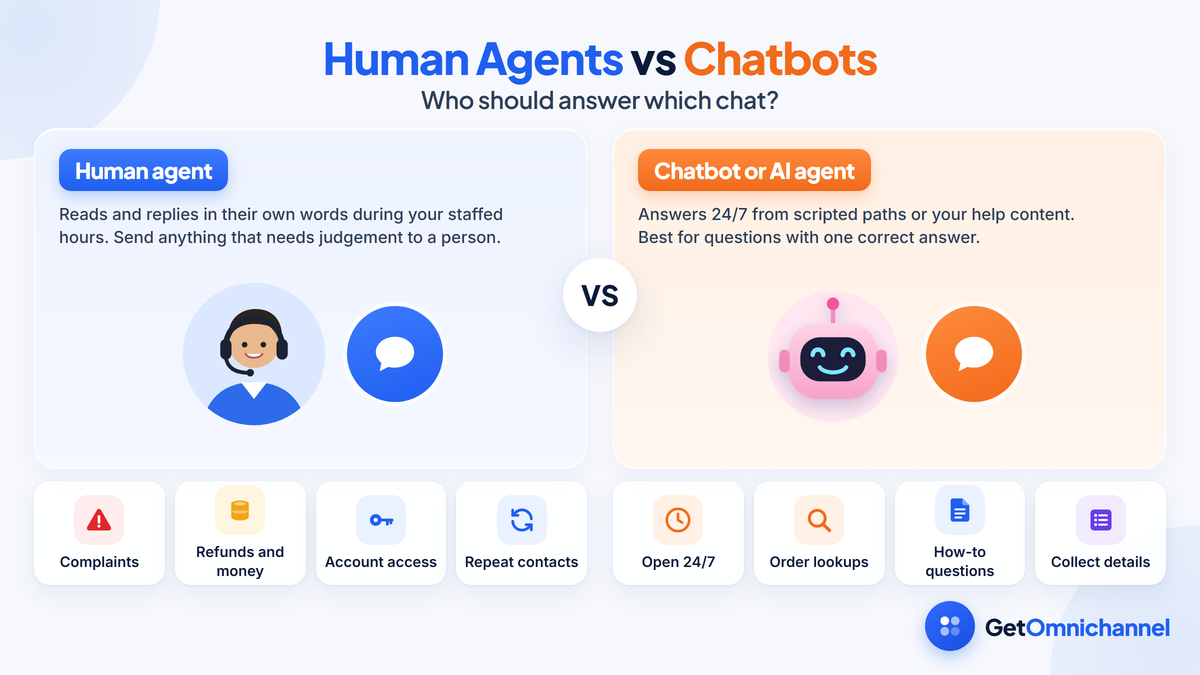
Human agents handle judgement, complaints, and anything involving money or account changes. Rule-based chatbots handle fixed paths, such as collecting an order number. AI agents answer open questions from your help content. Most teams combine them, with a clear handoff to a person.
| Human agent | Rule-based chatbot | AI agent | |
|---|---|---|---|
| How it answers | Reads and replies in their own words | Follows buttons and scripted paths you build | Writes answers from your help articles and data |
| Best for | Complaints, refunds, sales conversations, edge cases | Routing, collecting details, booking, order lookups | Common how-to and policy questions |
| Hours | Your staffed hours | 24/7 | 24/7 |
| Main risk | Slow replies when the team is busy | Dead ends when a question doesn't fit the script | Confident wrong answers if the help content is thin |
| Typical pricing | Per agent seat | Often included, or per conversation | Per conversation or per resolution |
The pricing row matters more than it looks. Intercom charges $0.99 per outcome for its Fin AI agent on top of seat prices, and LiveChat includes 10 AI resolutions a month on Essential and 200 on Growth (Intercom pricing, LiveChat pricing, checked October 2026). A bot that resolves more chats costs more under that model, so budget for success, not just for setup.
AI agents are improving quickly. Gartner predicts that by 2029, agentic AI will resolve 80% of common customer service issues without human intervention (Gartner, March 2025). That is a forecast, not a measured result. Today, the safer setup is narrower.
Let a bot answer questions that have one correct answer in your help content. Send anything about money, account access, a complaint, or a repeat contact to a person, and make "talk to a human" one tap away. A visitor who can't reach a person usually leaves.
Key features of live chat software
The core features are the widget, routing and queues, saved replies, chat history, offline messages, and reporting. Beyond those, the features worth paying for depend on whether you use chat mainly for sales, support, or both.
| Feature | What it does | Who needs it most |
|---|---|---|
| Customizable widget | Matches your brand, sets greetings, and chooses which pages show chat | Everyone |
| Routing and queues | Sends chats to the right team or agent and sets per-agent chat limits | Teams with more than two or three agents |
| Saved (canned) replies | Inserts prepared answers to common questions | Support teams with repeat questions |
| Chat history and transcripts | Keeps past conversations searchable | Everyone; check how long your plan keeps it |
| Offline messages | Turns after-hours chats into emails or tickets | Teams without 24/7 cover |
| Visitor tracking and proactive chat | Shows who is on which page and lets you start the conversation | Sales and ecommerce |
| Chatbot or AI agent | Answers or triages chats automatically | High chat volume or after-hours demand |
| CRM and helpdesk integrations | Links chats to customer records and tickets | Teams that also support customers by email or phone |
| Ratings and reports | Tracks satisfaction, response times, and chat volume | Anyone managing a team |
| Mobile apps | Lets agents answer from a phone | Small businesses and owners who answer chats themselves |
Two limits deserve a close look before you buy. The first is chat history: LiveChat’s Essential plan keeps 60 days of history, while Growth keeps it without limit (LiveChat pricing). The second is conversation caps: Tidio’s Free plan includes 50 billable conversations and Starter includes 100 (Tidio pricing). A busy store can outgrow a cap in days.
Integrations decide whether chat stays a separate inbox or becomes one channel in a connected support setup. If your team also answers email and phone, look for a tool that puts every conversation on the same customer record. That idea is the core of omnichannel customer service.
Common live chat use cases
Businesses use live chat for four main jobs: answering pre-sale questions, providing customer support, guiding users inside a software product, and qualifying leads. Each one calls for a different setup.
- Ecommerce and pre-sale questions. Shoppers ask about sizing, shipping, and stock before they buy. In Forrester’s consumer survey, 42% of US online adults said it was important for retailers to offer live chat, up from 27% in 2019 (Forrester, 2021). Put chat on product, cart, and checkout pages, and staff it during your peak shopping hours.
- Customer support. Order status, account issues, and how-to questions. Pair chat with a help center so a bot can answer the routine questions, and connect chat to your helpdesk so complex issues become tickets.
- SaaS onboarding and in-app help. A chat widget inside the product catches users at the moment they get stuck. Route by plan or account size so paying customers reach a person first.
- Lead qualification and booking. A bot asks a few questions and hands qualified visitors to sales or a calendar. HubSpot, for example, says its free chatbot builder can “qualify leads, book meetings, provide answers to common questions, and more” (HubSpot).
Regulated businesses, such as healthcare or financial services, should check how a vendor stores transcripts before collecting personal details in chat. Chat logs are customer records, and the vendor’s security and compliance documentation should say where they are kept and for how long.
Benefits and limitations of live chat
Live chat is fast for customers and efficient for agents, because one agent can handle several chats at once. Its main weakness is the promise it makes: a visitor expects an answer in seconds, so an unstaffed or slow chat can do more harm than having no chat at all.
Benefits
- Speed. Visitors get answers without waiting on hold or for an email reply.
- Concurrency. Unlike a phone call, an agent can work several chats at once, up to the limit you set.
- Context. Agents see the page the visitor is on and their earlier conversations.
- A written record. Transcripts help with training, disputes, and finding questions your website should answer.
Limitations
- Staffing. Chat needs someone watching it during the hours it is shown.
- Too many chats at once. Higher limits shorten the queue but slow every reply, so quality drops.
- Bot frustration. A bot with no clear way to reach a person turns a quick question into a complaint.
- Data handling. Visitors share names, emails, and order details, so retention and access settings matter.
How many agents do you need?
Use your busiest hour, not your daily total. The worked example below is an illustrative calculation, not a customer.
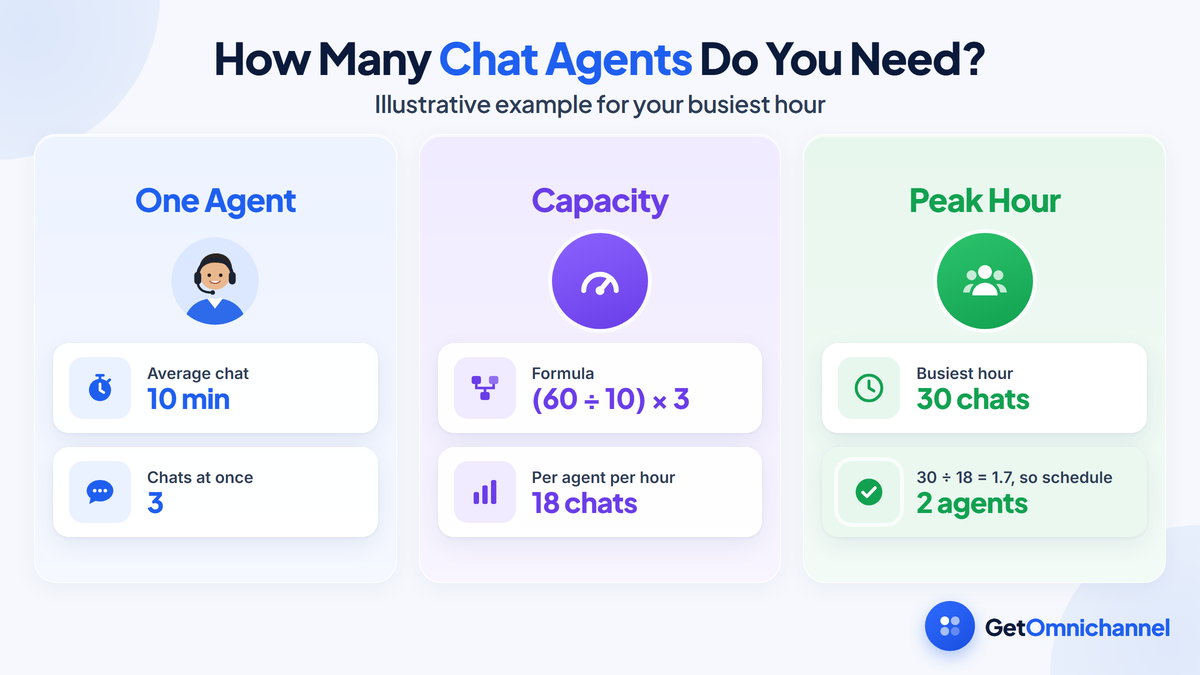
- Chats per agent per hour = (60 ÷ average chat length in minutes) × chats handled at once.
- Example: chats last 10 minutes on average, and each agent handles 3 at once, so one agent covers (60 ÷ 10) × 3 = 18 chats an hour.
- Peak demand: 30 chats in the busiest hour ÷ 18 = 1.7, so schedule 2 agents for that hour.
- Adjust: if a bot resolves a third of chats before they reach a person, peak demand falls to 20 and one agent covers most of it, with a backup on call.
Start each agent at two or three chats at a time and watch first-response time. Raise the limit only if response times hold, and add a person for your peak hours before you raise limits further.
How much does live chat software cost?
Live chat ranges from free to about $100 per agent a month. Free plans exist from tawk.to, HubSpot, and Tidio. Paid tools charge per agent seat, per conversation, or per AI resolution, and the pricing model matters as much as the headline price.
| Tool | Free option | Paid starting price | Pricing model |
|---|---|---|---|
| tawk.to | Live chat is free | $29/month to remove branding; AI Assist from $29/month; hired agents $1/hour | Free core plus add-ons |
| HubSpot | Free live chat and chatbot builder | Advanced automation needs paid Marketing Hub editions | Free tool inside a CRM |
| Tidio | Free plan with 50 billable conversations | Starter $24.17/month with 100 conversations | Per conversation volume |
| LiveChat | 14-day free trial | Essential $19 per user/month annual ($25 monthly); Growth $79 ($99 monthly) | Per agent seat |
| Intercom | 14-day free trial | Essential $29 per seat/month, plus $0.99 per Fin AI outcome | Per seat plus per AI resolution |
Sources: tawk.to pricing, HubSpot live chat, Tidio pricing, LiveChat pricing, and Intercom pricing, all checked October 2026. Confirm the billing period at checkout, because several vendors show annual prices by default.
Worked example: three agents, one month
- LiveChat Essential: 3 × $19 = $57 a month on annual billing, or 3 × $25 = $75 on monthly billing.
- Intercom Essential: 3 × $29 = $87 a month in seats. If the Fin AI agent resolves 300 chats, add 300 × $0.99 = $297, for $384 in total.
- Tidio Starter: $24.17 a month covers the three agents, but only 100 billable conversations. A team handling 300 chats a month needs a higher tier.
The pattern: per-seat pricing gets expensive as the team grows, per-conversation pricing gets expensive as chat volume grows, and per-resolution pricing grows with how much the AI handles. Estimate your monthly chats and agent count first, then compare tools on that number.
How to set up live chat: 5 steps
Decide your hours and who answers
Pick the hours chat is shown and who covers them. Outside those hours, use an offline form or a bot that collects details, not a widget that looks live.
Choose where chat appears
Start with the pages where questions block a purchase or a signup: pricing, checkout, and help. Add more pages once response times are steady.
Set routing and chat limits
Create teams or departments if you have them, set each agent's chat limit, and decide what visitors see when everyone is busy.
Write saved replies and the bot's scope
List your ten most common questions and write approved answers. Give the bot only the questions it can answer correctly, with a visible way to reach a person.
Measure and adjust weekly
Track the metrics below for the first month, read a sample of transcripts, and turn repeat questions into help articles or bot answers.
Metrics to track
- First response time: how long a visitor waits for the first reply.
- Queue and missed chats: how many visitors waited or left before anyone answered.
- Resolution rate: the share of chats solved without a follow-up ticket or call.
- Customer satisfaction (CSAT): the post-chat rating.
- Bot handoff rate: the share of bot chats passed to a person, and why.
- Chat-assisted conversions: sales or signups from visitors who chatted, for sales use cases.
How this guide was made
Researched and written by Kinjal Trivedi, SaaS & Technology Writer at GetOmnichannel. This guide explains how live chat software works in general and does not rank or score tools. Prices, plan limits, and feature descriptions come from each vendor's own pricing and help pages, the technical description of live connections from MDN Web Docs, and the survey and forecast figures from Forrester and Gartner, linked at each claim and checked in October 2026. The staffing and three-agent cost examples are our own illustrative calculations from those figures. We did not test the products named here.
Live chat software is a widget on your site, a workspace for your team, and the rules that connect them. It works best when it is staffed for your busy hours, uses a bot only for questions with one right answer, and hands everything else to a person quickly. Pick a pricing model that fits your team size and chat volume, then measure first-response time from day one.
Frequently asked questions
Conclusion: live chat is a promise of a fast answer
Live chat software connects a chat window on your site to a workspace for your team, with routing, history, and reports in between. Bots and AI agents now take the routine questions, but the tools that work best still make it easy to reach a person.
Before you choose a tool, decide your hours, estimate your busiest hour and monthly chat volume, and match those numbers to a pricing model. That will narrow the list faster than any feature comparison.
Next step: Compare tools, prices, and AI features in our guide to the best live chat software.
 Your information is encrypted and kept secure.