

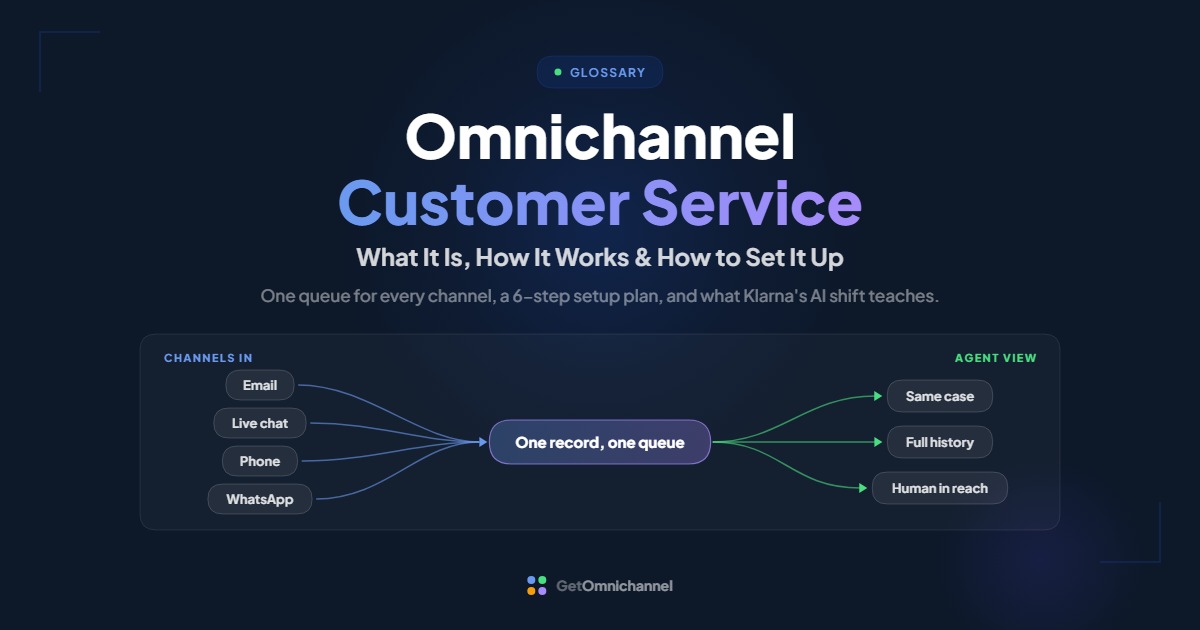
Omnichannel customer service is a support model where every channel a customer uses, including email, live chat, phone, SMS, WhatsApp, social messaging, and self-service, feeds one shared customer record and one queue, so any agent can pick up a conversation where it left off, whichever channel it continues on.
Most support teams already answer on several channels. The trouble starts when a customer moves between them: the chat transcript isn’t visible to the phone agent, the same issue arrives as three tickets, and the customer explains it all again. This guide explains what omnichannel customer service is, how it works behind the scenes, which channels to include, and how to set it up step by step, including how AI fits in and how to measure whether it’s working.
Omnichannel customer service connects every channel to one customer record and one queue, so customers never have to explain their issue twice.
Compare helpdesks →What is omnichannel customer service?
Omnichannel customer service (also called omnichannel customer support) means handling every support conversation as one continuous case, no matter how many channels it crosses. The customer might start in live chat, reply to a follow-up email, and finish on a phone call. To the agent, it’s one conversation with one history.
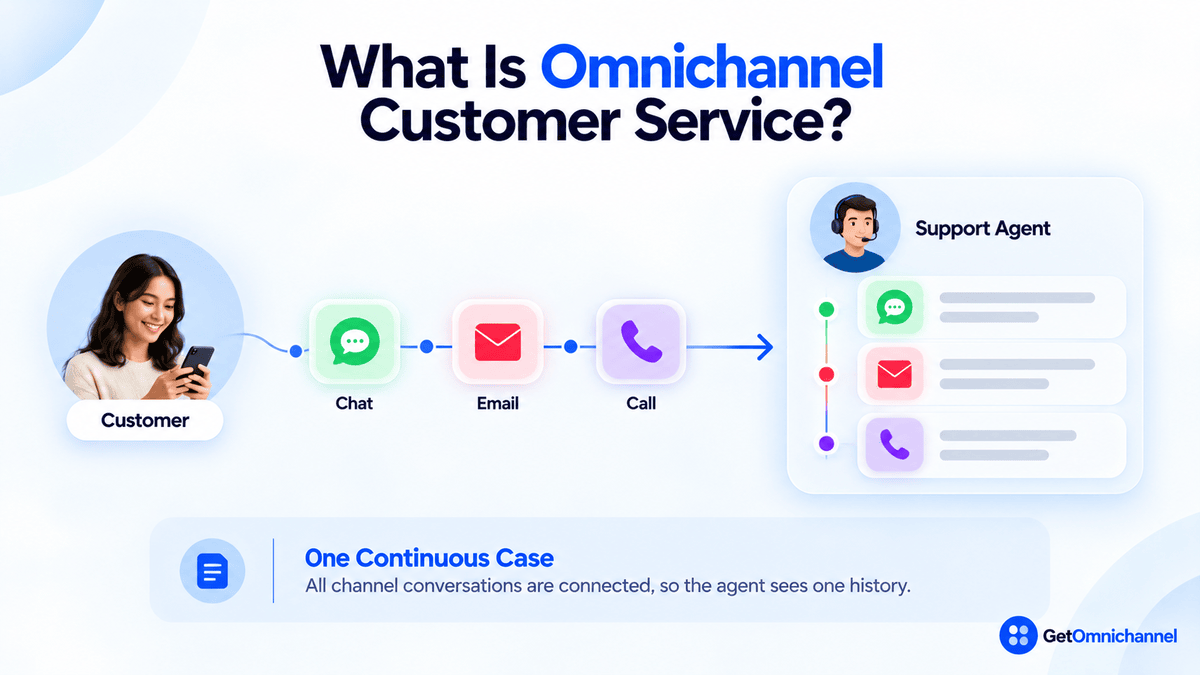
The core idea is simple: the conversation belongs to the customer, not to the channel. If you want the broader concept first, start with our guide to what omnichannel means.
Omnichannel customer service is one part of a wider omnichannel customer experience, which also covers marketing, sales, and in-person touchpoints. This guide focuses on the support side: how questions and problems get answered and resolved.
Omnichannel vs multichannel customer service
Multichannel customer service offers several channels, but each one runs on its own: its own inbox, its own history, often its own team. Omnichannel customer service connects them so the case, the history, and the customer’s identity move together.
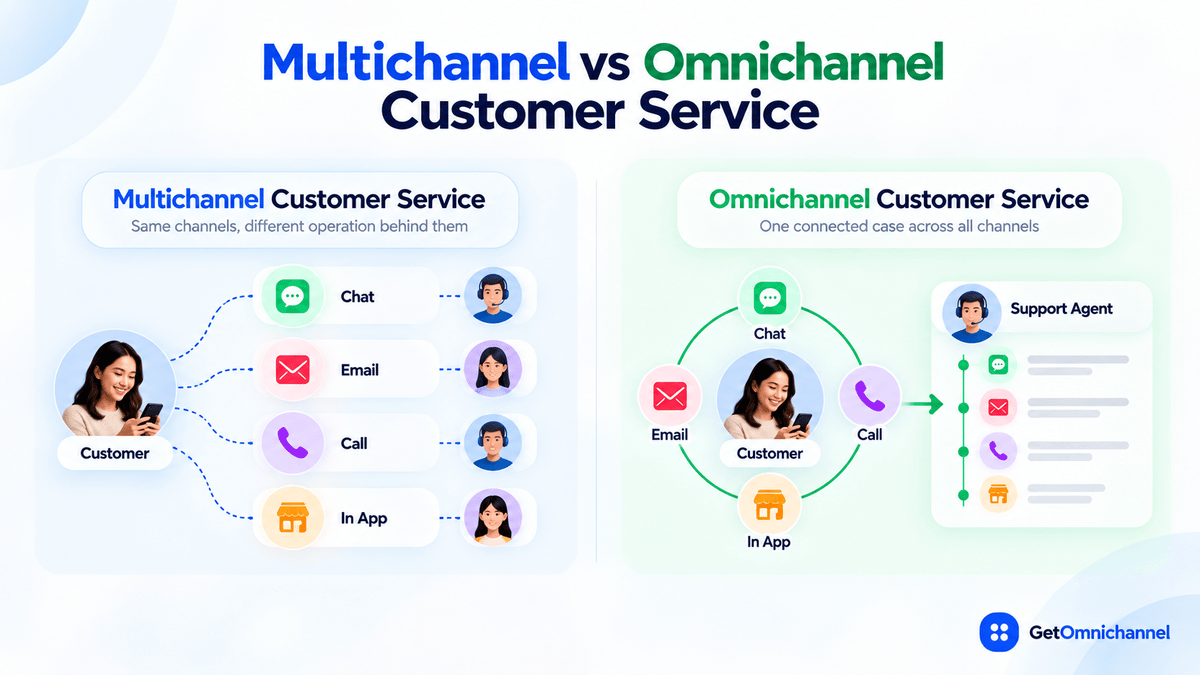
| Multichannel customer service | Omnichannel customer service | |
|---|---|---|
| Where conversations land | A separate inbox or tool per channel | One shared queue for all channels |
| Customer history | Stored per channel | One timeline across every channel |
| When the customer switches channel | A new ticket, and the customer repeats the issue | The same case continues, with full context |
| Routing | By channel ("the chat team takes chats") | By issue, skill, priority, and history |
| Agent tools | Several tabs and logins | One workspace |
| Reporting | Per-channel numbers | Per-case and per-customer numbers across channels |
The two can look identical from the outside: the same website chat, the same phone number. The difference shows up the second time the customer gets in touch. For a full side-by-side with examples, see omnichannel vs multichannel.
Why omnichannel customer service matters
Customers notice when support teams don’t share context, and recent research shows how strongly they feel about it:
- 81% of consumers want representatives to pick up where they left off, and 74% get frustrated when they have to repeat information. Source: Zendesk CX Trends 2026, based on more than 11,000 consumers and business leaders across 22 countries.
- 79% of customers expect consistent interactions across departments, yet 55% say it generally feels like they're communicating with separate departments, and 56% say they often have to repeat or re-explain information to different representatives. Source: Salesforce, State of the Connected Customer research.
- Poor customer service was the second most common reason customers stopped buying from a brand in the last year, cited by 43%, behind only high prices. Source: Salesforce, State of the AI Connected Customer, 7th edition, a survey of 15,015 consumers and 1,570 business buyers.
The common thread: customers don’t judge each channel separately. They judge whether your support team behaves like one team that remembers them.
How omnichannel customer service works
Behind the scenes, omnichannel customer service runs on five layers. If one is missing, customers feel the gap:
Channels in
Email, chat, phone, SMS, WhatsApp, social messages, and help center requests all flow into the same system instead of separate tools.
Identity matching
The system recognizes that an email address, a phone number, and a chat visitor belong to the same customer, and attaches every conversation to one contact record.
One queue and smart routing
Conversations from every channel enter one queue and are routed by topic, priority, language, skill, or customer history, not by which channel they arrived on.
A unified agent workspace
The agent sees one timeline: past chats, emails, calls, orders, open tickets, and notes, and can reply on any channel from the same screen.
Shared knowledge and reporting
Every channel draws on one knowledge base, and reports follow the case across channels rather than counting each channel on its own.
The context handoff checklist
The moment a conversation changes hands (bot to human, chat to phone, tier 1 to tier 2) is where most omnichannel setups break. Before you call your setup omnichannel, check that the next agent can see:
- Who the customer is, matched to one record, with plan, account, or order details.
- What they asked, in their own words, not just a category tag.
- What has already been tried, including bot answers and troubleshooting steps.
- What was promised, such as a refund, a callback, or an update by a certain date.
- Related open cases, so a second ticket on the same issue gets merged rather than worked twice.
- Why it was handed off, such as the bot couldn’t answer, the customer asked for a person, or it needs a specialist.
If an agent has to ask for any of these again, the customer is starting over.
Which channels should omnichannel customer service include?
There’s no required channel list. The right mix is the channels your customers already use, which you can staff well. Here is what each channel is typically best for:
| Channel | Best for | Watch out for |
|---|---|---|
| Detailed issues, attachments, non-urgent requests | Slow back-and-forth; duplicate threads from the same customer | |
| Live chat | Quick questions while customers are on your site or app | Customers expect a reply in minutes; don't offer it without staff to answer |
| Phone | Urgent, complex, or emotional issues | Calls that leave no record unless they are logged on the case |
| SMS | Short updates, reminders, and confirmations | Consent and messaging rules vary by country |
| WhatsApp and messaging apps | Ongoing, asynchronous conversations, especially in markets where these apps are widely used | Business messaging rules and approved templates for outbound messages |
| Social media messages | Customers who reach you where they already spend time | Public complaints need a fast route to a private channel |
| Self-service (help center, chatbot) | Repetitive questions, out-of-hours help | Dead ends with no route to a person |
| In person | Retail, healthcare, banking, and field service | Store or branch staff who can't see digital conversations |
Look at the last 90 days of contacts. Connect the two channels that carry most of your volume first, then add channels one at a time, only when you can answer them as reliably as the first two.
Benefits of omnichannel customer service
- Customers explain once. The issue, history, and promises travel with the case, which removes the most common frustration in support.
- Faster resolution. Agents start with context instead of rebuilding it, so more issues close on the first contact.
- Fewer duplicate tickets. When the same customer writes in on two channels, the conversations land on one record and can be merged.
- Better use of agent time. One queue lets you balance work across the team instead of having one channel’s agents overloaded while another’s sit idle.
- Honest reporting. You can see how many times a customer had to get in touch to solve one problem, which per-channel reports hide.
- Safer automation. A bot that hands off with context is far less risky than one that traps customers.
The trade-off: the gains grow with how often your customers cross channels. If nearly every contact starts and ends in one channel, the value is smaller, and a good single-channel tool may be enough for now.
How to set up omnichannel customer service in 6 steps
Use these steps to turn separate support inboxes into one support operation:
Audit your contacts
Pull the last 90 days of tickets, chats, and calls. Note the top reasons for contact, the channel each arrived on, and how often the same customer got in touch about the same issue more than once.
Pick your first two channels
Usually the two with the most volume, often email and live chat, or phone and email. Connect these before adding anything else.
Choose a platform with one customer record
A helpdesk, contact center platform, or omnichannel communication platform where every channel attaches to the same contact and the same case. Check that the channels you need are included on the plan you'd actually buy.
Set routing rules and response targets per channel
Route by issue and skill, not by channel. Set your own response-time targets for each channel, faster for live channels like chat and phone, longer for email, and publish them so customers know what to expect.
Design the handoffs
Write down how conversations move from bot to human, from chat to phone, and from tier 1 to specialists, and make sure the context handoff checklist above is covered every time.
Train the team, then measure
Make the shared record the only place work happens, retire side spreadsheets, and track the cross-channel metrics in the measurement section below.
AI and human agents in omnichannel customer service
AI chatbots and AI agents are now a channel of their own, and often the first one a customer meets. In an omnichannel setup, AI should collect details, answer routine questions, and hand off with the full context, never become a wall between the customer and a person.
Customers say so directly: 46% of customers say they are more likely to use an AI agent if there is a clear escalation path to a person. Source: Salesforce, State of the AI Connected Customer, 7th edition.
What Klarna's AI shift teaches
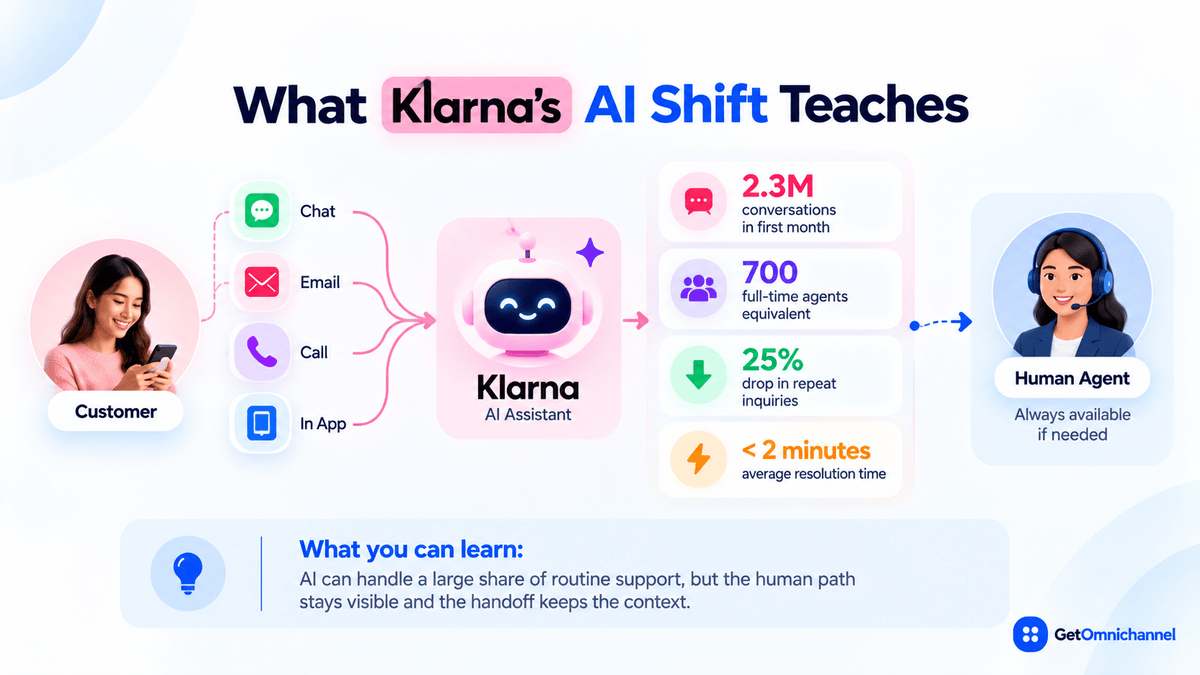
In February 2024, Klarna announced that its AI assistant had handled 2.3 million conversations in its first month, two-thirds of its customer service chats, doing the equivalent work of 700 full-time agents. The company reported a 25% drop in repeat inquiries and errands resolved in under 2 minutes, down from 11, across 23 markets and more than 35 languages, and noted that customers could still choose to talk to live agents. Source: Klarna, February 2024.
By May 2025, Klarna began recruiting human customer service agents again. CEO Sebastian Siemiatkowski told Bloomberg: "From a brand perspective, a company perspective, I just think it's so critical that you are clear to your customer that there will be always a human if you want." Source: CX Today, May 2025, reporting the Bloomberg interview.
What you can learn: AI can absorb a large share of routine volume, but omnichannel customer service means the human path stays visible and the handoff keeps the context. Treat the bot as one channel in the system, not as the system.
Three rules for AI in omnichannel support
- Tell customers when they’re talking to AI, and show them how to reach a person.
- Hand off with the transcript and the reason, so the human agent never asks the customer to start again.
- Measure what happens after the handoff, not just how many conversations the bot “contained.”
Omnichannel customer service examples
Two everyday scenarios show what omnichannel customer service looks like in practice. Both are typical examples rather than named companies.
A return that crosses three channels
A customer starts a return in live chat. The chat agent creates the return on the customer's order, and a confirmation email follows. A week later, the refund hasn't arrived, so the customer replies to that email. The reply attaches to the same case, and the agent sees the chat, the return label, and the warehouse scan, confirms the refund date, and closes the case. The customer never retypes their order number.
What you can learn: Linking cases to orders, not just to channels, is what lets any agent answer "where's my refund?" in one reply.
A clinic: from SMS reminder to phone call
A clinic sends an SMS appointment reminder. The patient replies asking to reschedule. The front-desk team sees the reply on the patient's record, offers two times by SMS, and the patient calls instead. The receptionist sees the SMS thread on screen and books the new slot without asking the patient to explain. Any patient data in this flow stays inside a system that meets the clinic's privacy obligations.
What you can learn: Proactive messages and inbound replies belong on the same record. Otherwise the phone team works blind.
Common challenges and how to handle them
| Challenge | Why it happens | What helps |
|---|---|---|
| Duplicate tickets | The same customer writes in on two channels before anyone replies | Match contacts by email and phone; merge related cases; set auto-acknowledgements so customers don't chase |
| Unmatched identities | Guest chat visitors and new phone numbers don't match a record | Ask for one identifier early (email or order number) and let agents link records manually |
| Bot dead ends | The chatbot can't answer and has no exit | Add a visible "talk to a person" option and pass the transcript |
| Uneven response times | Live channels get answered while email backs up, or the reverse | One queue with per-channel targets; staff to the busiest hours |
| Agent overload | Agents juggle several channels and tabs at once | One workspace; limit concurrent chats; route by skill |
| Per-channel reporting | Each tool reports its own numbers | Report per case: contacts per resolution, repeat contacts, and resolution time across channels |
Signs your team needs omnichannel customer service
You’re likely ready to move from multichannel to omnichannel customer service if:
- Customers often start with “as I told your colleague…” or “I already sent this by email.”
- The same issue regularly shows up as two or more tickets.
- Agents ask for an order or account number the customer already gave on another channel.
- Phone calls leave no record that the email or chat team can see.
- Your chatbot has no clean way to hand a conversation to a person.
- You can’t answer a simple question: how many contacts did it take to solve this customer’s problem?
If two or more of these sound familiar, the gaps between your channels are already costing you time and customer goodwill.
How to measure omnichannel customer service
Measure each case across channels, not each channel on its own:
| Metric | What it tells you | How to track it |
|---|---|---|
| First-contact resolution (FCR) | Whether issues are solved without a follow-up | Helpdesk reporting, counted per case across channels |
| Repeat contact rate | How often customers come back about the same issue | Cases reopened or linked within 7 days |
| Contacts per resolution | How many touches it takes to solve one problem | Count every chat, email, and call on a case |
| Duplicate ticket rate | How often one issue creates several tickets | Merged cases ÷ total cases |
| First response time by channel | Whether each channel meets its own target | Per-channel SLA reports |
| Bot-to-human handoff rate | How often AI escalates, and whether context goes with it | Bot analytics plus a review of handed-off cases |
| CSAT per case | Satisfaction for the whole issue, not one touchpoint | Survey sent when the case closes |
| Customer Effort Score (CES) | How easy it was to get help | Short survey after resolution |
Start with three: first-contact resolution, repeat contact rate, and contacts per resolution. Together they show whether customers are getting help without starting over.
Choosing software for omnichannel customer service
Look for a platform that gives agents one customer timeline (not one tab per channel), includes the channels you need on the plan you’d buy, keeps history when customers switch channels, routes by issue and skill, hands off from bot to human with the transcript, and reports per case across channels.
Where to start depends on your main channel:
- Email and ticket-heavy support: compare the best helpdesk & ticketing software.
- Chat-first support: compare the best live chat software.
- Phone-heavy support: compare the best call center software.
- Many channels at once: compare the best omnichannel communication platforms.
How this guide was made
Researched and written by Kinjal Trivedi, SaaS & Technology Writer at GetOmnichannel, who covers customer support, omnichannel, helpdesk, and CRM software. This guide explains general concepts and does not rank or score specific products. Statistics and company figures are taken from the published sources linked at each figure (checked October 2026). The ecommerce and clinic scenarios are illustrative, not named customers.
Omnichannel customer service isn't about how many channels you answer. It's whether a customer can switch channels and still talk to one team that remembers them. Connect your two busiest channels to one record first, and keep a human one click away.
Frequently asked questions
Conclusion: one team, whatever the channel
Omnichannel customer service turns separate inboxes into one support operation. The customer gets a team that remembers them; the agent gets one timeline instead of five tabs; the business gets reporting that shows how many contacts it really takes to solve a problem.
Start small: connect your two busiest channels to one customer record, write down your handoff rules, and keep a human within reach.
Next step: Compare tools that put every channel into one agent workspace in our guide to the best helpdesk & ticketing software, or, if you need many channels in one place, see the best omnichannel communication platforms.
 Your information is encrypted and kept secure.