

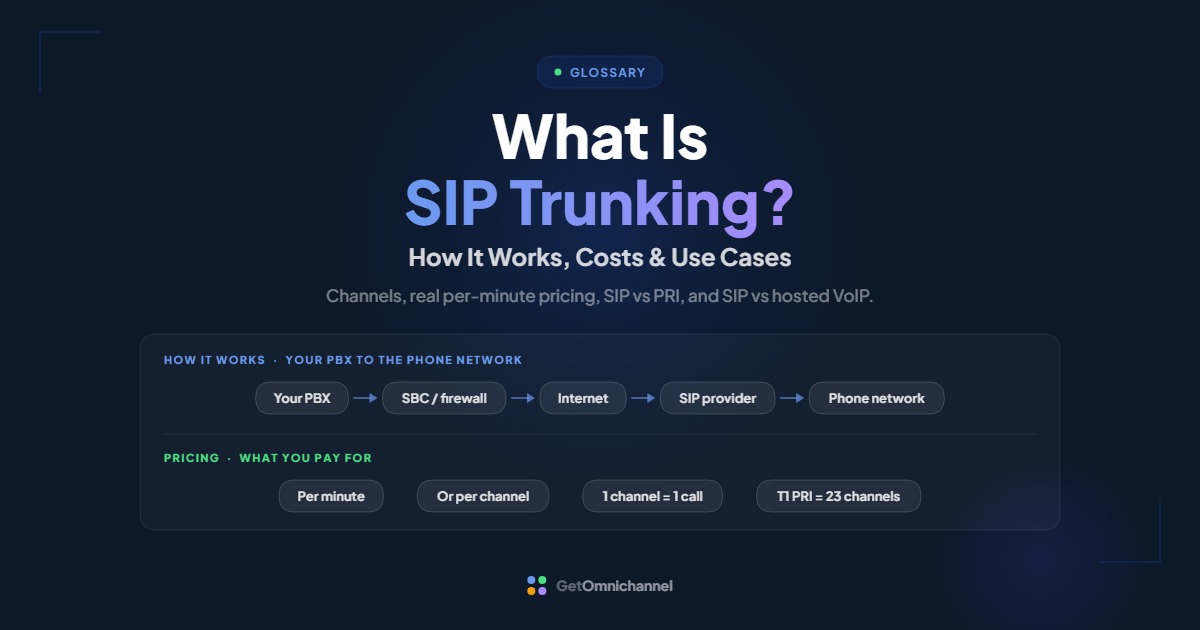
SIP trunking is a service that connects a business phone system (a PBX) to the public phone network over the internet instead of over traditional phone lines. You keep your own PBX and phones; the SIP trunk provider supplies phone numbers and carries your outside calls. You pay per minute or per channel, and each channel carries one call at a time.
SIP trunking sits between two other options. It replaces the old phone lines behind a PBX, but unlike hosted VoIP, it leaves the PBX itself in your hands. This guide explains how it works, how to size it, what it really costs, and the 911, caller ID, and security details most explainers skip.
SIP trunks connect your own PBX to the phone network over the internet. One channel per simultaneous call; pay per minute or per channel.
Compare VoIP providers →What is a SIP trunk?
SIP (Session Initiation Protocol) is the standard most internet phone systems use to set up, manage, and end calls; it’s defined in IETF RFC 3261. A trunk is an old telephone term for a shared line that carries many calls between two systems.
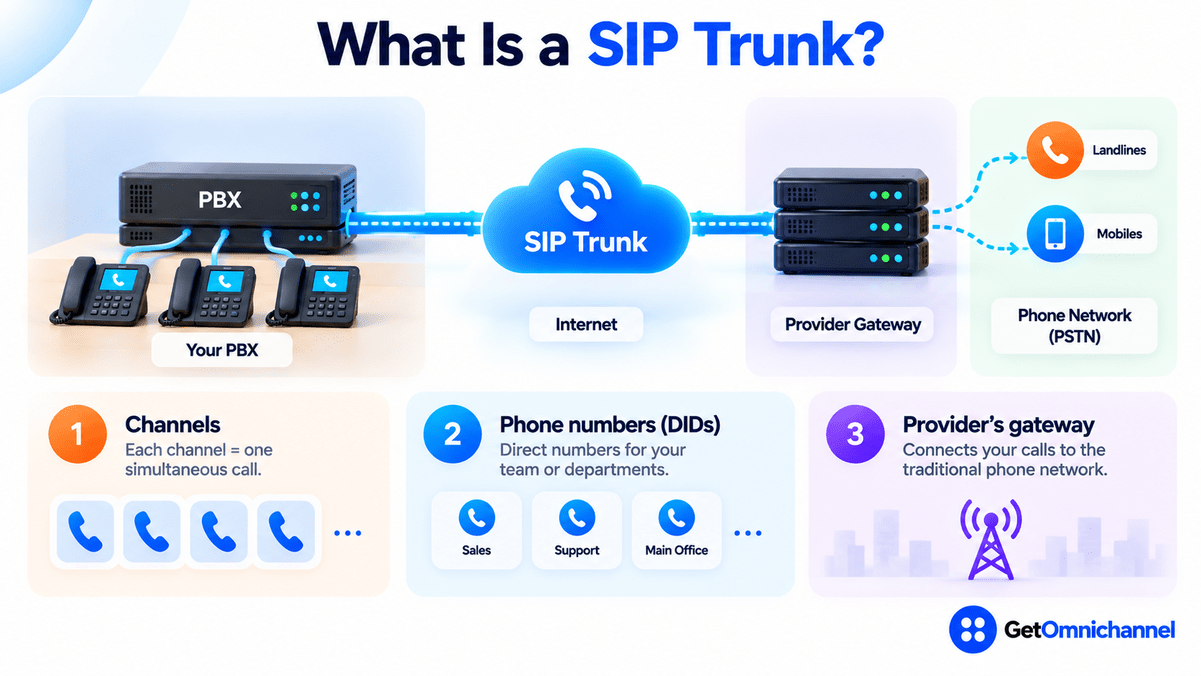
Put together, a SIP trunk is a virtual connection between your PBX and a provider, carried over your internet connection. It has three parts worth knowing:
- Channels: each channel carries one simultaneous call. Ten channels means ten calls at once, inbound and outbound combined.
- Phone numbers (DIDs): direct inward dialing numbers the provider assigns or ports to you, so each person or department can have its own number while sharing the trunk.
- The provider’s gateway: where your calls leave the internet and enter the traditional phone network to reach landlines and mobiles.
How does SIP trunking work?
Your phones talk to your PBX
Desk phones and softphones register with the on-premise or self-managed PBX, which handles extensions, menus, transfers, and voicemail as it always has.
The PBX hands outside calls to the trunk
When someone dials an outside number, the PBX sends the call over the SIP trunk, usually through a session border controller (SBC) or a firewall configured for SIP, which secures and translates the traffic at the edge of your network.
The call travels over your internet connection
Signaling (SIP) sets up the call, and the voice itself travels as data packets. Each active call uses one channel and roughly 87 Kbps each way on the common G.711 codec.
The provider connects to the phone network
The SIP trunk provider routes the call through its gateway to the public phone network, and routes incoming calls to your numbers back down the trunk to your PBX.
For a deeper look at SIP messages and how voice packets travel, see what is VoIP and how does it work.
SIP trunking vs PRI lines
Before SIP trunks, most PBXs connected to the phone network through PRI (Primary Rate Interface) circuits. A North American T1 PRI carries 23 voice channels plus one signaling channel; a European E1 PRI carries 30 (Cisco). That fixed block is the key difference.
| PRI (T1) | SIP trunk | |
|---|---|---|
| Connection | Dedicated physical circuit | Your internet connection |
| Capacity | 23 channels per circuit, in fixed blocks | Any number of channels, often adjustable month to month |
| Adding capacity | Order another circuit | Change the plan with the provider |
| Location | Tied to one site | Numbers can move between sites and providers |
| Dependency | The carrier's circuit | Your internet and power |
| Outlook | Legacy; carriers are retiring older networks | The common replacement |
A business needing 30 simultaneous calls has to buy two PRIs (46 channels) and pay for 16 it doesn’t use. With SIP trunking, it buys 30 channels, or simply pays per minute. Carriers are also retiring the legacy copper networks many of these circuits run on; our VoIP vs landline guide covers that phase-out.
SIP trunking vs hosted VoIP
Both use internet calling, so they’re often confused. The difference is who runs the PBX.
| SIP trunking | Hosted VoIP | |
|---|---|---|
| What the provider supplies | Phone numbers and the connection to the phone network | The whole phone system, numbers, and features |
| Who runs the PBX | You or your IT partner | The provider |
| Features | Whatever your PBX offers | The provider's feature set |
| Pricing | Per minute or per channel, plus numbers | Per user per month |
| Best for | Keeping a PBX you've already invested in | Avoiding PBX hardware altogether |
Many businesses use SIP trunking as a step: move a supported PBX onto SIP trunks now, then move to hosted VoIP when the PBX reaches end of support. Our guide to hosted VoIP vs on-premise PBX compares the two end states, including 5-year costs.
Who uses SIP trunking?
- Businesses with a PBX that still has years of support left and want to drop expensive PRI or analog lines without replacing the phone system.
- Contact centers and high-volume teams that need many simultaneous calls and want to scale channels up and down with demand.
- Multi-site organizations that want to centralize trunks in one place instead of paying for separate lines at every office.
- Teams using Microsoft Teams or another platform with “bring your own carrier” setups, where a SIP trunk provides the outside phone connection.
- Developers and software products that connect apps to the phone network programmatically, often paying purely per minute.
How much does SIP trunking cost?
Providers use two main pricing models:
- Metered (pay per minute): you pay for each minute of calling plus a monthly fee per phone number. Good for unpredictable or low-to-moderate call volume.
- Channel-based or unlimited: you pay a fixed monthly fee per channel, usually with calling included. Good for heavy, predictable call volume, as long as you size channels correctly.
Real per-minute prices: Twilio Elastic SIP Trunking (US)
- Outbound calls to the 48 contiguous states: $0.0100 per minute (Alaska $0.0862, toll-free numbers $0.0011).
- Inbound calls to a local number: $0.0034 per minute; to a toll-free number: $0.0130.
- Phone numbers: $1.15 per month local, $2.15 toll-free.
- Emergency calling: $0.75 per month per number, plus a $75 fee per 911 call placed from a number without a registered emergency address.
Source: Twilio US SIP trunking pricing, current as of August 2026 per the page, checked October 2026. Twilio also lists unlimited call concurrency, so there’s no channel count to buy. Other providers price differently; use this as a worked reference, not a market average.
Worked example: a 20-person office, one month
- Outbound: 10,000 minutes × $0.0100 = $100.00
- Inbound: 5,000 local minutes × $0.0034 = $17.00
- Numbers: 10 local numbers × $1.15 = $11.50
- Emergency calling: 10 numbers × $0.75 = $7.50
- Total: about $136 per month before taxes and regulatory fees, and before the cost of running your PBX, SBC, and internet connection.
Pull 3 months of call records from your PBX. If total minutes are modest or swing a lot, metered pricing is usually cheaper. If you have many people on the phone most of the day, get a channel-based quote for your peak simultaneous calls and compare the two totals.
How many SIP channels do you need?
One channel carries one call at a time, so you need as many channels as your peak simultaneous calls, inbound and outbound combined, not as many as your number of employees. Your PBX’s call reports usually show the busiest hour; size for that, plus some headroom for growth.
Each channel also needs internet bandwidth. On the G.711 codec, every active call uses about 87.2 Kbps in each direction on Ethernet (Cisco), so 23 channels, the size of one PRI, need about 2 Mbps of upload and download. Our guide to VoIP internet speed requirements has a full sizing table.
911 and caller ID on SIP trunks
- Register an emergency address for every number. The provider can only send the right location to 911 if you’ve registered it. The cost of skipping this can be explicit: Twilio, for example, charges $75 for each 911 call from a number without a registered address.
- Configure the PBX for direct 911 dialing. Kari’s Law applies to anyone “engaged in the business of installing, managing, or operating” a multi-line phone system, which requires dialing 911 without a prefix such as “9” and notifying a central point when someone does (FCC 19-76). With SIP trunking, the PBX is yours, so that configuration is too.
- Ask about caller ID authentication. FCC rules require voice service providers to implement the STIR/SHAKEN caller ID authentication framework in their IP networks (47 CFR 64.6301). Ask the provider how it authenticates calls from your numbers, since calls that can’t be fully verified are more likely to be flagged or labeled as spam.
SIP trunk security
A SIP trunk is a door from the internet to a system that can make paid calls, so toll fraud, where someone uses your trunk to run up international or premium-rate calls, is the main risk. The basic defenses:
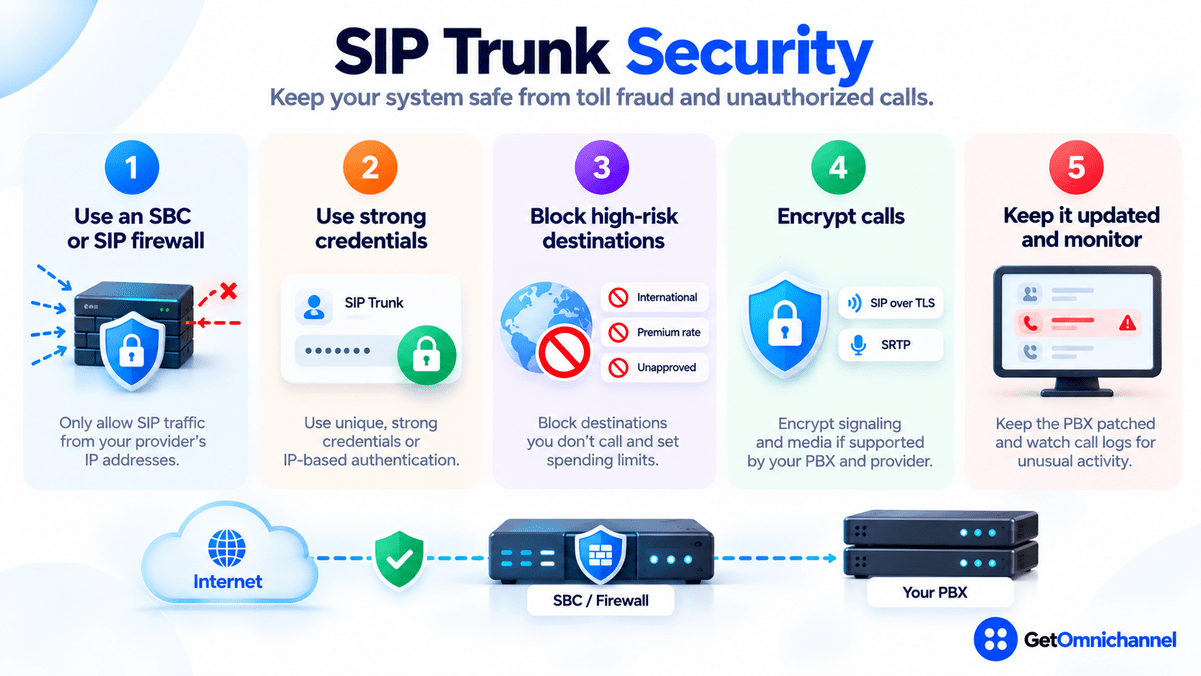
- Put an SBC or SIP-aware firewall at the edge, and only accept SIP traffic from your provider’s published IP addresses.
- Use strong, unique trunk credentials, or IP-based authentication where the provider supports it.
- Block international and premium destinations you don’t call, and set spending or call-rate limits with the provider.
- Encrypt signaling with SIP over TLS and media with SRTP (RFC 3711) if both your PBX and provider support it.
- Keep the PBX patched, and watch call logs for unusual after-hours or international activity.
Reliability and failover
SIP trunks depend on your internet connection and power, and on the PBX staying up. Plan for each:
- Internet outage: ask the provider to forward calls to backup numbers (such as mobiles) when the trunk can’t reach your PBX, and consider a second internet connection.
- Power outage: put the PBX, SBC, router, and network switch on battery backup.
- Provider issue: some businesses run trunks from two providers so calls can route through either.
- Test it: unplug the internet connection once during setup and confirm that incoming calls go where you expect.
How to set up SIP trunking
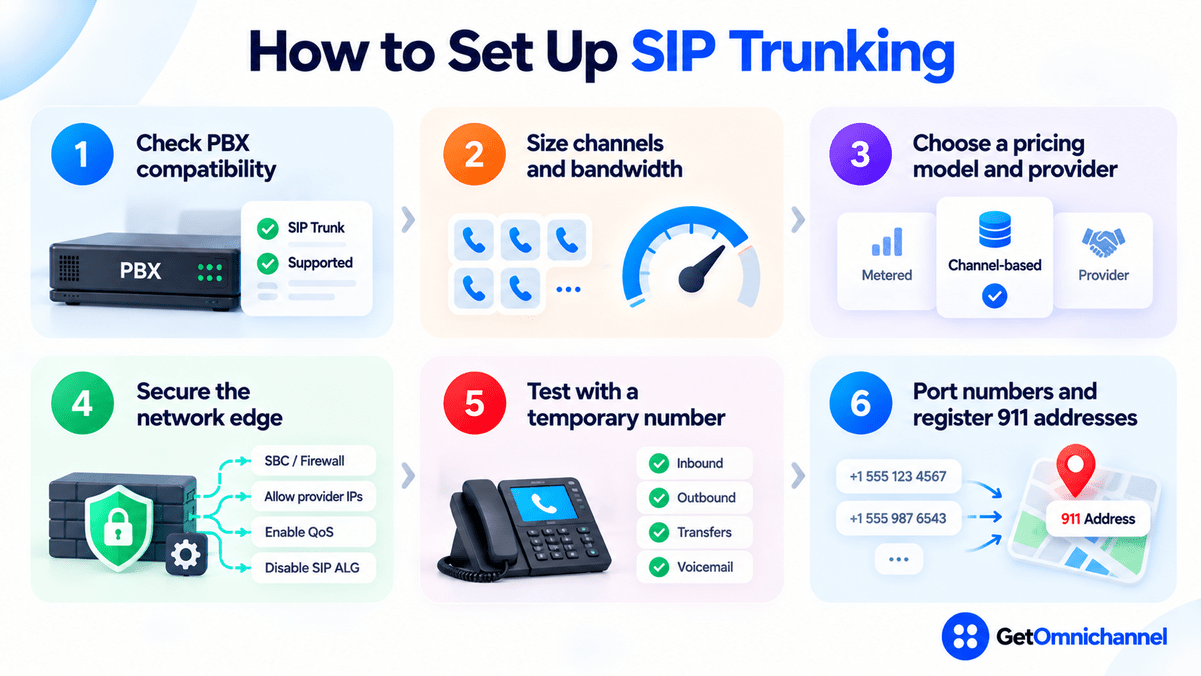
Check PBX compatibility
Confirm your PBX supports SIP trunks (most IP PBXs do), and check the provider's list of tested PBX models. Older digital PBXs may need a gateway.
Size channels and bandwidth
Use your peak simultaneous calls from call records, then check your upload speed covers that many calls.
Choose a pricing model and provider
Compare metered and channel-based quotes using your real minutes, and ask about 911, caller ID authentication, failover, and fraud controls.
Secure the network edge
Set up the SBC or firewall, restrict SIP to the provider's IP addresses, enable quality-of-service for voice, and turn off SIP ALG on the router unless the provider says otherwise.
Test with a temporary number
Connect the trunk, then test inbound and outbound calls, transfers, and voicemail before moving your main numbers.
Port numbers and register 911 addresses
Port your existing numbers, keep the old lines until the port completes, register an emergency address for each number, and test failover.
How this guide was made
Researched and written by Kinjal Trivedi, SaaS & Technology Writer at GetOmnichannel. This guide explains SIP trunking in general and does not rank or score specific providers. Prices are taken from Twilio's US SIP trunking pricing page (checked October 2026) as one published example. PRI channel counts and per-call bandwidth come from Cisco documentation, and 911 and caller ID rules from the FCC order and federal regulation linked at each claim. The 20-person office is an illustrative calculation, not a customer.
SIP trunking replaces the phone lines behind your PBX with an internet connection you can scale call by call. It's the right move when your PBX has years of life left; if it doesn't, compare hosted VoIP. Either way, size for peak simultaneous calls, register every 911 address, and lock down the trunk against toll fraud.
Frequently asked questions
Conclusion: keep your PBX, modernize the lines
SIP trunking lets you keep the phone system you’ve invested in while dropping fixed-capacity PRI and analog lines for an internet connection you can scale. It costs little per minute, but it leaves the PBX, its security, and its 911 configuration with you. Choose it when your PBX has years of support left, and plan the move to hosted VoIP for when it doesn’t.
Next step: If you’re deciding whether to keep the PBX at all, read hosted VoIP vs on-premise PBX, or compare plans in our guide to the best VoIP providers.
 Your information is encrypted and kept secure.